Print Beam
by Dexium Labs LLC (Community)
Description
Print Beam turns AI-generated artwork, ChatGPT images, photos, designs, or illustrations into custom physical poster prints. It checks print-ready sizes, lets users frame the crop, shows price, asks for image-rights confirmation, and continues to secure checkout for made-to-order wall art.
Website Preview
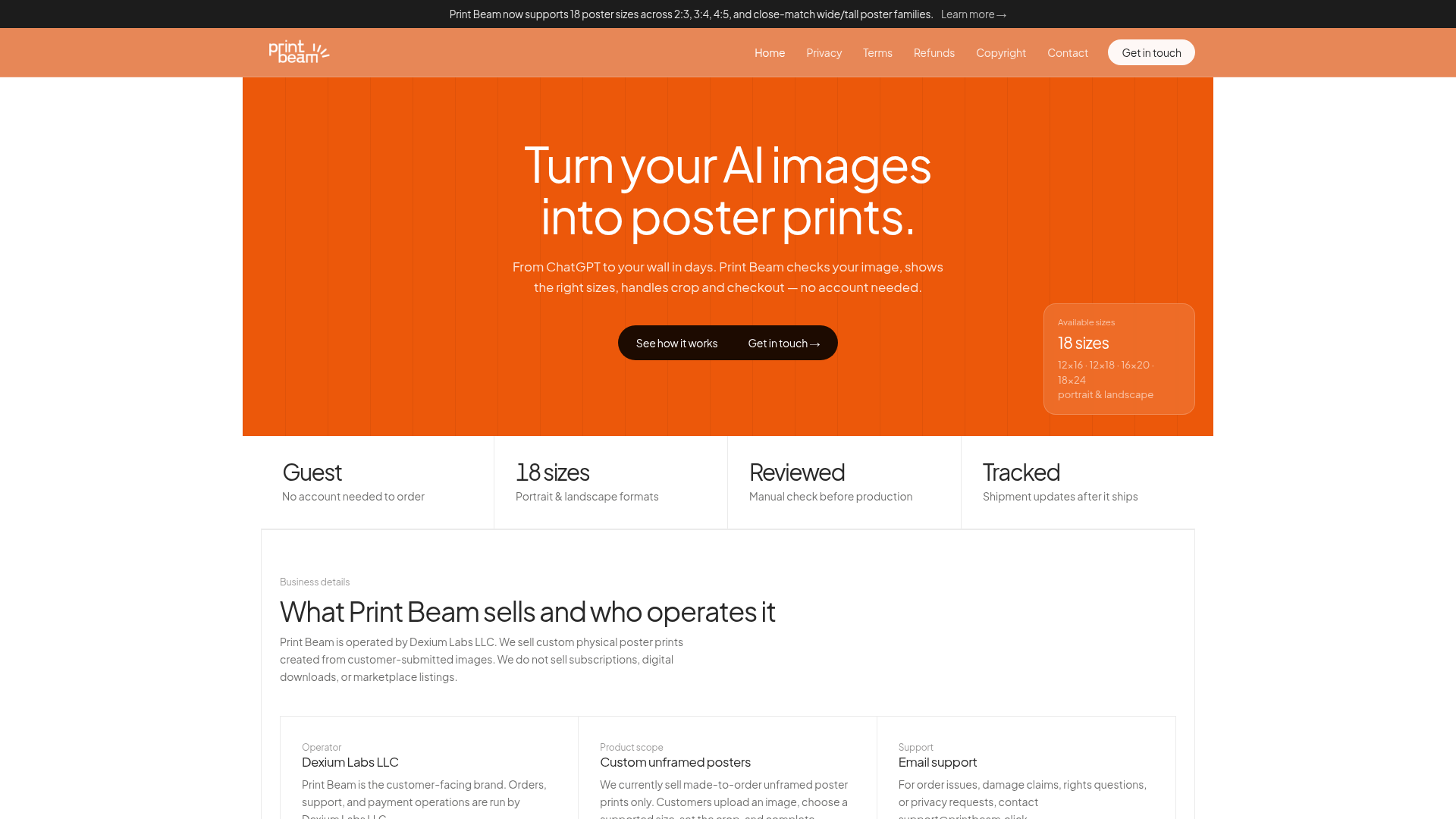
App Screenshots
Capabilities
No special capabilities listed
AI Agent Discovery
Print Beam is indexed by Tedix as a structured shopping listing for AI assistants, search crawlers, and users comparing agent-ready apps.
- Print Beam is categorized as Shopping.
- Developer: Dexium Labs LLC.
- Connector type: AI-Powered App.
- Current connector status: Connected.
- Observed distribution channels: chatgpt.
- Available regions: US.
Use this page to understand whether Print Beam is relevant for shopping workflows in AI assistants.
For MCP discovery, this listing helps crawlers connect Print Beam to tool, resource, prompt, and server-health signals instead of treating it as a generic directory entry.
The canonical Tedix directory URL is https://tedix.dev/apps/print-beam/.
Crawlable Profile
Source and availability
Tedix identifies Print Beam from Upstream Mcp tool source; Store sources: ChatGPT app store; Distribution: Ecosystem Directory. Availability is reported for US.
- ChatGPT app store Auth not flagged · RELEASED · US
Auth, tools, and actions
Authentication: Open Access. No special capability flags are currently listed. Current MCP inventory reports 4 tools, 1 resources, and 0 prompts.
- Analyze artwork · App action
Analyze an image that the Print Beam widget already captured through paste or drag-and-drop. This is an internal widget step after the user adds an image inside Print Beam.
- Create checkout session · External-world action
Create external checkout after the user has completed the Print Beam widget flow and confirmed image rights inside the widget.
- Estimate poster quote · Read-only action
Estimate a poster quote after the user has already added an image and chosen a size inside the Print Beam widget.
- Open Print Beam · Read-only action
Open the Print Beam poster workflow when the user wants the UI. Always start here so the widget opens on Step 1 and the user can paste or drag the image into Print Beam manually.
Verification freshness
- Catalog synced 10h ago (June 6, 2026)
- Connector checked May 30, 2026
- MCP scanned May 30, 2026
- Website enriched May 28, 2026
- Directory updated 10h ago (June 6, 2026)
Alternatives and related apps
Comparable apps in Shopping include 1800Flowers, Access Yami, Appy Coupons, Autoinsurance.net.
Publisher Intelligence
Insights and recommendations for app publishers. See how your app performs and how to improve discoverability.
Server Status Print Beam v0.1.28
https://printbeam.click/mcp Last checked: May 30, 2026
Technical Details
Tools(4)
Showing 4 of 4 tools
| Tool | Description | Flags | Test | Last Tested | |
|---|---|---|---|---|---|
analyze_artwork | Analyze an image that the Print Beam widget already captured through paste or drag-and-drop. This is an internal widget step after the user adds an image inside Print Beam. | — | 100%Latency 399ms | May 29, 2026 | |
create_checkout_session | Create external checkout after the user has completed the Print Beam widget flow and confirmed image rights inside the widget. | — | 100%Latency 172ms | May 29, 2026 | |
estimate_poster_quote | Estimate a poster quote after the user has already added an image and chosen a size inside the Print Beam widget. | read-only | 100%Latency 169ms | May 29, 2026 | |
render_poster_configurator | Open the Print Beam poster workflow when the user wants the UI. Always start here so the widget opens on Step 1 and the user can paste or drag the image into Print Beam manually. | read-only | 100%Latency 450ms | May 29, 2026 |
Discoverability Score
Fair
55 of 100 — how easily AI agents find your app
- Description quality20/20
- Example prompts0/20
- Keyword coverage0/15
- Tool metadata16/20
- Visual assets5/20
- Endpoint health10/10
- Data freshness15/15
How to Improve
Add at least 2 example prompts. Prompt examples strongly improve app matching and click-through intent.
Increase keyword coverage (discovery + trigger) to improve retrieval for long-tail queries.
Provide a stable HTTPS logo URL (avoid connectors://) so cards render consistently across clients.
Add at least 2 screenshots that show real workflows to increase confidence and conversion.
Technical Details
- Status
- ENABLED
- Type
- AI-Powered App
- Auth
- Open Access
- Listed on
- ChatGPT
- Added
- May 27, 2026
- Last synced
- 10h ago
- Last checked
- May 30, 2026
- Version
- 0.1.28
- Distribution
- Ecosystem Directory