Turn signals
into approved
actions.
Run autonomous workflows across systems your company already uses.
Draft a meeting agenda, revise it in the same conversation, or assign tool-based work to a tedi with scoped permissions and a record of its actions.
Tasks and examples
Start small. Check the result.
Choose a task to evaluate, then inspect its result. Customer accounts below describe particular projects, not guaranteed outcomes.
Commerce prototypes
Prototype a product experience for an AI chat. Catalog access, supported protocols, payment setup and review depend on the integration.
What clients say
“Tedix impressed us by implementing our Agentic Products Protocol within days and bringing it to life in the ChatGPT ecosystem. Their platform approach to enabling agentic commerce, combined with exceptional execution, made partnering with them an easy decision.”


These brands already sell inside AI chats







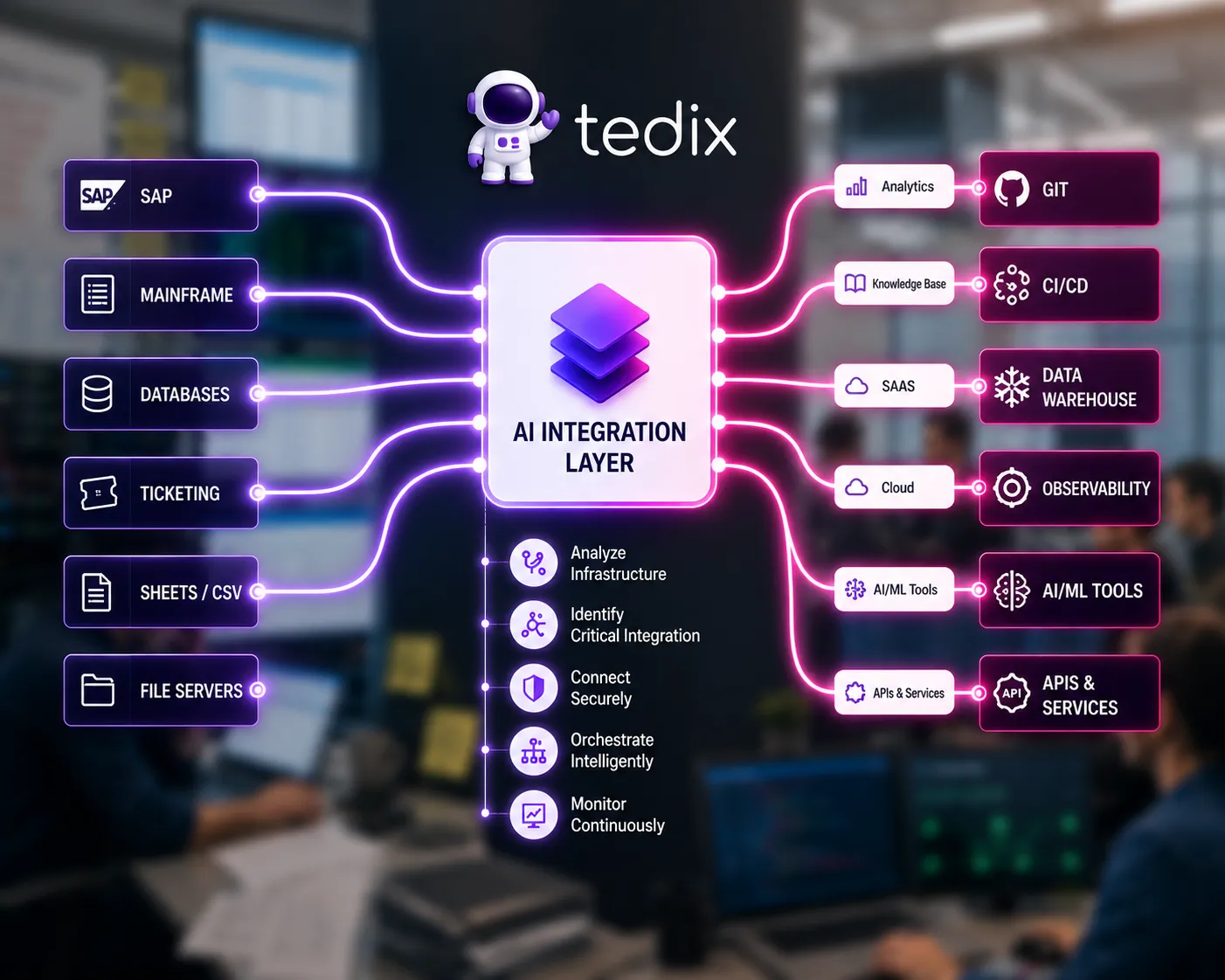
Explore a system integration
Ask a tedi to examine a bounded integration task. Confirm available access and test the result before relying on it in production.
Draft content in your voice
Supply a brief and approved references. Review accuracy and tone before publishing generated content.
What clients say
“The tedi assigned to us surprised us with deep expertise and research-style content perfectly aligned to our brand voice. It was like having a senior content strategist on the team.”Enterprise client — Expert content delivered autonomously


Draft and revise operational work
Start with a meeting agenda or a short plan. Continue in the same conversation and verify that revisions preserve what matters.
Test a bounded prototype
Use a small prototype to evaluate an idea. Delivery time and production readiness depend on scope, tools and review.
What clients say
“Tedix brought MiMexTrade to life in a matter of days. What we thought would take over a year was deployed and ready. Now we’re securing the budget to scale it across all of Germany.”SRE — Mexican Embassy in Germany

Integrations
Connect selected tools
Available integrations depend on your workspace, provider connection and permissions. Some workflows require setup or engineering.
Trust & Security
Inspect the work and its boundaries.
Data boundaries
Organization-scoped access and provider configuration govern data handling. Confirm hosting, retention and processing terms for your deployment.
Inspect run records
Read recorded outcomes, actions and rationale where available. A completed run does not certify correctness; check the result.
Organization-owned context
Conversation records, facts and skills have distinct lifecycles. Review what is retained and which export paths your deployment supports.
Scoped authority
Tools and protected actions follow configured permissions and approval rules. These controls reduce risk; they do not guarantee that every action is safe.
Start with one integration
Connect only what the first task needs. Provider access, configuration and workflow validation still take work.
Learning and reuse
Build on previous work
Retained context and reusable skills can reduce repeated work. Learning quality and cost savings must be measured.
Reusable procedures
Successful procedures can become skills. Review their scope and behavior before reusing them.
Workflow execution
Some skills run as workflows. Execution can still incur compute, provider and model costs.
Selected context
Retrieval selects relevant stored context within a bounded budget. It can miss facts or select the wrong ones.
Measure the outcome
Compare result quality, corrections and actual usage across repeated tasks. Improvement is an objective, not a guarantee.
tools built
apps live
catalog entries
AI platforms
Backed by
 BMWKGerman Federal Ministry
 AI NATIONAccelerator
 Munich Innovation EcosystemInnovation Hub
 Reaktor BerlinStartup Hub
 🇺🇸
🇺🇸
Check out our blog
Learn about the latest AI trends, automation playbooks, agentic commerce, and the future of autonomous work.
Read the blog
This isn’t for
everyone.
Tedix Cloud is in invited beta. Already invited? Sign in with your invited account. Need access? Contact the person who introduced you to Tedix; signing in alone does not create a workspace. The source is public on GitHub, and local mode runs without an invitation.
✓ Invited beta✓ Access arranged individually