
OK幹事
by Rocketa, Inc. (Community)
Description
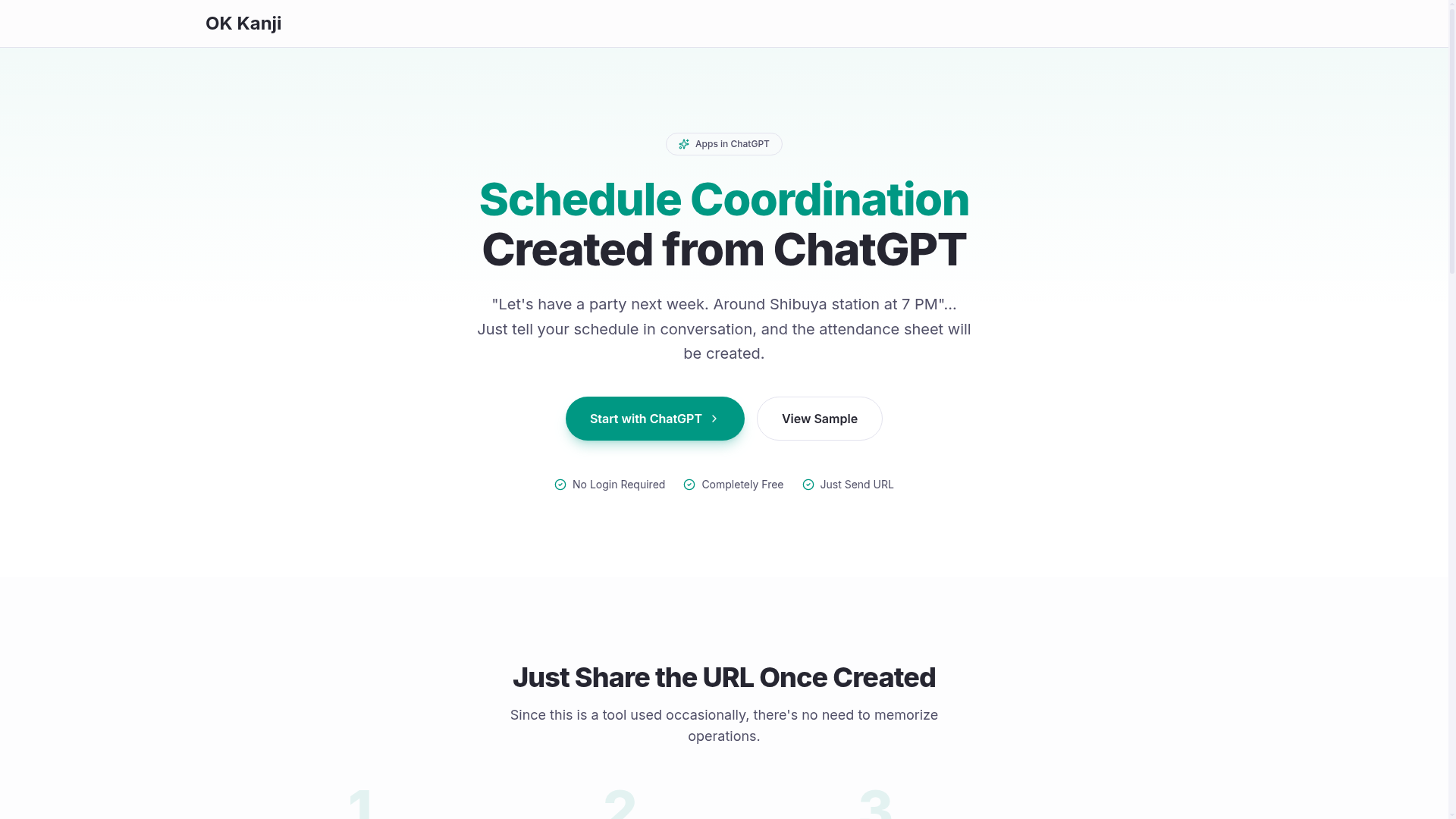
Just tell the app your event details (purpose, date, time, etc.), and it will automatically create an attendance poll. Share the generated link and anyone can respond instantly—no sign-up required. You can view responses and see which dates have the most participants directly from the poll in ChatGPT. Try requests like these: “@OK幹事 Create an attendance poll for a New Year’s party next week at 7 PM at Shibuya Station.” If there are conditions you want to exclude (e.g., weekends), just mention them. “@OK幹事 We’re planning a drinking party, so create an attendance poll for weekdays only over the next two weeks.” Note: All dates and times in this app are handled in Japan Standard Time (JST).
Website Preview

App Screenshots
Capabilities
No special capabilities listed
AI Agent Discovery
OK幹事 is indexed by Tedix as a structured productivity listing for AI assistants, search crawlers, and users comparing agent-ready apps.
- OK幹事 is categorized as Productivity.
- Developer: Rocketa, Inc..
- Connector type: AI-Powered App.
- Current connector status: Connected.
- Observed distribution channels: chatgpt.
- Available regions: FR, US, GB, ES, KR, IN.
Use this page to understand whether OK幹事 is relevant for productivity workflows in AI assistants.
For MCP discovery, this listing helps crawlers connect OK幹事 to tool, resource, prompt, and server-health signals instead of treating it as a generic directory entry.
The canonical Tedix directory URL is https://tedix.dev/apps/ok/.
Crawlable Profile
Source and availability
Tedix identifies OK幹事 from Upstream Mcp tool source; Store sources: ChatGPT app store; Distribution: Ecosystem Directory. Availability is reported for FR, US, GB, ES, KR, IN.
- ChatGPT app store Auth not flagged · RELEASED · FR, US, GB, ES, KR, IN
Auth, tools, and actions
Authentication: Open Access. No special capability flags are currently listed. Current MCP inventory reports 2 tools, 1 resources, and 0 prompts.
- 日程調整のためのスケジュールを作成する。 · External-world action
《操作》リクエストされたイベントの内容・候補日、時間からスケジュールを作成し、出欠表とURLを返します。《前提1》日本時間(UTC+9)を前提として動きます。《前提2》スケジュール作成の補助にOpenAI社のGPTを使用します。明後日・来週・来月など、自然言語の日時表現をISO 8601形式の文字列に置き換えます。《必須の入力値》イベントのタイトル(空の場合は"Event")・候補日(空の場合は翌日から14日間)・時間(空の場合は19:00)。《任意の入力値》説明・除外すべき日付や期間、条件。
- 日程調整のためのイベントを更新する。 · High-impact write action
《操作》リクエストされたイベントのタイトル・説明・候補日程を更新します。《前提》日本時間(UTC+9)を前提として動きます。《入力値》タイトル・説明・候補日・時間。《注意事項》候補日程が変更されると、すでに回答済みの出欠が削除されます。
Verification freshness
- Catalog synced 1d ago (June 5, 2026)
- Connector checked May 30, 2026
- MCP scanned May 30, 2026
- Website enriched May 28, 2026
- Directory updated 1d ago (June 5, 2026)
Alternatives and related apps
Comparable apps in Productivity include AI Voice Generator, AI Wisebase, AWS Marketplace, AccurateScribe.ai – Transcribe.
Publisher Intelligence
Insights and recommendations for app publishers. See how your app performs and how to improve discoverability.
Server Status mcp-typescript server on vercel v0.1.0
https://okkanji.com/api/mcp Last checked: May 30, 2026
Technical Details
Tools(2)
Showing 2 of 2 tools
| Tool | Description | Flags | Test | Last Tested | |
|---|---|---|---|---|---|
create-event | 《操作》リクエストされたイベントの内容・候補日、時間からスケジュールを作成し、出欠表とURLを返します。《前提1》日本時間(UTC+9)を前提として動きます。《前提2》スケジュール作成の補助にOpenAI社のGPTを使用します。明後日・来週・来月など、自然言語の日時表現をISO 8601形式の文字列に置き換えます。《必須の入力値》イベントのタイトル(空の場合は"Event")・候補日(空の場合は翌日から14日間)・時間(空の場合は19:00)。《任意の入力値》説明・除外すべき日付や期間、条件。 | — | 100%Latency 1.6s | May 30, 2026 | |
update-event | 《操作》リクエストされたイベントのタイトル・説明・候補日程を更新します。《前提》日本時間(UTC+9)を前提として動きます。《入力値》タイトル・説明・候補日・時間。《注意事項》候補日程が変更されると、すでに回答済みの出欠が削除されます。 | destructive | 100%Latency 516ms | May 30, 2026 |
Discoverability Score
Fair
62 of 100 — how easily AI agents find your app
- Description quality20/20
- Example prompts0/20
- Keyword coverage0/15
- Tool metadata16/20
- Visual assets13/20
- Endpoint health10/10
- Data freshness15/15
How to Improve
Add at least 2 example prompts. Prompt examples strongly improve app matching and click-through intent.
Increase keyword coverage (discovery + trigger) to improve retrieval for long-tail queries.
Add at least 2 screenshots that show real workflows to increase confidence and conversion.
Technical Details
- Status
- ENABLED
- Type
- AI-Powered App
- Auth
- Open Access
- Listed on
- ChatGPT
- Added
- April 24, 2026
- Last synced
- 1d ago
- Last checked
- May 30, 2026
- Version
- 0.1.0
- Distribution
- Ecosystem Directory