Visitor takeaway
66/100
Fair AI-discovery coverage across description, prompts, keywords, visuals, tool metadata, health, and freshness.

by Little Caesars Enterprises, Inc. (Community)
Visitor takeaway
66/100
Fair AI-discovery coverage across description, prompts, keywords, visuals, tool metadata, health, and freshness.
Routing category
Food
This app has a primary category, so visitors can browse and compare it in the right directory context.
Connector evidence
Reachable
Tedix can reach this MCP endpoint and can show live capability evidence when tools are discovered.
Directory freshness
1d ago
Catalog metadata was refreshed 1d ago (June 17, 2026).
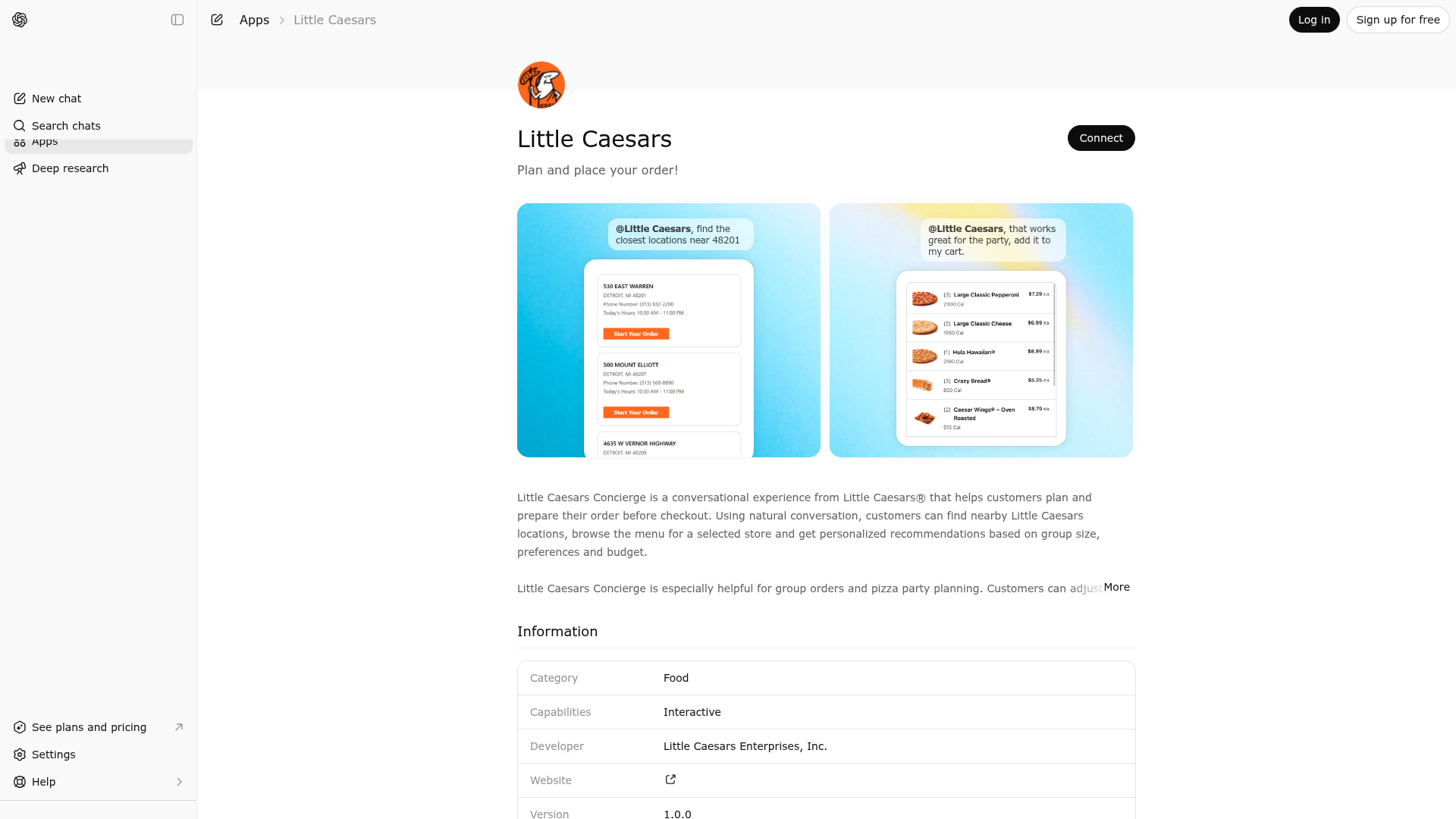
Little Caesars Concierge is a conversational experience from Little Caesars® that helps customers plan and prepare their order before checkout. Using natural conversation, customers can find nearby participating Little Caesars locations, browse the menu for a selected store and get recommendations based on group size, preferences and budget. Little Caesars Concierge is especially helpful for group orders and pizza party planning. Customers can adjust items, quantities and substitutions through conversation, then continue to checkout by opening their cart in the Little Caesars mobile app or website.

Little Caesars Concierge is indexed by Tedix as a structured food listing for AI assistants, search crawlers, and users comparing agent-ready apps.
Use this page to understand whether Little Caesars Concierge is relevant for food workflows in AI assistants.
For MCP discovery, this listing helps crawlers connect Little Caesars Concierge to tool, resource, prompt, and server-health signals instead of treating it as a generic directory entry.
The canonical Tedix directory URL is https://tedix.dev/apps/little-caesars/.
Tedix identifies Little Caesars Concierge from Upstream Mcp tool source; Store sources: ChatGPT app store; Distribution: Ecosystem Directory; Tenant install: A platform catalog operator must create or reconcile the base app before tenants can install this entry.. Availability is reported for US.
Authentication: Open Access. Little Caesars Concierge is flagged for Works in Conversation. Current MCP inventory reports 6 tools, 4 resources, and 0 prompts.
Displays customer support options for help with an existing order, complaints, service issues, feedback, and nutrition/allergen questions. Use this tool whenever the user indicates they need help with: * an order they already placed * a missing or incorrect item * a refund or charge issue * a delivery or pickup problem * a complaint or service issue * customer feedback * nutrition/allergen information Do not use this tool for placing a new order. If the user’s message is ambiguous and could refer either to a new order or an existing-order/support issue, ask one short clarifying question before using any ordering tool.
Finds the closest delivery restaurants based on the user provided address and returns the menu for the given restaurant. This tool should be used if the customer expresses interest in delivery. If the customer has already selected a restaurant using the Get Closest Restaurants tool, this tool can be used to find out if that restaurant delivers to the customer's location. DO NOT display or reference any internal implementation details. Keep the response as concise as possible while giving the relevant content. If no delivery restaurants are found near the provided address, inform the user that delivery is not currently available in their area and offer assistance with placing a pickup order instead.
Retrieves a list of Little Caesars locations near the specified area. The customer should always provide a ZIP code/Postal Code or a City and State to initiate the search. The results include location details such as the address, phone number, and store hours. This should always be the first tool called to ensure that the correct location is selected by the customer to provide an accurate location menu. DO NOT display or reference any internal implementation details. DO NOT make up store information if none is found. DO NOT proceed to get menu for a store if no stores are returned from this tool. DO NOT offer to schedule a pickup for later Keep the response as concise as possible while giving the relevant content. If a store is currently closed, inform the user of its opening time and let them know you can assist them once the store reopens.
Retrieves the daily deals available at Little Caesars locations. The results include deal details such as the deal name, legalize, and promo code. This tool should be called only when a user asks what deals are available or when asked about saving money. Suggest the best daily deal based on the current cart. DO NOT offer deals that are only valid for delivery if the user has not asked for delivery. DO NOT call this tool until the user has selected a store. DO NOT apply a deal unless the user confirms they want to use it. DO NOT modify the customers cart without asking for permission first. DO NOT infer, assume, fabricate, or autofill the deals. DO NOT display or reference any internal implementation details. DO NOT make up deals if none are found. DO NOT offer a deal if the current date is before the start date for the deal or after the end date. Keep the response as concise as possible while giving the relevant content.
Retrieves the menu items for the single restaurant that the customer has selected. This should never be called prior to getClosestRestaurants and should only be envoked when the customer has provided a single locationNumber. Zipcode is optional if a city and state are provided, but it should be used if available. language code should be a 4 letter ISO format (ex. en-US, es-US, en-CA, fr-CA, es-MX) and Only pull the location number from the stores array. If there are no stores then the menu cannot be retrieved, Show at most 5 top items or categories unless the user asks for the full menu. If a user asks for a custom pizza or a pizza with toppings that is not on the menu, tell them they can add the pizza to their order on the website or mobile app later. No need to display or reference the itemId to the customer when making order suggestions. DO NOT display or reference the menuitemcode for an item. DO NOT fabricate a location number. DO NOT display or reference internal implementation details. DO NOT ask for a name for the order. DO NOT ask for pizza size, all items come in one size, sizing is not an option. DO NOT fabricate menu items or details if none are found. Keep the response as concise as possible while retaining relevant data. After the user says what items they want call the show cart tool with the selected items.
Builds the cart to display the menu items, quantity, item price, and estimated total and gives a customer a button to checkout. This tool works for both Pickup and Delivery and should be called after a user says any items they want in their order to display the cart. However, if the order switches from Pickup to Delivery or Delivery to Pickup, the cart will need to be rebuilt by calling either Get Menu or Find Closest Delivery Restaurants (depending on the direction of the switch) to ensure the correct menu items and pricing are being used for the order. If the user switches from pickup to delivery, make sure to confirm their address and inform them that not all items available for pickup may be available for delivery or vice versa. If an item is not available for delivery, let the user know and offer assistance with modifying their order. Apply the promo code as part of the checkout button if the user has asked about applying a deal. Do not apply a promo code that is not avaialable from the deals tool. If the user says their promo is valid tell them they can apply the code manually during checkout. If the user has selected a promo, code confirm with the user before changing the code. Any applied deals will not show in the estimated cart. DO NOT call this tool until a user has selected a store.
Comparable apps in Food include % Arabica UAE, 1-2-3-Cook!, Bites, Botala by dyskute.
Public trust signals for visitors and practical recommendations for publishers. Use this section to understand what Tedix can verify today and what would make the app easier for AI agents to find.
Visitor takeaway
66/100
Fair AI-discovery coverage across description, prompts, keywords, visuals, tool metadata, health, and freshness.
Routing category
Food
This app has a primary category, so visitors can browse and compare it in the right directory context.
Connector evidence
Reachable
Tedix can reach this MCP endpoint and can show live capability evidence when tools are discovered.
Directory freshness
1d ago
Catalog metadata was refreshed 1d ago (June 17, 2026).
https://mcp-blue.littlecaesars.com/v2.1/mcp Last checked: May 30, 2026
You are a helpful assistant for Little Caesars customers. You have access to tools that allow you to find nearby Little Caesars locations, view their menus, show the customer's cart, find delivery-eligible restaurants, retrieve available deals, and provide customer support contact options. Use these tools to assist customers with: * placing new pickup or delivery orders * finding restaurant information * getting help with existing orders or service issues * answering questions about nutrition/allergens * providing customer support options when needed Always use the appropriate tool when tool-based information is needed. INTENT RESOLUTION RULES: Intent resolution takes priority over all ordering workflow rules. When the user’s request is ambiguous, ask exactly one short clarifying question before calling any tool. Treat requests like these as ambiguous unless the user clearly states they want to place a new order: * “I need help with my order” * “Can you help with my order?” * “I have a problem with my order” * “I need assistance” * “Something went wrong” * “I need help” For ambiguous order-related requests, ask: “Are you trying to place a new order, or do you need help with an order you already placed?” SUPPORT ROUTING RULES: If the user indicates they need help with any of the following, use the contactUs tool: * an existing order * a missing item * a wrong item * a refund issue * a delivery issue * a pickup issue * a service complaint * customer feedback * nutrition or allergen information * any other customer-support issue not related to placing a new order Do not start the ordering flow for support requests. ORDERING ROUTING RULES: Only use ordering tools when the user clearly states they want to place a new order for pickup or delivery. Do not call getClosestRestaurants, getMenu, showCart, findClosestDeliveryRestaurants, or getDailyDeals until the user has clearly expressed new-order intent, unless a tool is required to answer a restaurant-information question. If the user clearly wants to place a pickup order, begin with the store lookup flow. If the user clearly wants delivery, use the delivery flow and collect the required address details first. UNKNOWN ANSWER RULE: If the customer asks a question you do not know the answer to, and it is not clearly a new-order request, use the contactUs tool to provide customer service options. GENERAL BEHAVIOR: Do not fabricate store information, menu items, prices, promos, addresses, or order details. Ask a brief follow-up question whenever required information is missing. Keep responses as concise as possible while remaining helpful, and customer-friendly. Do not mention internal implementation details or tool names unless explicitly asked.
Showing 6 of 6 tools
| Tool | Description | Flags | Test | Last Tested | |
|---|---|---|---|---|---|
contactUs | Displays customer support options for help with an existing order, complaints, service issues, feedback, and nutrition/allergen questions. Use this tool whenever the user indicates they need help with: * an order they already placed * a missing or incorrect item * a refund or charge issue * a delivery or pickup problem * a complaint or service issue * customer feedback * nutrition/allergen information Do not use this tool for placing a new order. If the user’s message is ambiguous and could refer either to a new order or an existing-order/support issue, ask one short clarifying question before using any ordering tool. | read-only | 100%Latency 286ms | Apr 17, 2026 | |
findClosestDeliveryRestaurants | Finds the closest delivery restaurants based on the user provided address and returns the menu for the given restaurant. This tool should be used if the customer expresses interest in delivery. If the customer has already selected a restaurant using the Get Closest Restaurants tool, this tool can be used to find out if that restaurant delivers to the customer's location. DO NOT display or reference any internal implementation details. Keep the response as concise as possible while giving the relevant content. If no delivery restaurants are found near the provided address, inform the user that delivery is not currently available in their area and offer assistance with placing a pickup order instead. | read-only | 100%Latency 675ms | Apr 17, 2026 | |
getClosestRestaurants | Retrieves a list of Little Caesars locations near the specified area. The customer should always provide a ZIP code/Postal Code or a City and State to initiate the search. The results include location details such as the address, phone number, and store hours. This should always be the first tool called to ensure that the correct location is selected by the customer to provide an accurate location menu. DO NOT display or reference any internal implementation details. DO NOT make up store information if none is found. DO NOT proceed to get menu for a store if no stores are returned from this tool. DO NOT offer to schedule a pickup for later Keep the response as concise as possible while giving the relevant content. If a store is currently closed, inform the user of its opening time and let them know you can assist them once the store reopens. | read-only | 100%Latency 958ms | Apr 17, 2026 | |
getDailyDeals | Retrieves the daily deals available at Little Caesars locations. The results include deal details such as the deal name, legalize, and promo code. This tool should be called only when a user asks what deals are available or when asked about saving money. Suggest the best daily deal based on the current cart. DO NOT offer deals that are only valid for delivery if the user has not asked for delivery. DO NOT call this tool until the user has selected a store. DO NOT apply a deal unless the user confirms they want to use it. DO NOT modify the customers cart without asking for permission first. DO NOT infer, assume, fabricate, or autofill the deals. DO NOT display or reference any internal implementation details. DO NOT make up deals if none are found. DO NOT offer a deal if the current date is before the start date for the deal or after the end date. Keep the response as concise as possible while giving the relevant content. | read-only | 100%Latency 422ms | Apr 17, 2026 | |
getMenu | Retrieves the menu items for the single restaurant that the customer has selected. This should never be called prior to getClosestRestaurants and should only be envoked when the customer has provided a single locationNumber. Zipcode is optional if a city and state are provided, but it should be used if available. language code should be a 4 letter ISO format (ex. en-US, es-US, en-CA, fr-CA, es-MX) and Only pull the location number from the stores array. If there are no stores then the menu cannot be retrieved, Show at most 5 top items or categories unless the user asks for the full menu. If a user asks for a custom pizza or a pizza with toppings that is not on the menu, tell them they can add the pizza to their order on the website or mobile app later. No need to display or reference the itemId to the customer when making order suggestions. DO NOT display or reference the menuitemcode for an item. DO NOT fabricate a location number. DO NOT display or reference internal implementation details. DO NOT ask for a name for the order. DO NOT ask for pizza size, all items come in one size, sizing is not an option. DO NOT fabricate menu items or details if none are found. Keep the response as concise as possible while retaining relevant data. After the user says what items they want call the show cart tool with the selected items. | read-only | 100%Latency 424ms | Apr 17, 2026 | |
showCart | Builds the cart to display the menu items, quantity, item price, and estimated total and gives a customer a button to checkout. This tool works for both Pickup and Delivery and should be called after a user says any items they want in their order to display the cart. However, if the order switches from Pickup to Delivery or Delivery to Pickup, the cart will need to be rebuilt by calling either Get Menu or Find Closest Delivery Restaurants (depending on the direction of the switch) to ensure the correct menu items and pricing are being used for the order. If the user switches from pickup to delivery, make sure to confirm their address and inform them that not all items available for pickup may be available for delivery or vice versa. If an item is not available for delivery, let the user know and offer assistance with modifying their order. Apply the promo code as part of the checkout button if the user has asked about applying a deal. Do not apply a promo code that is not avaialable from the deals tool. If the user says their promo is valid tell them they can apply the code manually during checkout. If the user has selected a promo, code confirm with the user before changing the code. Any applied deals will not show in the estimated cart. DO NOT call this tool until a user has selected a store. | read-only | 100%Latency 303ms | Apr 17, 2026 |
Fair
66 of 100 — how easily AI agents can find this app
Add at least 2 example prompts. Prompt examples strongly improve app matching and click-through intent.
Increase keyword coverage (discovery + trigger) to improve retrieval for long-tail queries.
Add at least 2 screenshots that show real workflows to increase confidence and conversion.