
emaqi
by Orange, Inc. (Community)
Description
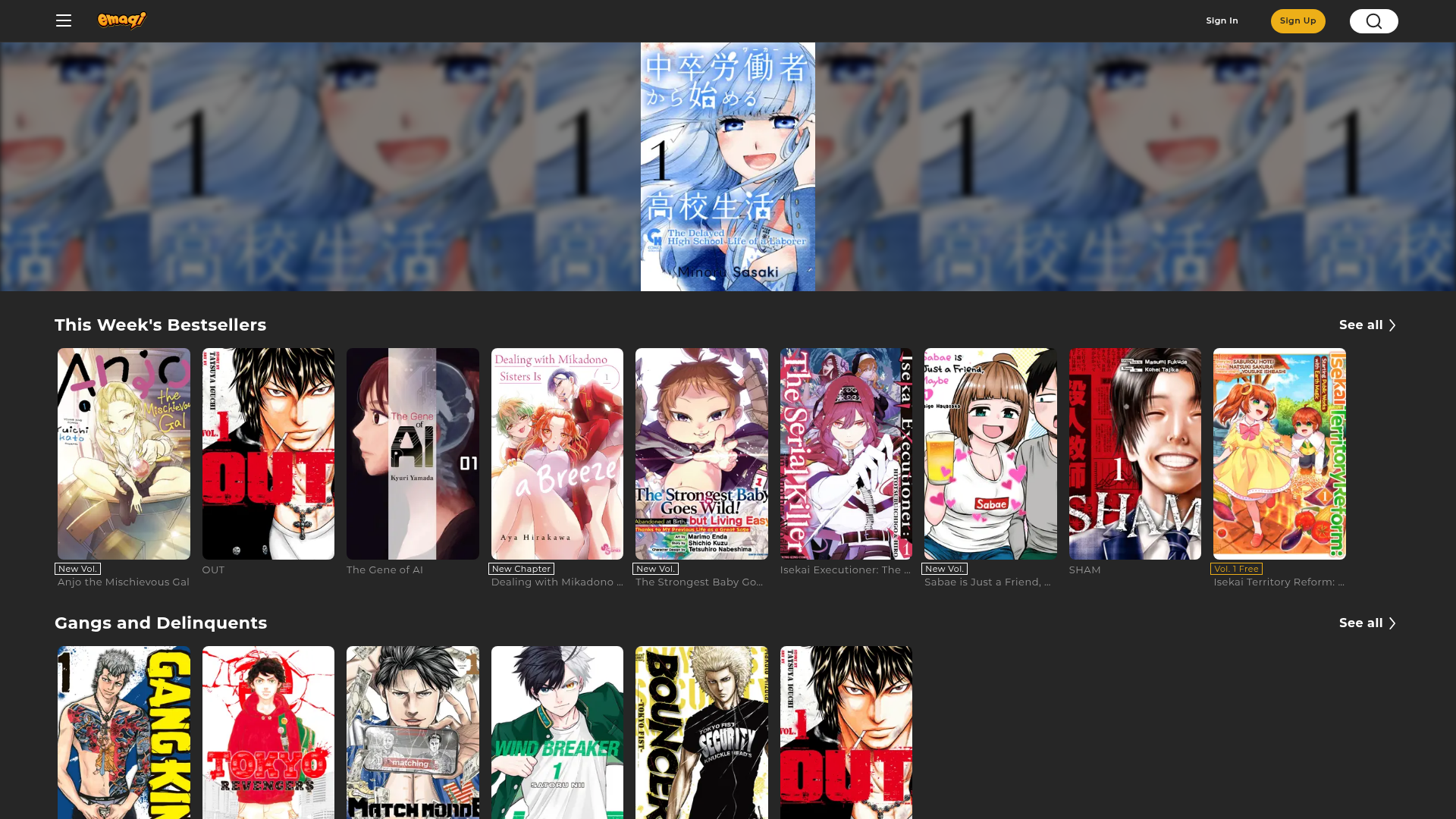
emaqi helps people discover English-language manga through title search, genre browsing, trending picks, and mood-based recommendations. It first gathers and narrows promising candidates, then presents the result in the final UI: a list UI for a final shortlist of selected titles, or a detail page for one chosen manga.
Website Preview

App Screenshots
Capabilities
No special capabilities listed
AI Agent Discovery
emaqi is indexed by Tedix as a structured entertainment listing for AI assistants, search crawlers, and users comparing agent-ready apps.
- emaqi is categorized as Entertainment.
- Developer: Orange, Inc..
- Connector type: AI-Powered App.
- Current connector status: Connected.
- Observed distribution channels: chatgpt.
- Available regions: US.
Use this page to understand whether emaqi is relevant for entertainment workflows in AI assistants.
For MCP discovery, this listing helps crawlers connect emaqi to tool, resource, prompt, and server-health signals instead of treating it as a generic directory entry.
The canonical Tedix directory URL is https://tedix.dev/apps/emaqi/.
Crawlable Profile
Source and availability
Tedix identifies emaqi from Upstream Mcp tool source; Store sources: ChatGPT app store; Distribution: Ecosystem Directory. Availability is reported for US.
- ChatGPT app store Auth not flagged · RELEASED · US
Auth, tools, and actions
Authentication: Open Access, Requires Login. No special capability flags are currently listed. Current MCP inventory reports 11 tools, 8 resources, and 0 prompts.
- manga__get_detail · Read-only action
Use this when you already have a comicId and want the detailed view with related recommendations. TRIGGER WORDS (examples): - "details", "more about this", "show info" - "tell me about this title", "show this manga" INPUT: - comicId must be provided from search/ranking results (use toolHints.items[].id). DATA-ONLY WORKFLOW: - This tool returns data only (no UI). Use it to gather candidates or metadata. - You may call multiple data-only tools to explore and refine candidates. - Must end with manga__show_list or manga__show_detail once candidates are ready. - When presenting a list, use all candidates unless the user asked for fewer.
- manga__get_discovery · Read-only action
Use this when the user asks for ranking/new releases/wait-free/trending manga lists. TRIGGER WORDS: - ranking/popular/top: "top manga", "popular manga", "best manga" - new releases: "new manga", "latest release", "newly released" - wait free: "wait free", "free later", "unlock by waiting" - trending: "trending", "hot now", "what's hot" PARAMETER SELECTION: - type: one of "ranking" | "new_releases" | "wait_free" | "trending" - category: ranking category slug (type=ranking only, default: "all") - period: ranking period slug (type=ranking only, default: "daily") WORKFLOW FOR RANKING: 1. Call manga__get_ranking_categories to get available category/period slugs 2. Match user intent to exact slugs 3. Call manga__get_discovery with type="ranking" DATA-ONLY WORKFLOW: - This tool returns data only (no UI). Use it to gather candidates or metadata. - You may call multiple data-only tools to explore and refine candidates. - Must end with manga__show_list or manga__show_detail once candidates are ready. - When presenting a list, use all candidates unless the user asked for fewer.
- manga__get_genres · Read-only action
Use this when you need the exact genre slugs (main/sub only) before running a genre search. After you obtain slugs, call manga__search_by_genre to get candidate titles, then decide what to show. DATA-ONLY WORKFLOW: - This tool returns data only (no UI). Use it to gather candidates or metadata. - You may call multiple data-only tools to explore and refine candidates. - Must end with manga__show_list or manga__show_detail once candidates are ready. - When presenting a list, use all candidates unless the user asked for fewer.
- manga__get_ranking_categories · Read-only action
Use this when you need the exact ranking category/period slugs before fetching a ranking. After you obtain slugs, call manga__get_discovery with type="ranking" to get candidate titles, then decide what to show. DATA-ONLY WORKFLOW: - This tool returns data only (no UI). Use it to gather candidates or metadata. - You may call multiple data-only tools to explore and refine candidates. - Must end with manga__show_list or manga__show_detail once candidates are ready. - When presenting a list, use all candidates unless the user asked for fewer.
- manga__search_by_genre · Read-only action
Use this when the user asks for a specific genre (English-only). WORKFLOW: 1. Call manga__get_genres first to get available genre slugs (main/sub only) 2. Pass the exact genreSlug to this tool DO NOT USE when: - User describes mood/feeling/vibe → use manga__vibe_recommend - User wants rankings/popular/new releases/wait-free/trending → use manga__get_discovery DATA-ONLY WORKFLOW: - This tool returns data only (no UI). Use it to gather candidates or metadata. - You may call multiple data-only tools to explore and refine candidates. - Must end with manga__show_list or manga__show_detail once candidates are ready. - When presenting a list, use all candidates unless the user asked for fewer.
- manga__search_by_keyword · Read-only action
Use this when the user provides a keyword or title-like query (English-only). TRIGGER WORDS (examples): - "samurai", "school life", "vampire" - "find <title>", "search for <title>", "looking for <title>" DO NOT USE when: - User mentions a specific genre → use manga__search_by_genre - User describes mood/feeling/vibe → use manga__vibe_recommend - User wants rankings/popular/new releases/wait-free/trending → use manga__get_discovery DATA-ONLY WORKFLOW: - This tool returns data only (no UI). Use it to gather candidates or metadata. - You may call multiple data-only tools to explore and refine candidates. - Must end with manga__show_list or manga__show_detail once candidates are ready. - When presenting a list, use all candidates unless the user asked for fewer.
- manga__show_detail · Read-only action
Show the detail UI for a comicId. Related recommendations are included by default and can be disabled. Use this as the FINAL UI step when you have a single target title and want to present its full detail page to the user. GUIDELINE: - Do NOT call show_detail immediately if you still need to explore, filter, or compare results. - It is OK (and expected) to call multiple data tools first, then use show_detail once you decide on a single title. - Input should come from toolHints.items[].id or toolHints.manga.id (e.g., after manga__get_detail). - If the user asks for "details", "more about this", or "show info", you should end with show_detail.
- manga__show_list · Read-only action
Show the list UI for specific comic IDs (order preserved). Use this as the FINAL UI step when you already have candidate comics (from search, ranking, recommendations) and want to present them to the user. This tool fetches details internally and renders the widget in one step. GUIDELINE: - Do NOT call show_list immediately if you still need to explore, filter, or compare results. - It is OK (and expected) to call multiple data tools first, then use show_list once you have a final shortlist. - Input should come from toolHints.items[].id or IDs you already resolved. - Use when the user expects a list UI rather than a single-title page. - Avoid shrinking the list unless the user asked for fewer results.
Plus 3 additional actions in the full tool inventory.
Verification freshness
- Catalog synced 1d ago (June 5, 2026)
- Connector checked May 30, 2026
- MCP scanned May 30, 2026
- Website enriched May 28, 2026
- Directory updated 1d ago (June 5, 2026)
Alternatives and related apps
Comparable apps in Entertainment include 123 Piano, 789 Sudoku, A-Z Dictionary, ABC Crossword.
Publisher Intelligence
Insights and recommendations for app publishers. See how your app performs and how to improve discoverability.
Server Status emaqi-mcp-server v0.1.0
https://mcp.emaqi.com/mcp Last checked: May 30, 2026
Technical Details
Tools(11)
Showing 11 of 11 tools
| Tool | Description | Flags | Test | Last Tested | |
|---|---|---|---|---|---|
manga__get_detail | Use this when you already have a comicId and want the detailed view with related recommendations. TRIGGER WORDS (examples): - "details", "more about this", "show info" - "tell me about this title", "show this manga" INPUT: - comicId must be provided from search/ranking results (use toolHints.items[].id). DATA-ONLY WORKFLOW: - This tool returns data only (no UI). Use it to gather candidates or metadata. - You may call multiple data-only tools to explore and refine candidates. - Must end with manga__show_list or manga__show_detail once candidates are ready. - When presenting a list, use all candidates unless the user asked for fewer. | read-only | 100%Latency 299ms | May 29, 2026 | |
manga__get_discovery | Use this when the user asks for ranking/new releases/wait-free/trending manga lists. TRIGGER WORDS: - ranking/popular/top: "top manga", "popular manga", "best manga" - new releases: "new manga", "latest release", "newly released" - wait free: "wait free", "free later", "unlock by waiting" - trending: "trending", "hot now", "what's hot" PARAMETER SELECTION: - type: one of "ranking" | "new_releases" | "wait_free" | "trending" - category: ranking category slug (type=ranking only, default: "all") - period: ranking period slug (type=ranking only, default: "daily") WORKFLOW FOR RANKING: 1. Call manga__get_ranking_categories to get available category/period slugs 2. Match user intent to exact slugs 3. Call manga__get_discovery with type="ranking" DATA-ONLY WORKFLOW: - This tool returns data only (no UI). Use it to gather candidates or metadata. - You may call multiple data-only tools to explore and refine candidates. - Must end with manga__show_list or manga__show_detail once candidates are ready. - When presenting a list, use all candidates unless the user asked for fewer. | read-only | 100%Latency 137ms | May 29, 2026 | |
manga__get_genres | Use this when you need the exact genre slugs (main/sub only) before running a genre search. After you obtain slugs, call manga__search_by_genre to get candidate titles, then decide what to show. DATA-ONLY WORKFLOW: - This tool returns data only (no UI). Use it to gather candidates or metadata. - You may call multiple data-only tools to explore and refine candidates. - Must end with manga__show_list or manga__show_detail once candidates are ready. - When presenting a list, use all candidates unless the user asked for fewer. | read-only | 100%Latency 115ms | May 29, 2026 | |
manga__get_ranking_categories | Use this when you need the exact ranking category/period slugs before fetching a ranking. After you obtain slugs, call manga__get_discovery with type="ranking" to get candidate titles, then decide what to show. DATA-ONLY WORKFLOW: - This tool returns data only (no UI). Use it to gather candidates or metadata. - You may call multiple data-only tools to explore and refine candidates. - Must end with manga__show_list or manga__show_detail once candidates are ready. - When presenting a list, use all candidates unless the user asked for fewer. | read-only | 100%Latency 119ms | May 29, 2026 | |
manga__search_by_genre | Use this when the user asks for a specific genre (English-only). WORKFLOW: 1. Call manga__get_genres first to get available genre slugs (main/sub only) 2. Pass the exact genreSlug to this tool DO NOT USE when: - User describes mood/feeling/vibe → use manga__vibe_recommend - User wants rankings/popular/new releases/wait-free/trending → use manga__get_discovery DATA-ONLY WORKFLOW: - This tool returns data only (no UI). Use it to gather candidates or metadata. - You may call multiple data-only tools to explore and refine candidates. - Must end with manga__show_list or manga__show_detail once candidates are ready. - When presenting a list, use all candidates unless the user asked for fewer. | read-only | 100%Latency 114ms | May 29, 2026 | |
manga__search_by_keyword | Use this when the user provides a keyword or title-like query (English-only). TRIGGER WORDS (examples): - "samurai", "school life", "vampire" - "find <title>", "search for <title>", "looking for <title>" DO NOT USE when: - User mentions a specific genre → use manga__search_by_genre - User describes mood/feeling/vibe → use manga__vibe_recommend - User wants rankings/popular/new releases/wait-free/trending → use manga__get_discovery DATA-ONLY WORKFLOW: - This tool returns data only (no UI). Use it to gather candidates or metadata. - You may call multiple data-only tools to explore and refine candidates. - Must end with manga__show_list or manga__show_detail once candidates are ready. - When presenting a list, use all candidates unless the user asked for fewer. | read-only | 100%Latency 122ms | May 29, 2026 | |
manga__show_detail | Show the detail UI for a comicId. Related recommendations are included by default and can be disabled. Use this as the FINAL UI step when you have a single target title and want to present its full detail page to the user. GUIDELINE: - Do NOT call show_detail immediately if you still need to explore, filter, or compare results. - It is OK (and expected) to call multiple data tools first, then use show_detail once you decide on a single title. - Input should come from toolHints.items[].id or toolHints.manga.id (e.g., after manga__get_detail). - If the user asks for "details", "more about this", or "show info", you should end with show_detail. | read-only | 100%Latency 130ms | May 29, 2026 | |
manga__show_list | Show the list UI for specific comic IDs (order preserved). Use this as the FINAL UI step when you already have candidate comics (from search, ranking, recommendations) and want to present them to the user. This tool fetches details internally and renders the widget in one step. GUIDELINE: - Do NOT call show_list immediately if you still need to explore, filter, or compare results. - It is OK (and expected) to call multiple data tools first, then use show_list once you have a final shortlist. - Input should come from toolHints.items[].id or IDs you already resolved. - Use when the user expects a list UI rather than a single-title page. - Avoid shrinking the list unless the user asked for fewer results. | read-only | 100%Latency 121ms | May 29, 2026 | |
manga__user_reading_history | Use this when the user asks what they have been reading recently or you need recent reading history as seeds for follow-up recommendations. This tool returns recent reading history only. If the user is not authenticated, it returns an empty list. DATA-ONLY WORKFLOW: - This tool returns data only (no UI). Use it to gather candidates or metadata. - You may call multiple data-only tools to explore and refine candidates. - Must end with manga__show_list or manga__show_detail once candidates are ready. - When presenting a list, use all candidates unless the user asked for fewer. | read-only | 100%Latency 101ms | May 29, 2026 | |
manga__user_recommend | Use this when the user wants recommendations based on reading history or a list of manga. TRIGGER: - User provides a list of titles they read/like - User asks for recommendations based on their history DO NOT USE when: - User describes mood/feeling → use manga__vibe_recommend DATA-ONLY WORKFLOW: - This tool returns data only (no UI). Use it to gather candidates or metadata. - You may call multiple data-only tools to explore and refine candidates. - Must end with manga__show_list or manga__show_detail once candidates are ready. - When presenting a list, use all candidates unless the user asked for fewer. | read-only | 100%Latency 127ms | May 29, 2026 | |
manga__vibe_recommend | Use this as an exploratory fallback when the user has a mood or tone in mind, but other recommendation tools do not provide a clear path. English-only input for both cluster and mood. cluster must be one of: - light - cozy - funny - romantic - emotional - dark - intense - mysterious TRIGGER: - The user gives a mood, vibe, or tone that fits one or more of the supported clusters rather than a specific title. - Good examples: "cozy comedy", "dark and intense", "romantic but light", "something mysterious" HOW TO USE: - First choose the closest allowed cluster from the list above and pass it as cluster. - Optionally pass the user's original phrasing in mood to add nuance, for example "cozy but a little sad". - Mood text should be English-only for now. - This tool is genre-first and uses mood text only as a secondary reranking hint. - When presenting recommendations to the user, do not show the raw result blindly. Filter the returned candidates down to the ones that seem appropriate for the user's request before calling a display tool. - Any light/heavy nuance should be expressed in mood text rather than a separate parameter. - It returns a diverse exploratory shortlist, not a precise best-match ranking. DO NOT USE when: - User asks for a specific title → use manga__search_by_keyword - User mentions a specific genre that can be searched directly → use manga__search_by_genre - User only asks for generic recommendations without supported vibe language → prefer manga__get_discovery or manga__user_recommend DATA-ONLY WORKFLOW: - This tool returns data only (no UI). Use it to gather candidates or metadata. - You may call multiple data-only tools to explore and refine candidates. - Must end with manga__show_list or manga__show_detail once candidates are ready. - When presenting a list, use all candidates unless the user asked for fewer. | read-only | 100%Latency 319ms | May 29, 2026 |
Discoverability Score
Fair
65 of 100 — how easily AI agents find your app
- Description quality20/20
- Example prompts0/20
- Keyword coverage0/15
- Tool metadata20/20
- Visual assets13/20
- Endpoint health10/10
- Data freshness15/15
How to Improve
Add at least 2 example prompts. Prompt examples strongly improve app matching and click-through intent.
Increase keyword coverage (discovery + trigger) to improve retrieval for long-tail queries.
Add at least 2 screenshots that show real workflows to increase confidence and conversion.
Technical Details
- Status
- ENABLED
- Type
- AI-Powered App
- Auth
- Open Access, Requires Login
- Listed on
- ChatGPT
- Added
- May 1, 2026
- Last synced
- 1d ago
- Last checked
- May 30, 2026
- Version
- 0.1.0
- Distribution
- Ecosystem Directory