
Achriom
by TMAI, LLC (Community)
Description
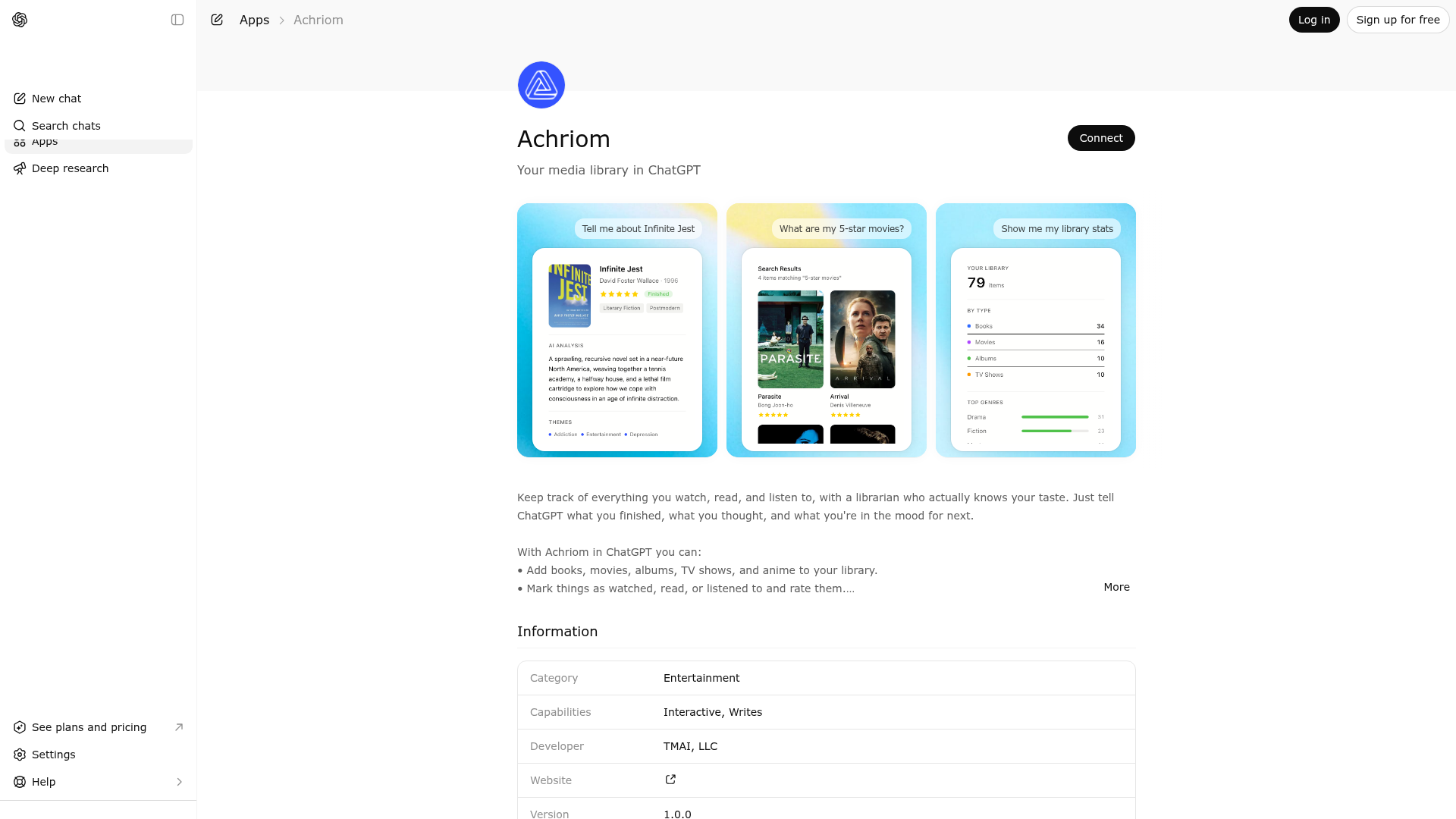
Keep track of everything you watch, read, and listen to, with a librarian who actually knows your taste. Just tell ChatGPT what you finished, what you thought, and what you're in the mood for next. With Achriom in ChatGPT you can: • Add books, movies, albums, TV shows, and anime to your library. • Mark things as watched, read, or listened to and rate them. • Get recommendations based on your real collection, not generic lists. • Search your library for something you can't quite remember. • Preview albums with 30-second clips before committing. • Search inside your uploaded books for specific passages. Connect your Achriom account to bring your full library into any conversation.
Website Preview

App Screenshots
Capabilities
No special capabilities listed
AI Agent Discovery
Achriom is indexed by Tedix as a structured lifestyle listing for AI assistants, search crawlers, and users comparing agent-ready apps.
- Achriom is categorized as Lifestyle.
- Developer: TMAI, LLC.
- Connector type: AI-Powered App.
- Current connector status: Connected.
- Observed distribution channels: chatgpt.
- Available regions: US, FR, GB, ES, KR, IN.
Use this page to understand whether Achriom is relevant for lifestyle workflows in AI assistants.
For MCP discovery, this listing helps crawlers connect Achriom to tool, resource, prompt, and server-health signals instead of treating it as a generic directory entry.
The canonical Tedix directory URL is https://tedix.dev/apps/achriom/.
Crawlable Profile
Source and availability
Tedix identifies Achriom from Upstream Mcp tool source; Store sources: ChatGPT app store; Distribution: Ecosystem Directory. Availability is reported for US, FR, GB, ES, KR, IN.
- ChatGPT app store Auth required · RELEASED · US, FR, GB, ES, KR, IN
Auth, tools, and actions
Authentication: Requires Login. No special capability flags are currently listed. Current MCP inventory reports 33 tools, 7 resources, and 10 prompts.
- add_item · App action
Add a new item to the library. For best results, use lookup_item first to get the external_id. IMPORTANT: Use anime (not show) for ALL Japanese animation including series, movies, OVAs.
- bulk_add_items · App action
Add up to 250 items to the library in ONE call. Use this whenever the user provides a list of more than 3 items to add — never loop add_item. Returns honest counts: {added, skipped_duplicates, failed} plus a per-item result list. Always report the exact counts to the user; never claim success without reading them.
- bulk_update_status · App action
Update status for multiple items at once.
- delete_item · High-impact write action
Delete an item from the library.
- edit_item · App action
Edit metadata (title, creator, external ID). Use new_external_id to re-link to correct database entry, then call re_enrich to fetch correct metadata.
- expand_research_scope · App action
Add an item to the current research corpus (focused research mode only).
- get_by_rating · Read-only action
Get items filtered by user rating range.
- get_by_status · Read-only action
Get items filtered by status. Books: unread, reading, finished, abandoned. Movies/shows/anime: unwatched, watching, watched, abandoned. Albums: unheard, listening, played, saved.
Plus 25 additional actions in the full tool inventory.
Verification freshness
- Catalog synced 1d ago (June 5, 2026)
- Connector checked May 30, 2026
- MCP scanned May 30, 2026
- Website enriched May 29, 2026
- Directory updated 1d ago (June 5, 2026)
Alternatives and related apps
Comparable apps in Lifestyle include 12andus Astrology, A-Z Dog Breeds, ASOS Stylist, AccuWeather®.
Publisher Intelligence
Insights and recommendations for app publishers. See how your app performs and how to improve discoverability.
Server Status achriom-mcp v1.0.0
https://mcp.achriom.com/mcp Last checked: May 30, 2026
Server Instructions
# Achriom - Personal Media Collection This MCP server provides access to someone's personal media library: books, movies, albums, and TV shows - including ratings, notes, and reading/watching history. ## Purpose Collections reveal taste. Use this data to be a thoughtful conversation partner about culture - helping users think more deeply about what they care about, discover things they'll love, and understand their own patterns of interest. **Use tools invisibly.** Users care about insight, not database queries. Do the background work, show the value. ## First Interaction (empty or brand-new library) Most people reach you right after connecting, with nothing in their library yet. If the library is empty or this is their first message, do not just report that it is empty and stop. Onboard them: 1. Warmly ask what they have been into lately. Keep it short and curious, like a well-read friend. Do not list features or explain what you can do. 2. When they name anything (books, movies, albums, shows, anime), add it. Use lookup_item for the right match, then add_item; for more than three at once use bulk_add_items. Disambiguate only when it genuinely matters. 3. Aim to get three to five items in before slowing down, then briefly confirm what you added. 4. Once a few are in, name one real pattern across them: a recurring theme, mood, era, or sensibility. One specific observation, not a summary. This is the moment the collection starts to feel understood. Do not analyze patterns from one or two items; there is not enough signal, so get more in first. If you are unsure whether they are starting fresh, a quick get_stats tells you. ## Quick Reference All tools use `media_type`: `"book"`, `"movie"`, `"album"`, or `"show"` **Explore & Discover:** - `search(media_type, query)` - Find by title, creator, genre, or theme - `get_details(media_type, title)` - Full info with AI analysis, notes, ratings - `get_stats(media_type?)` - Collection overview and patterns - `random_pick(media_type)` - Serendipitous discovery - `search_book_content(title, query)` - Semantic search in uploaded books **Tracking & History:** - `log_event(media_type, title, event_type?, event_date?)` - Log a finish or a re-watch/re-read/re-listen with a date. Use when they mention experiencing something again ("watched Heat again last night"). Repeats show in history and stats. - `set_format(title, format)` - For books, record how they read it: print, ebook, audiobook, or ereader. **Rich Media (Use Proactively!):** - `search_youtube(query)` - Returns videos with embed tags. ALWAYS embed videos when discussing books/movies/albums - don't just describe, demonstrate - `get_track_previews(album_title)` - 30-second Apple Music previews for albums IN the library - `preview_album(title, artist)` - Sample ANY album from Apple Music before adding. Great for discovery! - `tavily_search(query)` - Current cultural context from the web **When Adding Items:** Always use `lookup_item(media_type, title)` first to get the correct external ID (disambiguation matters - there are 5 movies called "The Invisible Man"). Then `add_item()` with that ID. **Data Sources:** - Books -> Open Library (ISBN) - Movies/Shows -> TMDB (tmdb_id) - NOT IMDB - Albums -> MusicBrainz (release UUID) ## Display Format (MUST use exactly) - Video: `[youtube:VIDEO_ID]` - extract just the ID from search_youtube results - Audio: `[audio:URL|TITLE|ARTIST|ARTWORK]` - from get_track_previews - Images: `` **Rule: Never describe a video without embedding it.** If you mention a video exists, use search_youtube to find it and embed with the tag.
Technical Details
Tools(33)
Showing 33 of 33 tools
| Tool | Description | Flags | Test | Last Tested | |
|---|---|---|---|---|---|
add_item | Add a new item to the library. For best results, use lookup_item first to get the external_id. IMPORTANT: Use anime (not show) for ALL Japanese animation including series, movies, OVAs. | — | 100%Latency 68ms | May 29, 2026 | |
bulk_add_items | Add up to 250 items to the library in ONE call. Use this whenever the user provides a list of more than 3 items to add — never loop add_item. Returns honest counts: {added, skipped_duplicates, failed} plus a per-item result list. Always report the exact counts to the user; never claim success without reading them. | — | 100%Latency 31ms | May 29, 2026 | |
bulk_update_status | Update status for multiple items at once. | — | 100%Latency 31ms | May 29, 2026 | |
delete_item | Delete an item from the library. | destructive | 100%Latency 35ms | May 29, 2026 | |
edit_item | Edit metadata (title, creator, external ID). Use new_external_id to re-link to correct database entry, then call re_enrich to fetch correct metadata. | — | 100%Latency 36ms | May 29, 2026 | |
expand_research_scope | Add an item to the current research corpus (focused research mode only). | — | 100%Latency 33ms | May 29, 2026 | |
get_by_rating | Get items filtered by user rating range. | read-only | 100%Latency 34ms | May 29, 2026 | |
get_by_status | Get items filtered by status. Books: unread, reading, finished, abandoned. Movies/shows/anime: unwatched, watching, watched, abandoned. Albums: unheard, listening, played, saved. | read-only | 100%Latency 37ms | May 29, 2026 | |
get_context | Get user context for adaptive conversation. Returns lifecycle stage and behavioral signals. | read-only | 100%Latency 31ms | May 29, 2026 | |
get_details | Get FULL details of an item FROM THE USER'S COLLECTION including AI analysis, user notes, rating, timeline, and all metadata. For albums: includes track list with durations. For box sets: lists ALL contained albums. Use this to answer specific questions about items the user owns. | read-only | 100%Latency 31ms | May 29, 2026 | |
get_scope_info | Get information about the current research scope. | read-only | 100%Latency 31ms | May 29, 2026 | |
get_signals | Get behavioral signals: theme repetition, consumption gaps, and recent activity. | read-only | 100%Latency 32ms | May 29, 2026 | |
get_stats | Get collection statistics including progress, rating distribution, genre/theme breakdown, and timeline. If no media_type specified, returns combined stats. | read-only | 100%Latency 28ms | May 29, 2026 | |
get_timeline | Get timeline showing items started and finished over time. | read-only | 100%Latency 28ms | May 29, 2026 | |
get_track_previews | Get playable 30-second audio previews for tracks from an album IN THE USER'S LIBRARY. | read-only | 100%Latency 27ms | May 29, 2026 | |
get_user_profile | Get the persistent profile built from past conversations. Shows taste patterns, key facts, cross-media connections, and preferences. | read-only | 100%Latency 29ms | May 29, 2026 | |
log_event | Log a completion or a re-watch/re-read/re-listen with a date. Use when the user mentions finishing something again ("watched Heat again last night", "reread Dune"). The first finish is tracked by status; this records repeats so they show in history and stats. | — | 100%Latency 31ms | May 29, 2026 | |
lookup_item | Search EXTERNAL databases (NOT the user's collection) to find items BEFORE adding them. Use search/get_details for items the user already owns. Data sources: Books=OpenLibrary, Movies/Shows=TMDB, Albums=Discogs, Anime=AniList. Use anime (not show) for Japanese animation. | read-only | 100%Latency 30ms | May 29, 2026 | |
preview_album | Preview any album from Apple Music WITHOUT adding to library. Use this to sample before committing to add. Returns playable 30-second previews. | read-only | 100%Latency 30ms | May 29, 2026 | |
random_pick | Pick random item(s) for serendipitous discovery. | read-only | 100%Latency 36ms | May 29, 2026 | |
re_enrich | Re-fetch all metadata from external sources. Use when item has wrong data. | — | 50%Latency 262ms | May 30, 2026 | |
read_book_section | Read a specific section of an uploaded book by line numbers. | read-only | 50%Latency 108ms | May 30, 2026 | |
save_insight | Save a lasting insight about the user to their persistent profile. Use when you discover meaningful patterns, preferences, personal connections to media, or cross-media themes. | — | 50%Latency 110ms | May 30, 2026 | |
search | Search the USER'S COLLECTION by title, creator, genre, or theme. Returns items they own with status, ratings, and for box sets, the list of contained albums. Use this to answer questions about what the user has. | read-only | 50%Latency 1.5s | May 30, 2026 | |
search_book_content | Semantic search within an uploaded book (EPUB/PDF). Uses AI embeddings to find relevant passages. | read-only | 50%Latency 110ms | May 30, 2026 | |
search_conversations | Search past conversations with this user. Supports semantic search - finds conceptually related conversations, not just keyword matches. | read-only | 50%Latency 108ms | May 30, 2026 | |
search_library | Semantic search across the user's entire library by meaning, theme, or vibe. Searches every book/movie/album/show/anime as one corpus. Use for cross-media or thematic questions like "things about grief" or "noir mood". For specific title/creator lookups, use the keyword `search` tool instead. | read-only | 50%Latency 111ms | May 30, 2026 | |
search_youtube | Search YouTube for relevant videos (interviews, trailers, analysis, music videos). | read-only | 50%Latency 113ms | May 30, 2026 | |
set_format | Set how a book was read: print, ebook, audiobook, or ereader. | — | 50%Latency 436ms | May 30, 2026 | |
show_item | ALWAYS use this tool when users say "show me", "open", "go to", "take me to", or "pull up" an item. This navigates them to the item's detail page. Works on ALL clients (web app, iOS app, Claude Desktop) - triggers navigation or returns clickable URL. Do NOT just describe the item when they want to SEE it. | read-only | 50%Latency 107ms | May 30, 2026 | |
update_notes | Add or update personal notes for an item. | — | 50%Latency 105ms | May 30, 2026 | |
update_rating | Set or update user rating. Supports half-stars: 0.5 to 5.0 in 0.5 increments (e.g. 3.5). | — | 50%Latency 334ms | May 30, 2026 | |
update_status | Update status. Books: unread, reading, finished, abandoned. Movies/shows/anime: unwatched, watching, watched, abandoned. Albums: unheard, listening, played, saved. | — | 50%Latency 300ms | May 30, 2026 |
Discoverability Score
Fair
65 of 100 — how easily AI agents find your app
- Description quality20/20
- Example prompts0/20
- Keyword coverage0/15
- Tool metadata20/20
- Visual assets13/20
- Endpoint health10/10
- Data freshness15/15
How to Improve
Add at least 2 example prompts. Prompt examples strongly improve app matching and click-through intent.
Increase keyword coverage (discovery + trigger) to improve retrieval for long-tail queries.
Add at least 2 screenshots that show real workflows to increase confidence and conversion.
Technical Details
- Status
- ENABLED
- Type
- AI-Powered App
- Auth
- Requires Login
- Listed on
- ChatGPT
- Added
- May 16, 2026
- Last synced
- 1d ago
- Last checked
- May 30, 2026
- Version
- 1.0.0
- Distribution
- Ecosystem Directory