Acal Calorie Tracker
by MB Janus Digital (Community)
Description
Use Acal to track your calories, follow your progress, and receive personalized insights to improve your diet based on your eating habits. How Acal works: 1) Set your goal Start by answering a 1 min questionnaire. Acal uses your body metrics, and goals to calculate your ideal daily calorie target. 2) Take a photo of your meal Acal analyzes the image and instantly provides an accurate calorie and macro breakdown, which is automatically added to your daily tracking. 3) Follow your progress See a clear overview of your calorie intake, nutrition balance, and progress toward your goal over time. 4) Chat with your AI nutrition assistant Because Acal understands your meal history, you can ask it questions about your diet and receive personalized insights based on your real eating patterns. Acal provides personal insights: - You tend to consume 300–400 extra calories on weekends, fixing this could fasten your weight loss by 2 times. - You have been snacking a lot on ice cream past 3 weeks. Only this has added up to 3000 additional calories. - Your protein intake drops heavily on Sundays, especially on breakfast. Adding protein earlier in the day could help you stay fuller for longer and reduce overeating later. Acal Calorie Tracker does not provide medical advice. All recommendations should be considered informational only. Please consult a qualified professional before making significant dietary or health changes.
Website Preview
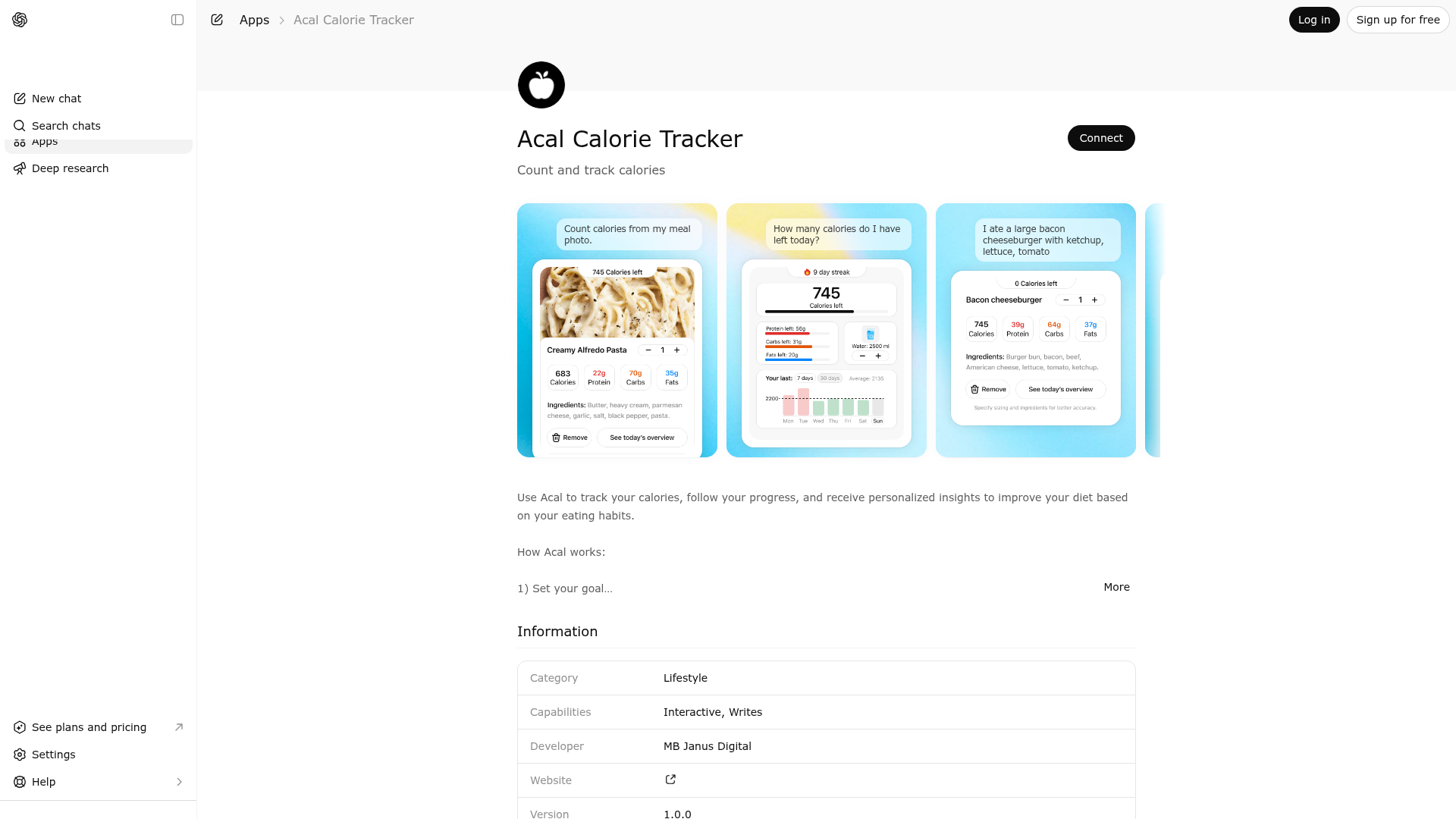
App Screenshots
Capabilities
No special capabilities listed
AI Agent Discovery
Acal Calorie Tracker is indexed by Tedix as a structured health listing for AI assistants, search crawlers, and users comparing agent-ready apps.
- Acal Calorie Tracker is categorized as Health.
- Developer: MB Janus Digital.
- Connector type: AI-Powered App.
- Current connector status: Connected.
- Observed distribution channels: chatgpt.
- Available regions: US, FR, GB, ES, KR, IN.
Use this page to understand whether Acal Calorie Tracker is relevant for health workflows in AI assistants.
For MCP discovery, this listing helps crawlers connect Acal Calorie Tracker to tool, resource, prompt, and server-health signals instead of treating it as a generic directory entry.
The canonical Tedix directory URL is https://tedix.dev/apps/acal-calorie-tracker/.
Crawlable Profile
Source and availability
Tedix identifies Acal Calorie Tracker from Upstream Mcp tool source; Store sources: ChatGPT app store; Distribution: Ecosystem Directory. Availability is reported for US, FR, GB, ES, KR, IN.
- ChatGPT app store Auth required · RELEASED · US, FR, GB, ES, KR, IN
Auth, tools, and actions
Authentication: Requires Login. No special capability flags are currently listed. Current MCP inventory reports 13 tools, 3 resources, and 0 prompts.
- Change Calorie Goal · App action
Use this when the signed-in user asks to change their goal. It opens the goal quiz and does not save anything until the quiz is submitted.
- Daily Dashboard · Read-only action
Use this when the signed-in user wants today's dashboard or a past day summary. It reads their saved dashboard data without changing it.
- Daily Dashboard Detailed Insights · Read-only action
Use this when the signed-in user wants a plain-text nutrition coaching report based on their current dashboard history.
- Remove Recent Activity · High-impact write action
Use this only from the signed-in user's app widget to permanently remove a logged meal or activity and refresh the dashboard.
- Update Water Intake · App action
Use this only from the signed-in user's app widget to save their water intake for a day.
- Initial Quiz · App action
Use this when the signed-in user wants to start onboarding or open the calorie goal quiz. This only opens the widget and does not save answers.
- Initial Quiz Submit · App action
Use this to save the signed-in user's onboarding quiz answers and create or update their calorie goal. It is usually called from the quiz widget.
- Update Meal · High-impact write action
Use this only from the signed-in user's app widget to change a logged meal quantity or permanently remove it from their tracker.
Plus 5 additional actions in the full tool inventory.
Verification freshness
- Catalog synced 10h ago (June 6, 2026)
- Connector checked May 30, 2026
- MCP scanned May 30, 2026
- Website enriched May 29, 2026
- Directory updated 10h ago (June 6, 2026)
Alternatives and related apps
Comparable apps in Health include Achieve Harmony, AdisInsight, AllTrails, Alma.
Publisher Intelligence
Insights and recommendations for app publishers. See how your app performs and how to improve discoverability.
Server Status calorie_calculator vv1.0.0
https://openaiapp.trycaloriecalculator.com/mcp Last checked: May 30, 2026
Technical Details
Tools(13)
Showing 13 of 13 tools
| Tool | Description | Flags | Test | Last Tested | |
|---|---|---|---|---|---|
change_calorie_goal | Use this when the signed-in user asks to change their goal. It opens the goal quiz and does not save anything until the quiz is submitted. | — | 100%Latency 74ms | May 29, 2026 | |
daily_dashboard | Use this when the signed-in user wants today's dashboard or a past day summary. It reads their saved dashboard data without changing it. | read-only | 100%Latency 23ms | May 29, 2026 | |
daily_dashboard_detailed_insights | Use this when the signed-in user wants a plain-text nutrition coaching report based on their current dashboard history. | read-only | 100%Latency 23ms | May 29, 2026 | |
daily_dashboard_remove_recent_activity | Use this only from the signed-in user's app widget to permanently remove a logged meal or activity and refresh the dashboard. | destructive | 100%Latency 23ms | May 29, 2026 | |
daily_dashboard_update_water | Use this only from the signed-in user's app widget to save their water intake for a day. | — | 100%Latency 25ms | May 29, 2026 | |
initial_quiz | Use this when the signed-in user wants to start onboarding or open the calorie goal quiz. This only opens the widget and does not save answers. | — | 100%Latency 23ms | May 29, 2026 | |
initial_quiz_submit | Use this to save the signed-in user's onboarding quiz answers and create or update their calorie goal. It is usually called from the quiz widget. | — | 100%Latency 22ms | May 29, 2026 | |
meal_update | Use this only from the signed-in user's app widget to change a logged meal quantity or permanently remove it from their tracker. | destructive | 100%Latency 23ms | May 29, 2026 | |
photo_calculator | Use this when the signed-in user shares a meal photo and wants a calorie estimate. The tool analyzes the photo and logs the meal in the user's private tracker. If the photo is visible in chat but ChatGPT does not provide an authorized file_id or download_url for this tool call, do not stop at a refusal. Instead, pass a short best-effort meal description in foodDescription and use the text calorie calculator fallback. | — | 100%Latency 23ms | May 29, 2026 | |
save_analyzed_meal | Use this only from the signed-in user's app widget to persist an already analyzed meal. | — | 100%Latency 23ms | May 29, 2026 | |
text_calculator | Use this when the signed-in user describes a meal in text and wants a calorie estimate. Also use this as a fallback when a meal photo is visible in chat but the photo tool does not receive an authorized file_id or download_url. In that case, summarize the visible meal into a short best-effort foodDescription and continue here. The tool estimates nutrition and logs the meal in the user's private tracker. | — | 100%Latency 22ms | May 29, 2026 | |
user_goal_status | Use this to check whether the signed-in user already has a saved calorie goal. It only reads existing goal status. | read-only | 100%Latency 22ms | May 29, 2026 | |
widget_log_event | Use this only from the app widget to record compact telemetry about user interactions and widget errors. | — | 100%Latency 23ms | May 29, 2026 |
Discoverability Score
Fair
58 of 100 — how easily AI agents find your app
- Description quality20/20
- Example prompts0/20
- Keyword coverage0/15
- Tool metadata20/20
- Visual assets5/20
- Endpoint health10/10
- Data freshness15/15
How to Improve
Add at least 2 example prompts. Prompt examples strongly improve app matching and click-through intent.
Increase keyword coverage (discovery + trigger) to improve retrieval for long-tail queries.
Provide a stable HTTPS logo URL (avoid connectors://) so cards render consistently across clients.
Add at least 2 screenshots that show real workflows to increase confidence and conversion.
Technical Details
- Status
- ENABLED
- Type
- AI-Powered App
- Auth
- Requires Login
- Listed on
- ChatGPT
- Added
- May 27, 2026
- Last synced
- 10h ago
- Last checked
- May 30, 2026
- Version
- v1.0.0
- Distribution
- Ecosystem Directory


