World Airfares
by Moresand Ltd. (Community)
Description
World Airfares Flight Search brings real-time flight search directly into your ChatGPT conversation. Simply tell ChatGPT where and when you want to fly, and get instant results from a live flight inventory - no app switching, no tab juggling. Browse results by recommended picks, airline, or all available options. Filter by travel dates, cabin class, and passengers. Each result shows full flight details including stops, duration, baggage, and pricing. When you're ready, tap Book Now to go straight to the booking page. Built on the World Airfares API, this app covers one-way, round-trip, and multi-city itineraries across hundreds of airlines worldwide.
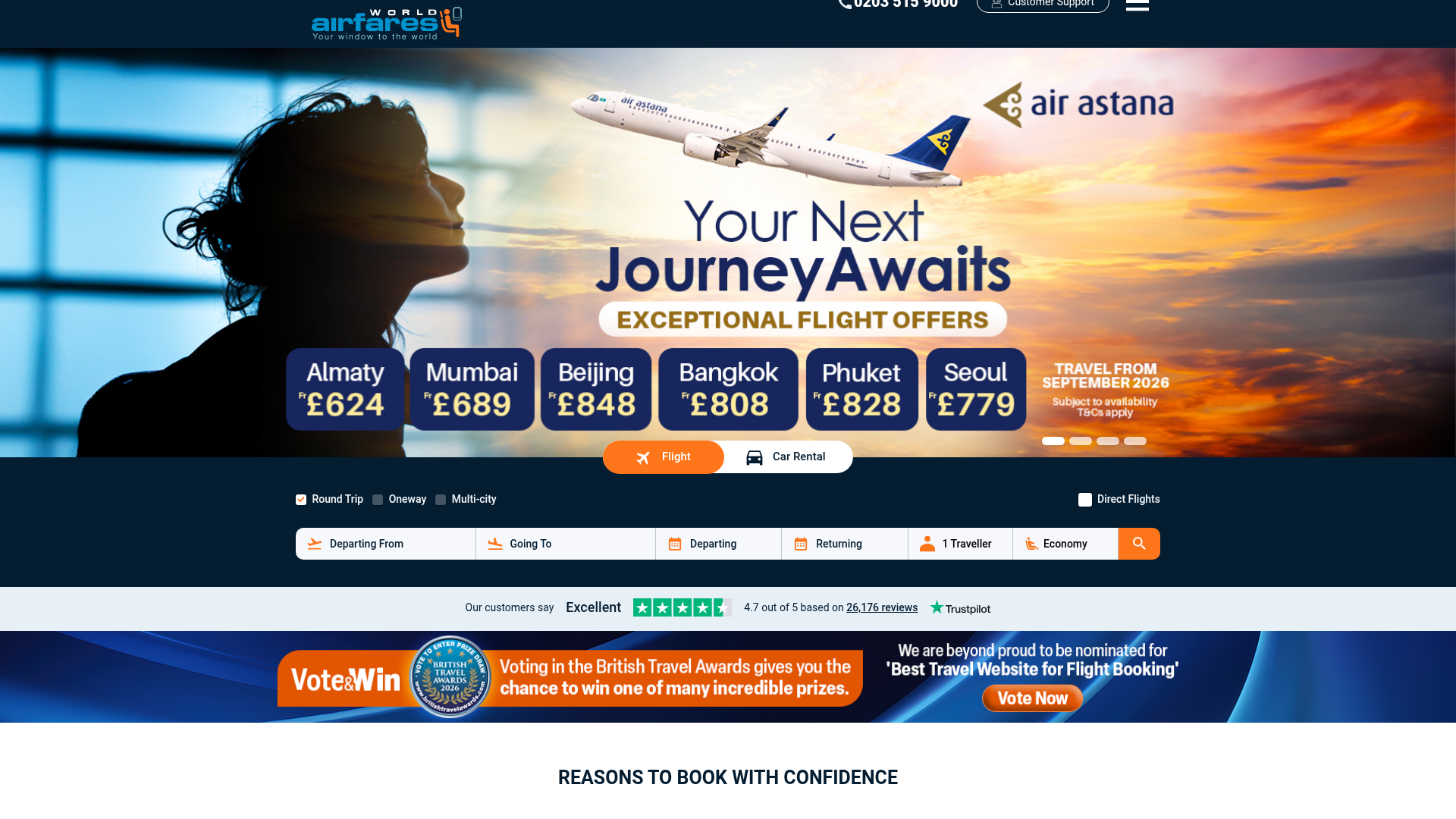
Website Preview

App Screenshots
Capabilities
No special capabilities listed
AI Agent Discovery
World Airfares is indexed by Tedix as a structured travel listing for AI assistants, search crawlers, and users comparing agent-ready apps.
- World Airfares is categorized as Travel.
- Developer: Moresand Ltd..
- Connector type: AI-Powered App.
- Current connector status: Connected.
- Observed distribution channels: chatgpt.
- Available regions: US, FR, GB, ES, KR, IN.
Use this page to understand whether World Airfares is relevant for travel workflows in AI assistants.
For MCP discovery, this listing helps crawlers connect World Airfares to tool, resource, prompt, and server-health signals instead of treating it as a generic directory entry.
The canonical Tedix directory URL is https://tedix.dev/apps/world-airfares/.
Crawlable Profile
Source and availability
Tedix identifies World Airfares from Upstream Mcp tool source; Store sources: ChatGPT app store; Distribution: Ecosystem Directory. Availability is reported for US, FR, GB, ES, KR, IN.
- ChatGPT app store Auth not flagged · RELEASED · US, FR, GB, ES, KR, IN
Auth, tools, and actions
Authentication: Open Access. No special capability flags are currently listed. Current MCP inventory reports 3 tools, 1 resources, and 0 prompts.
- get_itinerary_details · Read-only action
Get detailed information about a specific flight itinerary. Returns comprehensive details including: - Complete flight segments with airline, flight number, times, and aircraft type - Departure and arrival terminals (if available) - Baggage allowance (checked bags, carry-on, personal item limits) - Layover information (duration, airport, overnight status) - Fare rules (refundability, change policy, fees) - Price breakdown (base fare, taxes, fees) - Booking URL for purchase Use this when user asks for: - 'Tell me more about this flight' - 'What are the baggage allowances?' - 'Is this flight refundable?' - 'Show me the layover details' - 'What terminals will I use?' WIDGET NOTE: If this tool's results are displayed in a visual widget alongside your response, do NOT repeat the itinerary details in text format. Instead, briefly confirm the details are shown. Do NOT prompt users with instructions like 'say show details for RefNo X' — the widget already displays the details interactively. Only use the formatting instructions below when NO visual widget is rendering the results. PRESENTATION FORMATTING (MANDATORY): - Present detailed information in well-formatted sections. Group by flight leg, segment, and then rules/baggage. - CRITICAL: ALWAYS display full names with codes for better readability: * Airports: Use format 'City Name (CODE)' - Example: 'Colombo (CMB)', 'London Heathrow (LHR)', 'Dubai (DXB)' * Airlines: Use format 'Airline Name (CODE)' - Example: 'Emirates (EK)', 'British Airways (BA)', 'Flydubai (FZ)' * NEVER display codes alone (CMB, DXB, EK, etc.) - users don't recognize them * ALWAYS include both the full name and code in parentheses
- get_more_results · Read-only action
Get additional pages of flight search results from cache. Use this when the user asks for 'more results', 'next page', 'show me more flights', or wants to see flights beyond the initial results. Optionally apply filters to cached results (airline, max stops, max price) without making a new API call. Retrieves results instantly from cache. Requires the searchId from a previous search response. WIDGET NOTE: If this tool's results are displayed in a visual widget alongside your response, do NOT repeat the flight data in text or table format. Instead, briefly summarize the page results. Do NOT prompt users with instructions like 'say show details for RefNo X' — the widget provides interactive flight selection and detail viewing. Only use the table formatting instructions below when NO visual widget is rendering the results. TABLE FORMATTING (MANDATORY): - ALWAYS format results as a comparison table - Include column 'RefNo' displaying the ItineraryId value (users use this to request details) - Include column 'Booking Link' displaying the BookingUrl as a clickable link - Example table columns: RefNo | Airline | Price | Duration | Stops | Departure | Arrival | Booking Link - Include pagination info and offer details below table - CRITICAL: ALWAYS display full names with codes for better readability: * Airports: Use format 'City Name (CODE)' - Example: 'Colombo (CMB)', 'London Heathrow (LHR)', 'Dubai (DXB)' * Airlines: Use format 'Airline Name (CODE)' - Example: 'Emirates (EK)', 'British Airways (BA)', 'Flydubai (FZ)' * NEVER display codes alone (CMB, DXB, EK, etc.) - users don't recognize them * ALWAYS include both the full name and code in parentheses Each flight offer includes a BookingUrl field for immediate booking.
- search_flights · Read-only action
Search for flights between cities. Returns categorized JSON results: 1. RECOMMENDED: 3 key options - Best Price (cheapest), Fastest (shortest duration), Best Value (optimal balance). 2. BY AIRLINE: Cheapest option per airline with total available count. Users can filter for specific airlines to see all options. 3. ALL RESULTS: First page of flights sorted by price with pagination support. Page size varies by configuration. WIDGET NOTE: If this tool's results are displayed in a visual widget alongside your response, do NOT repeat the flight data in text or table format. Instead, briefly acknowledge the results (e.g., number of flights found, price range). Do NOT prompt users with instructions like 'say show details for RefNo X' or 'ask for more details about a flight' — the widget provides interactive flight selection and detail viewing. Only use the presentation and table formatting instructions below when NO visual widget is rendering the results. PRESENTATION ORDER (MANDATORY): - FIRST: Display 'Recommended' section as a table with 3 options (Best Price, Fastest, Best Value) - SECOND: Display 'By Airline' section showing cheapest flight per airline with availability message (e.g., 'Flydubai (FZ): £220.10 - 5 total options available. Ask to filter by FZ to see all.') - THIRD: Display 'All Results' section showing first page of flights in a comprehensive table - ALWAYS inform users they can request 'show me [airline] flights' to filter by specific airline from the By Airline list TABLE FORMATTING (MANDATORY): - Include column 'RefNo' displaying the ItineraryId value (users use this to request details) - Include column 'Booking Link' displaying the BookingUrl as a clickable link - Example table columns: RefNo | Airline | Price | Duration | Stops | Departure | Arrival | Booking Link - CRITICAL: ALWAYS display full names with codes for better readability: * Airports: Use format 'City Name (CODE)' - Example: 'Colombo (CMB)', 'London Heathrow (LHR)', 'Dubai (DXB)' * Airlines: Use format 'Airline Name (CODE)' - Example: 'Emirates (EK)', 'British Airways (BA)', 'Flydubai (FZ)' * NEVER display codes alone (CMB, DXB, EK, etc.) - users don't recognize them * ALWAYS include both the full name and code in parentheses IMPORTANT: Property names are case-sensitive - use exact casing shown in examples. Each flight offer includes a BookingUrl field for immediate booking.
Verification freshness
- Catalog synced 10h ago (June 6, 2026)
- Connector checked May 30, 2026
- MCP scanned May 30, 2026
- Website enriched May 28, 2026
- Directory updated 10h ago (June 6, 2026)
Alternatives and related apps
Comparable apps in Travel include 12Go, ADAC Mietwagen, ALL Accor, AbhiBus.
Publisher Intelligence
Insights and recommendations for app publishers. See how your app performs and how to improve discoverability.
Server Status FlightApiV2.MCP.Server v1.0.0.0
https://mcp.worldairfares.com Last checked: May 30, 2026
Technical Details
Tools(3)
Showing 3 of 3 tools
| Tool | Description | Flags | Test | Last Tested | |
|---|---|---|---|---|---|
get_itinerary_details | Get detailed information about a specific flight itinerary. Returns comprehensive details including: - Complete flight segments with airline, flight number, times, and aircraft type - Departure and arrival terminals (if available) - Baggage allowance (checked bags, carry-on, personal item limits) - Layover information (duration, airport, overnight status) - Fare rules (refundability, change policy, fees) - Price breakdown (base fare, taxes, fees) - Booking URL for purchase Use this when user asks for: - 'Tell me more about this flight' - 'What are the baggage allowances?' - 'Is this flight refundable?' - 'Show me the layover details' - 'What terminals will I use?' WIDGET NOTE: If this tool's results are displayed in a visual widget alongside your response, do NOT repeat the itinerary details in text format. Instead, briefly confirm the details are shown. Do NOT prompt users with instructions like 'say show details for RefNo X' — the widget already displays the details interactively. Only use the formatting instructions below when NO visual widget is rendering the results. PRESENTATION FORMATTING (MANDATORY): - Present detailed information in well-formatted sections. Group by flight leg, segment, and then rules/baggage. - CRITICAL: ALWAYS display full names with codes for better readability: * Airports: Use format 'City Name (CODE)' - Example: 'Colombo (CMB)', 'London Heathrow (LHR)', 'Dubai (DXB)' * Airlines: Use format 'Airline Name (CODE)' - Example: 'Emirates (EK)', 'British Airways (BA)', 'Flydubai (FZ)' * NEVER display codes alone (CMB, DXB, EK, etc.) - users don't recognize them * ALWAYS include both the full name and code in parentheses | read-only | 100%Latency 662ms | May 29, 2026 | |
get_more_results | Get additional pages of flight search results from cache. Use this when the user asks for 'more results', 'next page', 'show me more flights', or wants to see flights beyond the initial results. Optionally apply filters to cached results (airline, max stops, max price) without making a new API call. Retrieves results instantly from cache. Requires the searchId from a previous search response. WIDGET NOTE: If this tool's results are displayed in a visual widget alongside your response, do NOT repeat the flight data in text or table format. Instead, briefly summarize the page results. Do NOT prompt users with instructions like 'say show details for RefNo X' — the widget provides interactive flight selection and detail viewing. Only use the table formatting instructions below when NO visual widget is rendering the results. TABLE FORMATTING (MANDATORY): - ALWAYS format results as a comparison table - Include column 'RefNo' displaying the ItineraryId value (users use this to request details) - Include column 'Booking Link' displaying the BookingUrl as a clickable link - Example table columns: RefNo | Airline | Price | Duration | Stops | Departure | Arrival | Booking Link - Include pagination info and offer details below table - CRITICAL: ALWAYS display full names with codes for better readability: * Airports: Use format 'City Name (CODE)' - Example: 'Colombo (CMB)', 'London Heathrow (LHR)', 'Dubai (DXB)' * Airlines: Use format 'Airline Name (CODE)' - Example: 'Emirates (EK)', 'British Airways (BA)', 'Flydubai (FZ)' * NEVER display codes alone (CMB, DXB, EK, etc.) - users don't recognize them * ALWAYS include both the full name and code in parentheses Each flight offer includes a BookingUrl field for immediate booking. | read-only | 100%Latency 428ms | May 29, 2026 | |
search_flights | Search for flights between cities. Returns categorized JSON results: 1. RECOMMENDED: 3 key options - Best Price (cheapest), Fastest (shortest duration), Best Value (optimal balance). 2. BY AIRLINE: Cheapest option per airline with total available count. Users can filter for specific airlines to see all options. 3. ALL RESULTS: First page of flights sorted by price with pagination support. Page size varies by configuration. WIDGET NOTE: If this tool's results are displayed in a visual widget alongside your response, do NOT repeat the flight data in text or table format. Instead, briefly acknowledge the results (e.g., number of flights found, price range). Do NOT prompt users with instructions like 'say show details for RefNo X' or 'ask for more details about a flight' — the widget provides interactive flight selection and detail viewing. Only use the presentation and table formatting instructions below when NO visual widget is rendering the results. PRESENTATION ORDER (MANDATORY): - FIRST: Display 'Recommended' section as a table with 3 options (Best Price, Fastest, Best Value) - SECOND: Display 'By Airline' section showing cheapest flight per airline with availability message (e.g., 'Flydubai (FZ): £220.10 - 5 total options available. Ask to filter by FZ to see all.') - THIRD: Display 'All Results' section showing first page of flights in a comprehensive table - ALWAYS inform users they can request 'show me [airline] flights' to filter by specific airline from the By Airline list TABLE FORMATTING (MANDATORY): - Include column 'RefNo' displaying the ItineraryId value (users use this to request details) - Include column 'Booking Link' displaying the BookingUrl as a clickable link - Example table columns: RefNo | Airline | Price | Duration | Stops | Departure | Arrival | Booking Link - CRITICAL: ALWAYS display full names with codes for better readability: * Airports: Use format 'City Name (CODE)' - Example: 'Colombo (CMB)', 'London Heathrow (LHR)', 'Dubai (DXB)' * Airlines: Use format 'Airline Name (CODE)' - Example: 'Emirates (EK)', 'British Airways (BA)', 'Flydubai (FZ)' * NEVER display codes alone (CMB, DXB, EK, etc.) - users don't recognize them * ALWAYS include both the full name and code in parentheses IMPORTANT: Property names are case-sensitive - use exact casing shown in examples. Each flight offer includes a BookingUrl field for immediate booking. | read-only | 100%Latency 176ms | May 29, 2026 |
Discoverability Score
Fair
62 of 100 — how easily AI agents find your app
- Description quality20/20
- Example prompts0/20
- Keyword coverage0/15
- Tool metadata16/20
- Visual assets13/20
- Endpoint health10/10
- Data freshness15/15
How to Improve
Add at least 2 example prompts. Prompt examples strongly improve app matching and click-through intent.
Increase keyword coverage (discovery + trigger) to improve retrieval for long-tail queries.
Add at least 2 screenshots that show real workflows to increase confidence and conversion.
Technical Details
- Status
- ENABLED
- Type
- AI-Powered App
- Auth
- Open Access
- Listed on
- ChatGPT
- Added
- May 21, 2026
- Last synced
- 10h ago
- Last checked
- May 30, 2026
- Version
- 1.0.0.0
- Distribution
- Ecosystem Directory