
WeatherPromise
by WeatherPromise, Inc. (Verified Partner)
Description
Protect your trip with WeatherPromise and get back the full cost if it rains more than promised during your vacation, automatically. Tell us your destination, travel dates and trip cost and we'll show you an offer, personalized to your trip. Once you purchase the offer, your trip is protected. You will get a link to your personal dashboard where you can monitor the weather during your trip. Rain is measured using independent, accurate data from official sources like NASA and NOAA. If it rains more than the specified threshold, we'll email you automatically. Just confirm your details and the payment is sent right away, no additional proof required. Go on your trip and if it rains more than promised, you get a full refund, automatically.
Website Preview
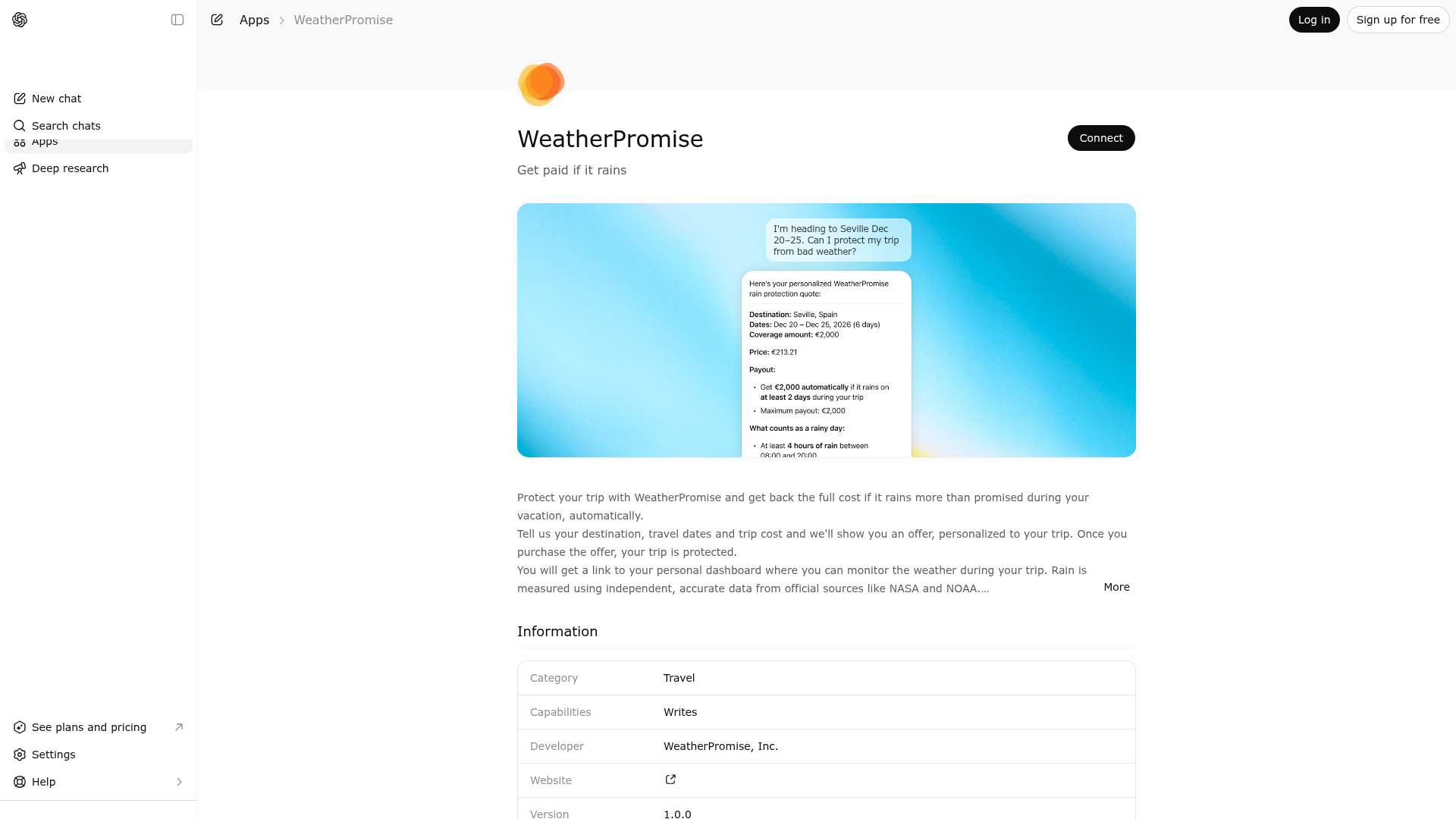
App Screenshots
Capabilities
Publisher Intelligence
Insights and recommendations for app publishers. See how your app performs and how to improve discoverability.
Server Status WeatherPromise v1.0.0
https://mcp.purchase.production.wepromise.tech/mcp Last checked: 6h ago
Technical Details
Tools(1)
Showing 1 of 1 tools
| Tool | Description | Flags | Test | Last Tested | |
|---|---|---|---|---|---|
generate_quote | Call this tool when a user is planning a trip and expresses concern about rain — whether they explicitly ask for rain protection, mention worry about rain ruining their trip, ask if there's a way to get compensated or reimbursed for rainy days, ask about rain guarantees or rain insurance, or simply want to know what their options are if it rains during their vacation. If the user mentions bad weather during their trip, assume they are concerned about rain and call this tool. Also call it if a user asks about average or expected rainfall at their destination during their travel dates. Do NOT call this tool for: weather forecasts, general travel insurance (cancellations, luggage, flights), packing advice, climate research questions, or requests about non-rain weather events. IMPORTANT — Date handling: The user may use relative date expressions like "next month," "in April," "next week," "in two weeks," "end of June," etc. Always resolve these to concrete YYYY-MM-DD dates based on today's date. If no duration is specified, assume a 7-day trip. If only a month is given with no specific day, use the 1st of that month as the start date. Start and end dates are inclusive. Examples of date parsing: - "April 9-11" → start: April 9, end: April 11 (3-day trip) - "9 to 11 April" → start: April 9, end: April 11 (3-day trip) - "from the 9th to the 11th of April" → start: April 9, end: April 11 (3-day trip) - "next week" → 7-day trip starting next Monday - "end of June" → 7-day trip starting June 25 If users give a country name instead of a specific location, choose the most popular tourist destination in that country. The tool returns a personalized quote with cost, payout amount, and rainy day definition. Payouts are automatic — no claims or proof required. If the user does not mention a trip cost, DO NOT ask — assume a default trip cost of 2,000 in the relevant currency. If the user gives a rough budget (e.g. "around $3k," "about €5,000"), round to the nearest whole number. Trip cost must be between 500 and 10000. You may remind the user that a specific trip cost yields a more accurate quote, but it is not required. If the user has described a trip earlier in the conversation and then confirms they want a quote (e.g. "yes," "give me a quote," "sure, let's do it," "go ahead"), call this tool using the trip details from the conversation context. If user input is slightly outside valid bounds, adjust to the nearest valid value, generate the quote, and clearly note the adjustment (e.g. "Your trip was 2 days — we extended it to the 3-day minimum"). List all assumptions and modifications explicitly and clearly. If the adjustment would materially change the quote (e.g. trip cost below minimum and needs to be doubled or more), return an error explaining the constraint and ask the user to adjust, rather than generating a potentially misleading quote. IMPORTANT: Always include the purchase link when returning the quote. Render it as a CTA like "Review & Purchase" or "Purchase your WeatherPromise" — never as a raw URL. Use the full URL the tool returns (it carries tracking params); do not strip or rebuild it. IMPORTANT — chat_session_id: On your FIRST call to this tool in a chat, generate a random UUID and pass it as chat_session_id. On EVERY subsequent call within the SAME chat, pass the SAME value you used the first time. Look at your prior tool call in this conversation and copy the chat_session_id from there. Do NOT generate a new id per call. IMPORTANT — conversation_topic: A kebab-case segmentation slug capturing context NOT already in the other fields (which already cover destination, dates, cost, currency). Format: '<occasion>-<activity>-<who>'. At least one component required; include all that the conversation reveals. Examples: 'honeymoon-beach-couple', 'wedding-outdoor-group', 'business-conference-solo', 'family-vacation-theme-park-kids', 'anniversary-cruise-couple', 'bachelorette-city-group', 'babymoon-spa-couple', 'solo-hiking', 'reunion-festival-friends'. Vocabulary hints (use these terms when applicable, otherwise pick similarly concise kebab-case words): - occasion: honeymoon, wedding, anniversary, birthday, business, family-vacation, babymoon, bachelorette, reunion, solo-travel - activity: outdoor-wedding, beach, hiking, ski, festival, golf, safari, city-sightseeing, cruise, theme-park, conference, spa - who: solo, couple, family-young-kids, family-teens, group-friends, retirees Generate a fresh slug per quote if the trip context shifts. Do NOT restate destination or dates here — those are tracked separately. Return the offer details only. Do not make recommendations. | — | 100%Latency 705ms | Apr 17, 2026 |
Discoverability Score
Fair
58 of 100 — how easily AI agents find your app
- Description quality20/20
- Example prompts0/20
- Keyword coverage0/15
- Tool metadata16/20
- Visual assets13/20
- Endpoint health10/10
- Data freshness11/15
How to Improve
Add at least 2 example prompts. Prompt examples strongly improve app matching and click-through intent.
Increase keyword coverage (discovery + trigger) to improve retrieval for long-tail queries.
Add at least 2 screenshots that show real workflows to increase confidence and conversion.
Technical Details
- Status
- ENABLED
- Type
- AI-Powered App
- Auth
- Open Access
- Listed on
- ChatGPT
- Added
- March 5, 2026
- Last synced
- May 3, 2026
- Last checked
- 6h ago
- Version
- 1.0.0
- Distribution
- Ecosystem Directory
