
Tripbtoz
by (주)트립비토즈 (Community)
Description
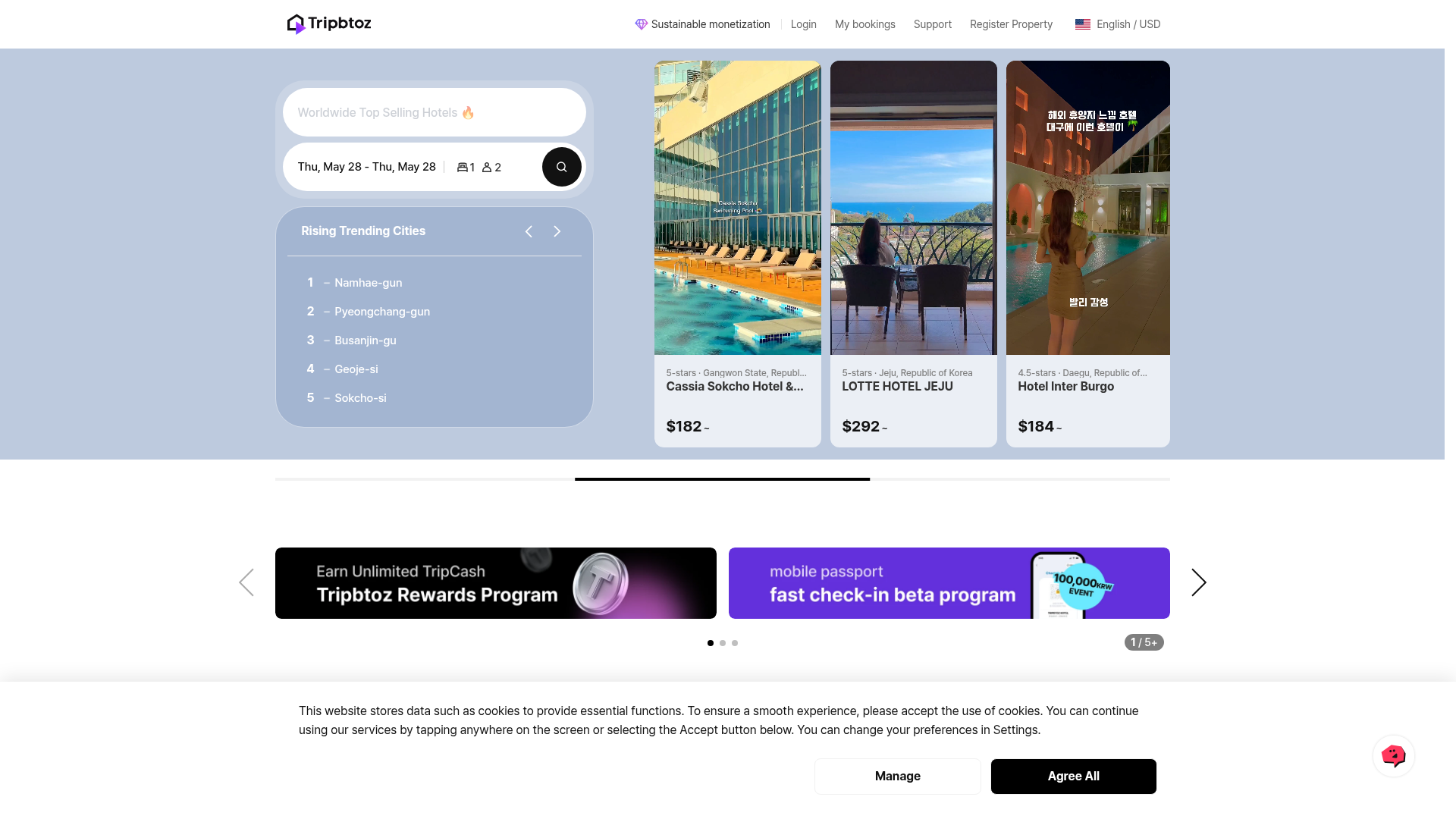
Tripbtoz is a hotel booking assistant that helps travelers find the right stay with less effort. Search hotels by city, district, or landmark, browse results in a clean list, and open any hotel to see key details—such as room options and rates for your dates—so you can compare quickly and decide with confidence. Why people will love it - Find hotels by location or landmark in seconds - Compare stays with a simple, readable results view - Check room options and prices in one place before booking
Website Preview

App Screenshots
Capabilities
No special capabilities listed
AI Agent Discovery
Tripbtoz is indexed by Tedix as a structured travel listing for AI assistants, search crawlers, and users comparing agent-ready apps.
- Tripbtoz is categorized as Travel.
- Developer: (주)트립비토즈.
- Connector type: AI-Powered App.
- Current connector status: Connected.
- Observed distribution channels: chatgpt.
- Available regions: US, ES, KR, IN, FR, GB.
Use this page to understand whether Tripbtoz is relevant for travel workflows in AI assistants.
For MCP discovery, this listing helps crawlers connect Tripbtoz to tool, resource, prompt, and server-health signals instead of treating it as a generic directory entry.
The canonical Tedix directory URL is https://tedix.dev/apps/tripbtoz/.
Crawlable Profile
Source and availability
Tedix identifies Tripbtoz from Upstream Mcp tool source; Store sources: ChatGPT app store; Distribution: Ecosystem Directory. Availability is reported for US, ES, KR, IN, FR, GB.
- ChatGPT app store Auth not flagged · RELEASED · US, ES, KR, IN, FR, GB
Auth, tools, and actions
Authentication: Open Access. No special capability flags are currently listed. Current MCP inventory reports 2 tools, 3 resources, and 0 prompts.
- get_hotel_detail · Read-only action
Get detailed information about a SPECIFIC HOTEL by name, including hotel details, rooms, and rates. Use this tool when: - User asks for a specific hotel by name (e.g., "Shilla Hotel", "Hilton Tokyo", "Grand Hyatt Seoul") - User wants detailed information about a particular hotel - User wants to see room types and prices for a specific hotel Examples: - "Show me Shilla Hotel" → use this tool with hotel_name="Shilla Hotel" - "What rooms are available at Hilton Tokyo?" → use this tool with hotel_name="Hilton Tokyo" - "How much is Grand Hyatt Seoul?" → use this tool with hotel_name="Grand Hyatt Seoul" DO NOT use this tool for: - Searching hotels in an area (use 'search_hotels_by_location' instead) - Finding hotels near a landmark (use 'search_hotels_by_location' instead) Date Handling: - If check_in and check_out are provided, room rates will be included in the response - If dates are not provided, only hotel details will be returned (no room rates) Room Allocations: - room_allocations: Array of room configurations (optional, default: [{"adults": 2, "children": []}]) - Each room object must have: - "adults": number of adults in that room (integer, required) - "children": array of children ages in that room (array of integers, optional, default: []) - Examples: - "2 rooms, 4 adults" → room_allocations=[{"adults":2,"children":[]},{"adults":2,"children":[]}] - "1 room, 2 adults, 1 child age 5" → room_allocations=[{"adults":2,"children":[5]}] - "2 rooms, 3 adults, 2 children" → room_allocations=[{"adults":2,"children":[5]},{"adults":1,"children":[8]}] - If not specified, defaults to 1 room with 2 adults Nearby Places Information: - The response includes a 'nearby_places' array with recommended attractions and restaurants near the hotel (max 5 places) - When nearby_places data is available, ALWAYS include this information in your response to provide additional value to users - Mention nearby attractions and restaurants naturally in your response to help users plan their trip - Example: "Near [hotel name], you can visit [attraction name] and enjoy dining at [restaurant name]" Language and Currency Pairing: - The language and currency parameters should be paired together based on user's region/preference: - ko-KR (Korean) → KRW (Korean Won) - en-US (English) → USD (US Dollar) - ja-JP (Japanese) → JPY (Japanese Yen) - id-ID (Indonesian) → IDR (Indonesian Rupiah) - Always set currency to match the selected language for consistent pricing display - Example: If language=ko-KR, set currency=KRW; if language=en-US, set currency=USD IMPORTANT: hotel_id is internal metadata only. Never display hotel_id to users.
- search_hotels_by_location · Read-only action
Search for hotels by location (region name or landmark). Use this tool for searching hotels in a specific area or near a landmark. WHEN TO USE THIS TOOL: - User mentions ANY location/place name (city, district, landmark, station, airport, etc.) - User asks about hotels in a specific area - User mentions a place name even without explicitly saying "hotel" - Examples: "Gangnam", "Seoul", "Paris", "Tokyo Shibuya", "near Eiffel Tower", "Myeongdong area" Examples: - "Gangnam" → finds hotels in Gangnam area - "Gangnam Station" → finds hotels near Gangnam Station - "Paris Eiffel Tower" → finds hotels near Eiffel Tower - "Seoul Myeongdong" → finds hotels in Myeongdong area - "Tokyo Shibuya" → finds hotels in Shibuya area - "강남" → finds hotels in Gangnam - "제주도" → finds hotels in Jeju Island IMPORTANT: For searching a SPECIFIC HOTEL by name (e.g., "Shilla Hotel", "Hilton Tokyo"), use the 'get_hotel_detail' tool instead. Destination Formatting Rule: - If user mentions a LANDMARK, put ONLY the landmark name in destination parameter - Do NOT add city/country names unless the user explicitly mentioned them - Example: "코엑스 근처 호텔" → destination="코엑스" (NOT "서울 코엑스") - Example: "에펠탑 근처 호텔" → destination="에펠탑" (NOT "파리 에펠탑") - Example: "강남역 근처 호텔" → destination="강남역" (NOT "서울 강남역") - If user explicitly mentions city/country, include them: "파리 에펠탑 근처" → destination="파리 에펠탑" Budget Parameters: - budget_min: Minimum budget amount (optional) - budget_max: Maximum budget amount (optional) - budget_scope: Budget scope - "per_night" (1박 기준) or "total_stay" (전체 숙박 기준) - budget_raw_text: Original user input text for budget (e.g., "20만원대", "30~40만원") Budget Rule: - If user says "20만원대", set budget_min=200000 and budget_max=299999 (KRW, per-night) - If user says "30~40만원", set budget_min=300000 and budget_max=400000 - If user says "25만원 이하", set budget_max=250000 (budget_min omitted) - If user says "20만원 이상", set budget_min=200000 (budget_max omitted) - If budget not mentioned, omit both budget_min and budget_max - For Korean users (language: ko-KR): Budget should be specified in KRW (Korean Won) - For non-Korean users (language: en-US, etc.): Budget should be specified in USD (US Dollar) Date Handling: - If user specifies exact dates (e.g., "March 15-17", "February 3 to March 6"), use those EXACT dates as provided - If user specifies vague dates (e.g., "early March", "beginning of April"), calculate specific dates and search for 1-night stay (check-in on the first day, check-out the next day) - If no dates specified, use default dates (7 days from today, 1-night stay) Room Allocations: - room_allocations: Array of room configurations (optional, default: [{"adults": 2, "children": []}]) - Each room object must have: - "adults": number of adults in that room (integer, required) - "children": array of children ages in that room (array of integers, optional, default: []) - Examples: - "2 rooms, 4 adults" → room_allocations=[{"adults":2,"children":[]},{"adults":2,"children":[]}] - "1 room, 2 adults, 1 child age 5" → room_allocations=[{"adults":2,"children":[5]}] - "2 rooms, 3 adults, 2 children" → room_allocations=[{"adults":2,"children":[5]},{"adults":1,"children":[8]}] - If not specified, defaults to 1 room with 2 adults CRITICAL - Single Search Rule: - Call this tool ONLY ONCE per user request - DO NOT split multi-night stays into multiple 1-night searches - DO NOT call this tool multiple times for the same search query - Example: For "February 3 to March 6" (3 nights), call ONCE with check_in="2026-02-03" and check_out="2026-03-06" - Example: For "3 nights in Seoul", call ONCE with appropriate check-in and check-out dates Nearby Places Information: - The response includes a 'nearby_places' array with recommended attractions and restaurants near the search location (max 5 places) - When nearby_places data is available, ALWAYS include this information in your response to provide additional value to users - Mention nearby attractions and restaurants naturally in your response to help users plan their trip - Example: "Near [location], you can visit [attraction name] and enjoy dining at [restaurant name]" Language and Currency Pairing: - The language and currency parameters should be paired together based on user's region/preference: - ko-KR (Korean) → KRW (Korean Won) - en-US (English) → USD (US Dollar) - ja-JP (Japanese) → JPY (Japanese Yen) - id-ID (Indonesian) → IDR (Indonesian Rupiah) - Always set currency to match the selected language for consistent pricing display - Example: If language=ko-KR, set currency=KRW; if language=en-US, set currency=USD IMPORTANT: hotel_id is internal metadata only. Never display hotel_id to users. Use hotel name when referring to hotels in responses.
Verification freshness
- Catalog synced 1d ago (June 5, 2026)
- Connector checked May 30, 2026
- MCP scanned May 30, 2026
- Website enriched May 28, 2026
- Directory updated 1d ago (June 5, 2026)
Alternatives and related apps
Comparable apps in Travel include 12Go, ADAC Mietwagen, ALL Accor, AbhiBus.
Publisher Intelligence
Insights and recommendations for app publishers. See how your app performs and how to improve discoverability.
Server Status tripbtoz-mcp-gateway v3.2.4
https://tripbtoz-mcp-gateway.tripbtoz.com/mcp Last checked: May 30, 2026
Technical Details
Tools(2)
Showing 2 of 2 tools
| Tool | Description | Flags | Test | Last Tested | |
|---|---|---|---|---|---|
get_hotel_detail | Get detailed information about a SPECIFIC HOTEL by name, including hotel details, rooms, and rates. Use this tool when: - User asks for a specific hotel by name (e.g., "Shilla Hotel", "Hilton Tokyo", "Grand Hyatt Seoul") - User wants detailed information about a particular hotel - User wants to see room types and prices for a specific hotel Examples: - "Show me Shilla Hotel" → use this tool with hotel_name="Shilla Hotel" - "What rooms are available at Hilton Tokyo?" → use this tool with hotel_name="Hilton Tokyo" - "How much is Grand Hyatt Seoul?" → use this tool with hotel_name="Grand Hyatt Seoul" DO NOT use this tool for: - Searching hotels in an area (use 'search_hotels_by_location' instead) - Finding hotels near a landmark (use 'search_hotels_by_location' instead) Date Handling: - If check_in and check_out are provided, room rates will be included in the response - If dates are not provided, only hotel details will be returned (no room rates) Room Allocations: - room_allocations: Array of room configurations (optional, default: [{"adults": 2, "children": []}]) - Each room object must have: - "adults": number of adults in that room (integer, required) - "children": array of children ages in that room (array of integers, optional, default: []) - Examples: - "2 rooms, 4 adults" → room_allocations=[{"adults":2,"children":[]},{"adults":2,"children":[]}] - "1 room, 2 adults, 1 child age 5" → room_allocations=[{"adults":2,"children":[5]}] - "2 rooms, 3 adults, 2 children" → room_allocations=[{"adults":2,"children":[5]},{"adults":1,"children":[8]}] - If not specified, defaults to 1 room with 2 adults Nearby Places Information: - The response includes a 'nearby_places' array with recommended attractions and restaurants near the hotel (max 5 places) - When nearby_places data is available, ALWAYS include this information in your response to provide additional value to users - Mention nearby attractions and restaurants naturally in your response to help users plan their trip - Example: "Near [hotel name], you can visit [attraction name] and enjoy dining at [restaurant name]" Language and Currency Pairing: - The language and currency parameters should be paired together based on user's region/preference: - ko-KR (Korean) → KRW (Korean Won) - en-US (English) → USD (US Dollar) - ja-JP (Japanese) → JPY (Japanese Yen) - id-ID (Indonesian) → IDR (Indonesian Rupiah) - Always set currency to match the selected language for consistent pricing display - Example: If language=ko-KR, set currency=KRW; if language=en-US, set currency=USD IMPORTANT: hotel_id is internal metadata only. Never display hotel_id to users. | read-only | 100%Latency 1.2s | May 29, 2026 | |
search_hotels_by_location | Search for hotels by location (region name or landmark). Use this tool for searching hotels in a specific area or near a landmark. WHEN TO USE THIS TOOL: - User mentions ANY location/place name (city, district, landmark, station, airport, etc.) - User asks about hotels in a specific area - User mentions a place name even without explicitly saying "hotel" - Examples: "Gangnam", "Seoul", "Paris", "Tokyo Shibuya", "near Eiffel Tower", "Myeongdong area" Examples: - "Gangnam" → finds hotels in Gangnam area - "Gangnam Station" → finds hotels near Gangnam Station - "Paris Eiffel Tower" → finds hotels near Eiffel Tower - "Seoul Myeongdong" → finds hotels in Myeongdong area - "Tokyo Shibuya" → finds hotels in Shibuya area - "강남" → finds hotels in Gangnam - "제주도" → finds hotels in Jeju Island IMPORTANT: For searching a SPECIFIC HOTEL by name (e.g., "Shilla Hotel", "Hilton Tokyo"), use the 'get_hotel_detail' tool instead. Destination Formatting Rule: - If user mentions a LANDMARK, put ONLY the landmark name in destination parameter - Do NOT add city/country names unless the user explicitly mentioned them - Example: "코엑스 근처 호텔" → destination="코엑스" (NOT "서울 코엑스") - Example: "에펠탑 근처 호텔" → destination="에펠탑" (NOT "파리 에펠탑") - Example: "강남역 근처 호텔" → destination="강남역" (NOT "서울 강남역") - If user explicitly mentions city/country, include them: "파리 에펠탑 근처" → destination="파리 에펠탑" Budget Parameters: - budget_min: Minimum budget amount (optional) - budget_max: Maximum budget amount (optional) - budget_scope: Budget scope - "per_night" (1박 기준) or "total_stay" (전체 숙박 기준) - budget_raw_text: Original user input text for budget (e.g., "20만원대", "30~40만원") Budget Rule: - If user says "20만원대", set budget_min=200000 and budget_max=299999 (KRW, per-night) - If user says "30~40만원", set budget_min=300000 and budget_max=400000 - If user says "25만원 이하", set budget_max=250000 (budget_min omitted) - If user says "20만원 이상", set budget_min=200000 (budget_max omitted) - If budget not mentioned, omit both budget_min and budget_max - For Korean users (language: ko-KR): Budget should be specified in KRW (Korean Won) - For non-Korean users (language: en-US, etc.): Budget should be specified in USD (US Dollar) Date Handling: - If user specifies exact dates (e.g., "March 15-17", "February 3 to March 6"), use those EXACT dates as provided - If user specifies vague dates (e.g., "early March", "beginning of April"), calculate specific dates and search for 1-night stay (check-in on the first day, check-out the next day) - If no dates specified, use default dates (7 days from today, 1-night stay) Room Allocations: - room_allocations: Array of room configurations (optional, default: [{"adults": 2, "children": []}]) - Each room object must have: - "adults": number of adults in that room (integer, required) - "children": array of children ages in that room (array of integers, optional, default: []) - Examples: - "2 rooms, 4 adults" → room_allocations=[{"adults":2,"children":[]},{"adults":2,"children":[]}] - "1 room, 2 adults, 1 child age 5" → room_allocations=[{"adults":2,"children":[5]}] - "2 rooms, 3 adults, 2 children" → room_allocations=[{"adults":2,"children":[5]},{"adults":1,"children":[8]}] - If not specified, defaults to 1 room with 2 adults CRITICAL - Single Search Rule: - Call this tool ONLY ONCE per user request - DO NOT split multi-night stays into multiple 1-night searches - DO NOT call this tool multiple times for the same search query - Example: For "February 3 to March 6" (3 nights), call ONCE with check_in="2026-02-03" and check_out="2026-03-06" - Example: For "3 nights in Seoul", call ONCE with appropriate check-in and check-out dates Nearby Places Information: - The response includes a 'nearby_places' array with recommended attractions and restaurants near the search location (max 5 places) - When nearby_places data is available, ALWAYS include this information in your response to provide additional value to users - Mention nearby attractions and restaurants naturally in your response to help users plan their trip - Example: "Near [location], you can visit [attraction name] and enjoy dining at [restaurant name]" Language and Currency Pairing: - The language and currency parameters should be paired together based on user's region/preference: - ko-KR (Korean) → KRW (Korean Won) - en-US (English) → USD (US Dollar) - ja-JP (Japanese) → JPY (Japanese Yen) - id-ID (Indonesian) → IDR (Indonesian Rupiah) - Always set currency to match the selected language for consistent pricing display - Example: If language=ko-KR, set currency=KRW; if language=en-US, set currency=USD IMPORTANT: hotel_id is internal metadata only. Never display hotel_id to users. Use hotel name when referring to hotels in responses. | read-only | 100%Latency 2.3s | May 29, 2026 |
Discoverability Score
Fair
62 of 100 — how easily AI agents find your app
- Description quality20/20
- Example prompts0/20
- Keyword coverage0/15
- Tool metadata16/20
- Visual assets13/20
- Endpoint health10/10
- Data freshness15/15
How to Improve
Add at least 2 example prompts. Prompt examples strongly improve app matching and click-through intent.
Increase keyword coverage (discovery + trigger) to improve retrieval for long-tail queries.
Add at least 2 screenshots that show real workflows to increase confidence and conversion.
Technical Details
- Status
- ENABLED
- Type
- AI-Powered App
- Auth
- Open Access
- Listed on
- ChatGPT
- Added
- April 28, 2026
- Last synced
- 1d ago
- Last checked
- May 30, 2026
- Version
- 3.2.4
- Distribution
- Ecosystem Directory