
Recreation.gov
by Booz Allen Hamilton (Community)
Description
Search and explore campgrounds across Recreation.gov. Find campgrounds by location or keyword, check campsite availability for specific dates, view detailed campground and campsite information including photos, amenities, and pricing. Filter results by camping type, vehicle length, electricity, amenities, and more. Includes an interactive map and rich visual cards for browsing results.
Website Preview
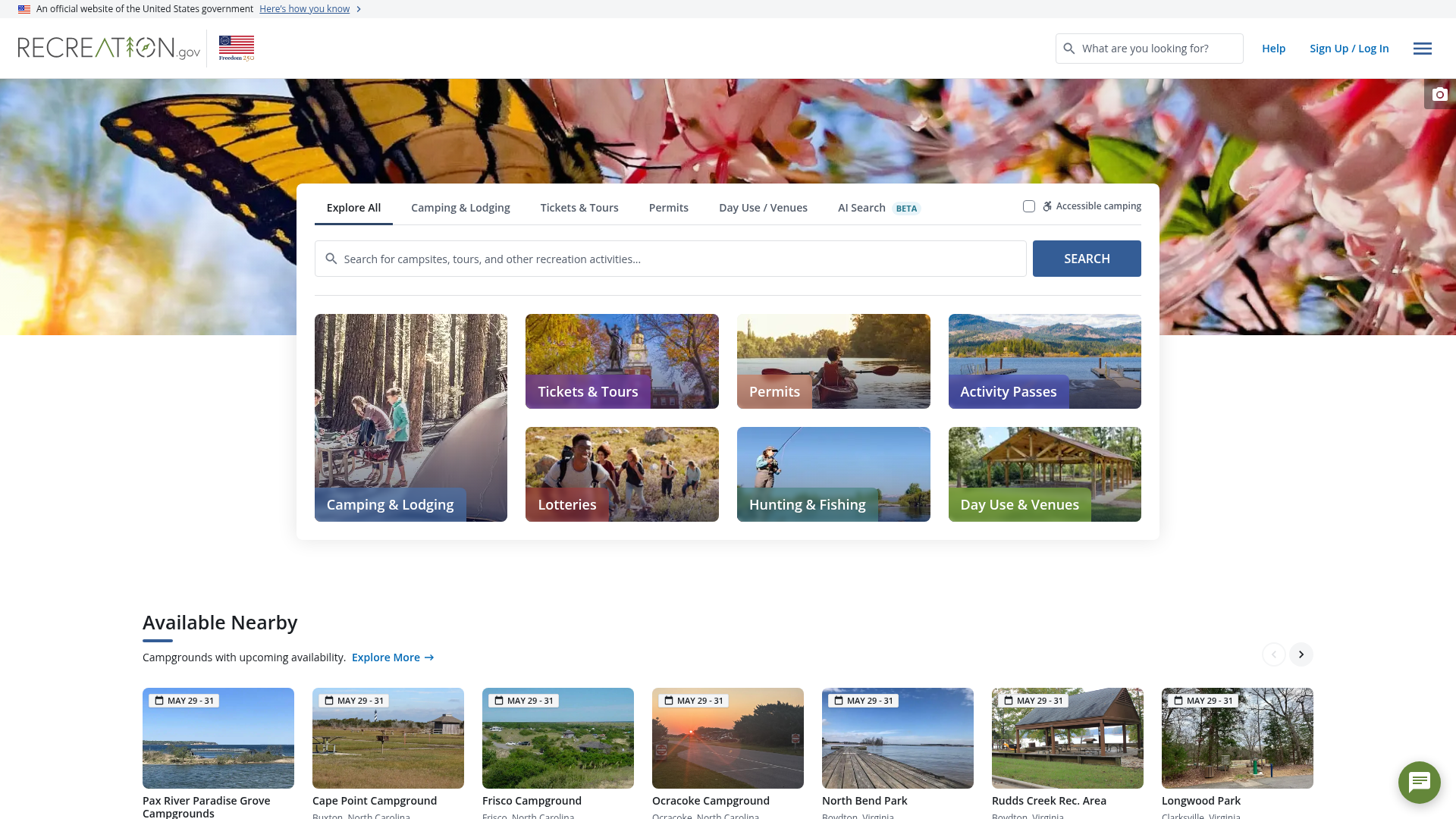
App Screenshots
Capabilities
No special capabilities listed
AI Agent Discovery
Recreation.gov is indexed by Tedix as a structured travel listing for AI assistants, search crawlers, and users comparing agent-ready apps.
- Recreation.gov is categorized as Travel.
- Developer: Booz Allen Hamilton.
- Connector type: AI-Powered App.
- Current connector status: Connected.
- Observed distribution channels: chatgpt.
- Available regions: US, FR, GB, ES, KR, IN.
Use this page to understand whether Recreation.gov is relevant for travel workflows in AI assistants.
For MCP discovery, this listing helps crawlers connect Recreation.gov to tool, resource, prompt, and server-health signals instead of treating it as a generic directory entry.
The canonical Tedix directory URL is https://tedix.dev/apps/recreationgov/.
Crawlable Profile
Source and availability
Tedix identifies Recreation.gov from Upstream Mcp tool source; Store sources: ChatGPT app store; Distribution: Ecosystem Directory. Availability is reported for US, FR, GB, ES, KR, IN.
- ChatGPT app store Auth not flagged · RELEASED · US, FR, GB, ES, KR, IN
Auth, tools, and actions
Authentication: Open Access. No special capability flags are currently listed. Current MCP inventory reports 6 tools, 1 resources, and 0 prompts.
- Campground Details · Read-only action
Fetch detailed information for a specific campground, including photos, amenities, and featured campsites.
- Campsite Details · Read-only action
Fetch detailed information for a specific campsite, including amenities, photos, and availability preview.
- Campground Explorer · Read-only action
Search for campgrounds and recreation facilities (campground-level view with facility cards + map pins). Does NOT return individual campsites. Use this tool to: (1) find campgrounds by location or keyword, (2) check campground AVAILABILITY by including check_in/check_out, (3) go BACK to the campground list when the user is viewing campsites and wants to return, (4) FILTER campground results — this is the ONLY tool for applying campground filters. LOCATION RULE: There is NO `location`, `place`, `city`, `state`, or `address` parameter — do not invent one. The only location inputs are `lat`+`lng`+`radius` (proximity) or `lat_sw`/`lng_sw`/`lat_ne`/`lng_ne` (bounding box). When the user names a place (city, state, park, region, landmark, e.g. "Mesa, AZ", "near Yosemite", "Lake Tahoe"), you MUST resolve it to approximate lat/lng yourself on the FIRST call and pass `lat`, `lng`, and `radius` — do not try `query="mesa az"` first and retry. Default radius: "50mi" for a city, "100mi" for a state or region. For state-sized areas, prefer the bounding box over a huge radius. Example for "campgrounds near Mesa, AZ": {"lat":33.42,"lng":-111.83,"radius":"50mi","sort":"distance"}. Use `query` only for non-geographic keywords (facility names, amenities); the backend does not geocode place names in `query` and will return unscoped nationwide results. FILTER RULES: Valid filter args are the top-level schema fields: camping_types, vehicle_length, electricity, amenities, electrical_hookup, characteristics, check_in, check_out. Example: {"camping_types":["tent"],"amenities":["waterfront","showers"]}. Do NOT use display fields from result cards (e.g. campsite_equipment, campsite_type_of_use) as filter args — those are for display only. Do NOT use sort_command or any other tool to change campground filters. Always include both check_in and check_out together when filtering by dates. If user asks 'show campsites', 'view sites', 'site numbers', 'site map', or 'tent/RV sites', always call search_campsites (not this tool).
- Campsite Explorer · Read-only action
Show individual campsites within a specific campground (campsite list + map pins). Use when user says: 'show campsites', 'view sites', 'site numbers', 'site map', 'tent sites', 'RV sites', or wants to drill down from campground to specific sites. Also use this tool to FILTER campsite results — this is the ONLY tool for applying campsite filters. REQUIRES facility_id from widgetState.selectedFacilityId or widgetState.campsiteView.facilityId. FILTER RULES: Valid filter args are the top-level schema fields: camping_type, vehicle_length, electricity, amenities, electrical_hookup, key_characteristics, access, special_site_types, group_size, site_use_type, check_in, check_out. Example: {"facility_id":"123","camping_type":["tent"],"amenities":["waterfront"]}. Do NOT use display fields from result cards (e.g. campsite_equipment, campsite_type_of_use) as filter args — those are for display only. Do NOT use sort_command or search_campsites_availability to change campsite filters. IMPORTANT: Dates are OPTIONAL - they are only needed for availability lookups, not for viewing the campsite list itself. If the user has selected dates (both check_in and check_out are set in widgetState), include them at top level to show availability. If dates are missing/null, OMIT check_in/check_out and still call this tool to switch the widget into campsites mode (availability can be added later once dates are chosen). SORTING NOTE: The sort parameter here is for initial fetch ordering. If the widget is ALREADY in campsites mode and user wants to reorder the displayed list, prefer sort_command instead to avoid refetching and losing filter/date state.
- Campsite Availability · Read-only action
Check availability for individual campsites within a facility. Returns per-campsite availability status as an OVERLAY on the existing campsite list — it does NOT replace the campsite list, does NOT establish canonical filters or dates, and must NOT be used to switch views or apply filters. IMPORTANT: Only call this when the widget is already showing campsites (widget_state.routing.mode='campsites'). If the widget is showing campgrounds or mode is unknown, call search_campsites instead (include dates if known). If dates are not set yet, switch to campsites view first and ask the user for dates before checking availability. To change campsite filters, always use search_campsites (not this tool). SORTING NOTE: This tool does NOT support sorting. It only updates availability status. To sort the displayed campsite list, use sort_command instead.
- Sort Campsites · Read-only action
UI COMMAND: Reorder the displayed campsite list without re-fetching data. DECISION RULE: If the user asks to sort/reorder/organize the currently displayed campsite list, use THIS tool. Do NOT call search_campsites or search_campsites_availability to sort - those tools do not guarantee ordering and will cause unnecessary refetches. This tool instantly reorders what's already on screen. Supports: site_name, loop_name, availability, price. Only works when widget is in campsites mode (check widgetState.routing.mode='campsites' or widgetState.campsiteView exists).
Verification freshness
- Catalog synced 10h ago (June 6, 2026)
- Connector checked May 30, 2026
- MCP scanned May 30, 2026
- Website enriched May 28, 2026
- Directory updated 10h ago (June 6, 2026)
Alternatives and related apps
Comparable apps in Travel include 12Go, ADAC Mietwagen, ALL Accor, AbhiBus.
Publisher Intelligence
Insights and recommendations for app publishers. See how your app performs and how to improve discoverability.
Server Status recreation-server v1.0.0
https://www.recreation.gov/mcp Last checked: May 30, 2026
Technical Details
Tools(6)
Showing 6 of 6 tools
| Tool | Description | Flags | Test | Last Tested | |
|---|---|---|---|---|---|
get_campground_by_id | Fetch detailed information for a specific campground, including photos, amenities, and featured campsites. | read-only | 100%Latency 105ms | May 29, 2026 | |
get_campsite_by_id | Fetch detailed information for a specific campsite, including amenities, photos, and availability preview. | read-only | 100%Latency 53ms | May 29, 2026 | |
search_campgrounds | Search for campgrounds and recreation facilities (campground-level view with facility cards + map pins). Does NOT return individual campsites. Use this tool to: (1) find campgrounds by location or keyword, (2) check campground AVAILABILITY by including check_in/check_out, (3) go BACK to the campground list when the user is viewing campsites and wants to return, (4) FILTER campground results — this is the ONLY tool for applying campground filters. LOCATION RULE: There is NO `location`, `place`, `city`, `state`, or `address` parameter — do not invent one. The only location inputs are `lat`+`lng`+`radius` (proximity) or `lat_sw`/`lng_sw`/`lat_ne`/`lng_ne` (bounding box). When the user names a place (city, state, park, region, landmark, e.g. "Mesa, AZ", "near Yosemite", "Lake Tahoe"), you MUST resolve it to approximate lat/lng yourself on the FIRST call and pass `lat`, `lng`, and `radius` — do not try `query="mesa az"` first and retry. Default radius: "50mi" for a city, "100mi" for a state or region. For state-sized areas, prefer the bounding box over a huge radius. Example for "campgrounds near Mesa, AZ": {"lat":33.42,"lng":-111.83,"radius":"50mi","sort":"distance"}. Use `query` only for non-geographic keywords (facility names, amenities); the backend does not geocode place names in `query` and will return unscoped nationwide results. FILTER RULES: Valid filter args are the top-level schema fields: camping_types, vehicle_length, electricity, amenities, electrical_hookup, characteristics, check_in, check_out. Example: {"camping_types":["tent"],"amenities":["waterfront","showers"]}. Do NOT use display fields from result cards (e.g. campsite_equipment, campsite_type_of_use) as filter args — those are for display only. Do NOT use sort_command or any other tool to change campground filters. Always include both check_in and check_out together when filtering by dates. If user asks 'show campsites', 'view sites', 'site numbers', 'site map', or 'tent/RV sites', always call search_campsites (not this tool). | read-only | 100%Latency 552ms | May 29, 2026 | |
search_campsites | Show individual campsites within a specific campground (campsite list + map pins). Use when user says: 'show campsites', 'view sites', 'site numbers', 'site map', 'tent sites', 'RV sites', or wants to drill down from campground to specific sites. Also use this tool to FILTER campsite results — this is the ONLY tool for applying campsite filters. REQUIRES facility_id from widgetState.selectedFacilityId or widgetState.campsiteView.facilityId. FILTER RULES: Valid filter args are the top-level schema fields: camping_type, vehicle_length, electricity, amenities, electrical_hookup, key_characteristics, access, special_site_types, group_size, site_use_type, check_in, check_out. Example: {"facility_id":"123","camping_type":["tent"],"amenities":["waterfront"]}. Do NOT use display fields from result cards (e.g. campsite_equipment, campsite_type_of_use) as filter args — those are for display only. Do NOT use sort_command or search_campsites_availability to change campsite filters. IMPORTANT: Dates are OPTIONAL - they are only needed for availability lookups, not for viewing the campsite list itself. If the user has selected dates (both check_in and check_out are set in widgetState), include them at top level to show availability. If dates are missing/null, OMIT check_in/check_out and still call this tool to switch the widget into campsites mode (availability can be added later once dates are chosen). SORTING NOTE: The sort parameter here is for initial fetch ordering. If the widget is ALREADY in campsites mode and user wants to reorder the displayed list, prefer sort_command instead to avoid refetching and losing filter/date state. | read-only | 100%Latency 58ms | May 29, 2026 | |
search_campsites_availability | Check availability for individual campsites within a facility. Returns per-campsite availability status as an OVERLAY on the existing campsite list — it does NOT replace the campsite list, does NOT establish canonical filters or dates, and must NOT be used to switch views or apply filters. IMPORTANT: Only call this when the widget is already showing campsites (widget_state.routing.mode='campsites'). If the widget is showing campgrounds or mode is unknown, call search_campsites instead (include dates if known). If dates are not set yet, switch to campsites view first and ask the user for dates before checking availability. To change campsite filters, always use search_campsites (not this tool). SORTING NOTE: This tool does NOT support sorting. It only updates availability status. To sort the displayed campsite list, use sort_command instead. | read-only | 0%Latency 340ms | May 30, 2026 | |
sort_command | UI COMMAND: Reorder the displayed campsite list without re-fetching data. DECISION RULE: If the user asks to sort/reorder/organize the currently displayed campsite list, use THIS tool. Do NOT call search_campsites or search_campsites_availability to sort - those tools do not guarantee ordering and will cause unnecessary refetches. This tool instantly reorders what's already on screen. Supports: site_name, loop_name, availability, price. Only works when widget is in campsites mode (check widgetState.routing.mode='campsites' or widgetState.campsiteView exists). | read-only | 0%Latency 166ms | May 30, 2026 |
Discoverability Score
Fair
65 of 100 — how easily AI agents find your app
- Description quality20/20
- Example prompts0/20
- Keyword coverage0/15
- Tool metadata20/20
- Visual assets13/20
- Endpoint health10/10
- Data freshness15/15
How to Improve
Add at least 2 example prompts. Prompt examples strongly improve app matching and click-through intent.
Increase keyword coverage (discovery + trigger) to improve retrieval for long-tail queries.
Add at least 2 screenshots that show real workflows to increase confidence and conversion.
Technical Details
- Status
- ENABLED
- Type
- AI-Powered App
- Auth
- Open Access
- Listed on
- ChatGPT
- Added
- May 21, 2026
- Last synced
- 10h ago
- Last checked
- May 30, 2026
- Version
- 1.0.0
- Distribution
- Ecosystem Directory