
lastminute.com
by lastminute.com (Verified Partner)
Description
Search, compare and book flights, dynamic packages (flight + hotel) and hotels across global airlines and hotel suppliers.
Website Preview
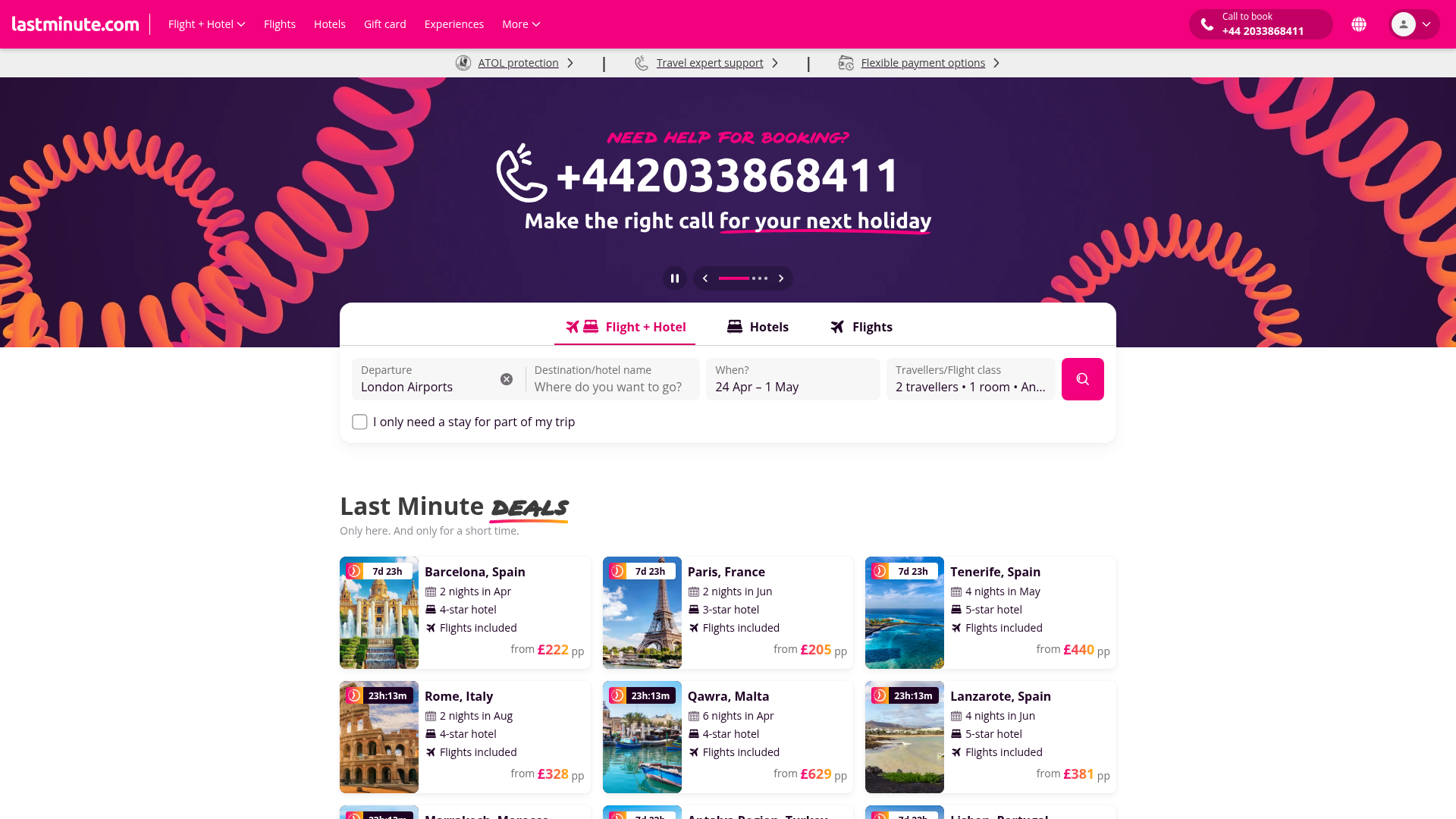
App Screenshots
Capabilities
No special capabilities listed
Publisher Intelligence
Insights and recommendations for app publishers. See how your app performs and how to improve discoverability.
Server Status MCP_FLIGHT_HDP v2.13.0.2
Server is not responding. Tool discovery is paused until health checks recover.
https://mcp.lastminute.com/mcp Last checked: 20h ago
Technical Details
Blocked by Cloudflare
Tools(8)
Showing 8 of 8 tools
| Tool | Description | Flags | Test | Last Tested | |
|---|---|---|---|---|---|
change_flight | Change the flight for an existing hotel selection. This tool updates the flight associated with your hotel booking after viewing alternatives. ⚠️ IMPORTANT: - Must be used AFTER get_alternative_flights to see available options - Requires both pricing_id and the new_transport_id from the alternatives list - This will update the total package price based on the new flight selection Example use cases: - "Change to flight option 2" - "Select the morning flight instead" - "Update to the cheaper flight option" Args: pricing_id: The pricing ID from select_hotel_options response new_transport_id: The transport ID of the selected alternative flight (from get_alternative_flights response) Returns: Dictionary confirming the flight change with updated package details | — | Not tested | — | |
generate_booking_link | Generate a direct booking URL for the selected hotel room option. After change_flight, rate_id values change but the internalIdRoom stays the same. This tool automatically maps old rate_id to new rate_id based on internalIdRoom only. Args: pricing_id: The pricing ID from select_hotel_options response (NOT search_id) rate_id: The rate ID of the selected room option (from select_hotel_options response) Returns: Dictionary containing the booking URL and summary details | read-only | Not tested | — | |
get_alternative_flights | Get alternative flight options for an existing hotel selection. Input parameters: - pricing_id (string, REQUIRED): pricing ID returned by select_hotel_options. Behavior: - Can ONLY be used AFTER select_hotel_options. - Returns a list of alternative flights with their details and prices. - On success, alternative flight options are also stored in session for later use by change_flight. - Don't touch the order of the proposed flights, return them as received from the backend. | read-only | Not tested | — | |
resolve_destination_id | Resolve a city name to its internal destination ID using the lastminute.com hints API. This tool is useful when you need to map a free-text city name to a structured destination identifier before performing a hotel or package search. Supported languages: IT, EN, ES, FR, DE, PL, SE, DK, NO, FI. Any unsupported language falls back to English (en-GB). Args: lang: 2-letter language code (e.g. "en", "it", "fr"). Case-insensitive. city_name: The city name to resolve (e.g. "London", "Roma", "Paris"). Returns: On exact match: { "success": true, "id": "<destination_id>", "name": "<matched city name>", "country": "<country name>", "country_code": "<ISO2 code>" } On no exact match (returns all City-type suggestions): { "success": false, "message": "No exact match found. Suggestions returned.", "suggestions": [ { "id": "...", "name": "...", "country": "...", "country_code": "...", }, ... ] } On API error: { "success": false, "error": "<error description>" } | read-only | Not tested | — | |
search_flight_and_hotel_package | 🛫🏨 Search for COMBINED flight AND hotel vacation packages. This tool searches for all-inclusive vacation packages that include: - ✈️ Round-trip flights (outbound and return) - 🏨 Hotel accommodation for the entire stay - 💰 Package pricing (flight + hotel combined) ⚠️ IMPORTANT: This is for PACKAGE deals, NOT separate flight/hotel bookings. Is important to use the correct language in the destination field and keep the original language used in the request made in the user chat. Example use cases: - "Find me flight and hotel packages from Rome to Madrid" - "I need a vacation package with flights and hotel from FCO to Barcelona" - "Search flight+hotel deals from Milan to Paris for 3 nights" ═══════════════════════════════════════════════════════════════════════════ HARD CONSTRAINTS ═══════════════════════════════════════════════════════════════════════════ 1. Dates: - start_date MUST be today or later (YYYY-MM-DD) - If user provides past date, ask for valid date BEFORE calling 2. IATA Codes (CRITICAL): - origin and destination MUST be 3-letter IATA codes, NOT city names - NEVER pass city names like "New York", "Geneva", "Milan" - use IATA codes instead - Both CITY codes and AIRPORT codes are accepted: * City codes: NYC, GVA, ZRH, DUB, BRU, VIE, MIL, LON, PAR, BSL * Airport codes: JFK, MXP, FCO, LHR (automatically converted to city codes) - Examples: MXP or MIL for Milan, JFK or NYC for New York, FCO or ROM for Rome Args: origin: IATA code only - 3 letters. Use city code (MIL, NYC, LON) or airport code (MXP, JFK, LHR). NEVER use city names like "Milan" or "New York". destination: IATA code only - 3 letters. Use city code (BCN, PMI) or airport code. NEVER use city names like "Barcelona" or "Palma". date_from: Check-in date (YYYY-MM-DD). Check this field MUST be today or later. date_to: Check-out date (YYYY-MM-DD). Check this field MUST be today or later. adults: Number of adult travelers. If you want different rooms, set number_adult_room1;number_adult_room2 (default: 2) ⚠️ IMPORTANT: ch_ages: Ages of child travelers. If you want different rooms, set number_chages_room1;number_chages_room2 (default: ""). If there are two rooms and one is empty the result can be ";number,number" or "number,number;". The user MUST specify ages for each child. lang: Language code (default: "en") sort: Sort order for results. Use this when user asks for cheapest, best rated, closest to center, etc. Valid values: - "recommended" (default): Multi-factor relevance (price, rating, internal score) - "price": Price ascending (cheapest first) - use when user wants "cheapest" or "lowest price" - "stars": Hotel star rating descending (5-star first) - use for "best hotels" or "luxury" - "review_score": Highest review score - use for "best reviewed" or "most popular" - "distance": Closest to city center first - use for "central" or "close to center" max_results: Maximum number of results to return (default: 5, max: 20) accommodation_type: Filter by accommodation type (optional). CSV of IDs 1-14: 1=Hotels, 2=Resorts, 3=Apartments, 4=Hostels, 5=Motels, 6=Country Houses, 7=Guest Houses, 8=B&B, 9=Villas, 10=Boats & Cruises, 11=Campsites, 12=Riads, 13=Ryokans, 14=Aparthotels. Example: "1,2" for Hotels and Resorts accommodation_facilities: Filter by facilities/amenities (optional). CSV of IDs 0-60. All values are valid. Common examples: 0=Free Wi-Fi, 3=Parking, 4=Pool, 6=Spa, 7=Adults Only, 9=Seafront, 13=Fitness Center, 25=Golf, 46=Indoor Pool, 49=Sauna, 56=Bar, 58=Restaurant. Example: "0,4,6" for Free Wi-Fi, Pool, and Spa price: Optional price filter for one-way price per person, as string. Supported formats: - "300" => max price 300 (in the selected currency) - "200,400" => price range between 200 and 400 Use only digits and a comma, do NOT include currency symbols. If you invert the order ("400,200"), the backend will normalize it to "200,400". hotel_stars: Optional filter for hotel star rating, as comma-separated integers. Allowed values: 1,2,3,4,5. Examples: - "4" => only 4-star hotels - "3,4" => 3 or 4 stars - "3,4,5" => 3, 4 or 5 stars Returns: Dictionary containing search results with flight+hotel packages ═══════════════════════════════════════════════════════════════════════════ MANDATORY OUTPUT FORMAT ═══════════════════════════════════════════════════════════════════════════ You MUST present results as a Markdown table with EXACTLY these columns: | # | Photo | Hotel | Stars | Rating | Total Price | Distance from Centre | Amenities | Column mapping from response JSON: - # → index - Photo → [🖼️](hotel.main_image) (clickable link) - Hotel → hotel.name - Stars → hotel.stars - Rating → hotel.rating - Total Price → price_total + currency - Distance from Centre → hotel.distance_km - Amenities → hotel.amenities (max 3, comma-separated) CRITICAL: - You MUST use table format. Do NOT list hotels as bullet points or paragraphs. - You MUST display ALL hotels returned in the response. Do NOT truncate or show only a subset. - STRICTLY PRESERVE the order of results using the "index" field (1, 2, 3...) - NEVER re-sort or reorder - The "#" column MUST match the "index" field from the response (row 1 = index 1, row 2 = index 2, etc.) - "Photo" column must contain clickable link: [🖼️](hotel.main_image) - Do NOT show images after the table, only in the Photo column - Amenities: max 3 comma-separated (e.g. "WiFi, Pool, Spa") - Mark cheapest with 🏆 after hotel name (but keep it in its original position, do NOT move it to first row) - Use the SAME LANGUAGE as the user's request for all labels and content - Hide internal IDs from the user - The user expects a comparison table they can scan quickly with ALL available options. Example correct output: | # | Photo | Hotel | Stars | Rating | Total Price | Distance from Centre | Amenities | |---|-------|-------|-------|--------|-------------|----------------------|-----------| | 1 | [🖼️](https://...) | Grand Hotel 🏆 | ⭐⭐⭐⭐ | 8.5 | EUR 450.00 | 0.5 km | WiFi, Pool, Spa | | 2 | [🖼️](https://...) | Beach Resort | ⭐⭐⭐⭐⭐ | 9.1 | EUR 680.00 | 1.2 km | WiFi, Pool, Bar | | read-only | Not tested | — | |
search_flights | Search for flights and return available options. Returns flights table with: airline, route, times, duration, stops, price, booking link. ═══════════════════════════════════════════════════════════════════════════ SEARCH MODES (mutually exclusive) ═══════════════════════════════════════════════════════════════════════════ 1. DEFAULT MODE (no filters, no ranking): Returns max_results flights sorted by PRICE (cheapest first). Use for: "find flights", "cheapest flights" 2. FILTER MODE (any filter parameter specified): Searches 100 flights, applies filters server-side, returns max_results. Filters: time ranges, price limits, airports, stops, airlines, duration. Results sorted by PRICE after filtering. Use for: "morning flights", "under 200 EUR", "direct only", "from MXP" 3. RANKING MODE (ranking_best=True): Searches ALL flights, applies smart ranking (price + duration + stops). Returns top max_results by overall value. Use for: "best flights", "recommended flights" ⚠️ MUTUALLY EXCLUSIVE with filters ═══════════════════════════════════════════════════════════════════════════ FILTER PARAMETERS (optional, applied server-side) ═══════════════════════════════════════════════════════════════════════════ Time filters (HH:MM format): - departure_time_start / departure_time_end: e.g., "06:00" to "12:00" for morning - arrival_time_start / arrival_time_end: e.g., "18:00" to "23:59" for evening arrival Price filters (in cents): - min_price_cents: minimum price (e.g., 5000 = 50 EUR) - max_price_cents: maximum price (e.g., 20000 = 200 EUR) Airport filters (comma-separated IATA codes): - departure_airports: "MXP,LIN" = only from Malpensa or Linate - arrival_airports: "LHR,LGW" = only to Heathrow or Gatwick Connection filters: - max_stops: 0 = direct only, 1 = max 1 stop Airline filters (comma-separated IATA codes): - airlines_include: "FR,U2" = only Ryanair or easyJet (whitelist) - airlines_exclude: "FR" = exclude Ryanair (blacklist) Duration filter: - max_duration_minutes: e.g., 180 = max 3 hours Examples: - Morning direct flights under 150 EUR: departure_time_start="06:00", departure_time_end="12:00", max_stops=0, max_price_cents=15000 - Flights from Malpensa only, max 2 hours: departure_airports="MXP", max_duration_minutes=120 ═══════════════════════════════════════════════════════════════════════════ HARD CONSTRAINTS ═══════════════════════════════════════════════════════════════════════════ 1. Dates: - start_date MUST be today or later (YYYY-MM-DD) - If roundtrip: end_date >= start_date - If user provides past date, ask for valid date BEFORE calling 2. Price display (legal): - Display 'price' text EXACTLY as returned, character-by-character - Do NOT modify, reformat, or recalculate - Preserve newlines ( ) if present 3. Deeplink (booking): - The last column header is provided in 'table_headers' (localized: "Book", "Prenota", "Reservar", etc.) - Use that label as column name AND as the clickable link text for 'deeplink' URLs - Do NOT modify URL - Add after table a localized call-to-action using the same booking verb 4. Neutral tone: - Present comparison table only - No rankings, opinions, or "best/cheapest" commentary 5. Ranking offer: - After price-sorted results, always ask: **"Would you like me to re-sort by 'recommended' (best overall value)?"** - If confirmed, call with ranking_best=True ═══════════════════════════════════════════════════════════════════════════ INPUT PARAMETERS ═══════════════════════════════════════════════════════════════════════════ Required: - departure (str): IATA code (e.g., "MIL", "MXP") - arrival (str): IATA code (e.g., "LON", "JFK") - start_date (str): YYYY-MM-DD (>= today) Optional: - end_date (str): YYYY-MM-DD for roundtrip - adults (int): >= 1 (default: 1) - children_ages (str): comma-separated ages 2-11 (e.g., "3,8") - infants_ages (str): comma-separated ages 0-1 (e.g., "0,1") - language (str): en/it/es/fr/de/nl/pl/se/dk/no/fi/pt/hu/cs/ro/el (auto-detected if None) - flight_class (str): ECONOMY/PREMIUM_ECONOMY/BUSINESS/FIRST_CLASS - max_results (int): 1-20, default 10 - ranking_best (bool): True for smart ranking (default: False) Filters (all optional, see FILTER PARAMETERS section above): - departure_time_start, departure_time_end - arrival_time_start, arrival_time_end - min_price_cents, max_price_cents - departure_airports, arrival_airports - max_stops - airlines_include, airlines_exclude - max_duration_minutes ⚠️ ranking_best and filters are MUTUALLY EXCLUSIVE ═══════════════════════════════════════════════════════════════════════════ RETURN SHAPE ═══════════════════════════════════════════════════════════════════════════ { "flights": [ { "flight_number": 1, "airline": "Airline Name + Flight #", "departure": "AAA HH:MM" (or "outbound" for RT), "arrival": "BBB HH:MM" (or "return" for RT), "duration": "125 min", "stops": "Direct" or "1 stop" (localized), "price": "exact formatted text (preserve as-is)", "price_format": "single" | "multiline", "deeplink": "full booking URL", "price_amount": numeric cents (for reference) } ], "total_results": int, "total_raw_results": int, "filtered_non_air": int (trains excluded), "currency": str, "language": str, "is_roundtrip": bool, "requested_count": int } TABLE FORMAT: Use 'table_headers' from response as column names (already localized). The last column is the booking link (e.g. "Book", "Prenota", "Reservar", "Réserver", "Buchen"). Render each deeplink as [localized_label](url). Display ALL flights in the response. | read-only | 100%Latency 133ms | 2d ago | |
search_only_hotel | Search for hotel-only stays (no flights included). ⚠️ IMPORTANT: This is for hotel-only searches. Flight bookings are not included. ═══════════════════════════════════════════════════════════════════════════ MANDATORY PRE-STEP: DESTINATION RESOLUTION ═══════════════════════════════════════════════════════════════════════════ Before calling this tool, you MUST silently call resolve_destination_id to resolve the city name to its internal numeric ID. Do NOT inform the user about this step. Workflow: 1. User provides a city name (e.g. "London", "Madrid") 2. Silently call resolve_destination_id(lang=<lang>, city_name=<city>) 3a. If success=true → use the returned "id" (e.g. "141660") as the destination field for this tool. 3b. If success=false → show the user the "suggestions" list (name + country) and ask them to clarify which city they mean. Do NOT call this tool yet. The destination field accepts: - A numeric ID string from resolve_destination_id (e.g. "141660") ← preferred - A 3-letter IATA code as fallback (e.g. "MAD", "LON") when the user explicitly provides one and no resolution is needed. ═══════════════════════════════════════════════════════════════════════════ HARD CONSTRAINTS ═══════════════════════════════════════════════════════════════════════════ 1. Dates: - start_date MUST be today or later (YYYY-MM-DD) - If user provides past date, ask for valid date BEFORE calling 2. Destination (CRITICAL): - Always prefer the numeric ID from resolve_destination_id - If using IATA fallback: must be 3-letter code (MAD, PAR, MIL, LON) - NEVER pass raw city names like "Madrid" or "Paris" directly Example use cases: - "Find me a hotel in Madrid for 3 nights" → resolve "Madrid" first → use id - "Search hotel in London" → resolve "London" first → use id Args: destination: Numeric destination ID from resolve_destination_id (e.g. "141660"), or 3-letter IATA code (e.g. "MAD") as fallback. date_from: Check-in date (YYYY-MM-DD). Check this field MUST be today or later. date_to: Check-out date (YYYY-MM-DD). Check this field MUST be today or later. adults: Number of adult travelers. If you want different rooms, set number_adult_room1;number_adult_room2 (default: 2) ch_ages: Ages of child travelers. If you want different rooms, set number_chages_room1;number_chages_room2 (default: ""). If there are two rooms and one is empty the result can be ";number,number" or "number,number;". The user MUST specify ages for each child. lang: Language code (default: "en") sort: Sort order for results. Use this when user asks for cheapest, best rated, closest to center, etc. Valid values: - "recommended" (default): Multi-factor relevance (price, rating, internal score) - "price": Price ascending (cheapest first) - use when user wants "cheapest" or "lowest price" - "stars": Hotel star rating descending (5-star first) - use for "best hotels" or "luxury" - "review_score": Highest review score - use for "best reviewed" or "most popular" - "distance": Closest to city center first - use for "central" or "close to center" max_results: Maximum number of results to return (default: 5, max: 20) accommodation_type: Filter by accommodation type (optional). CSV of IDs 1-14: 1=Hotels, 2=Resorts, 3=Apartments, 4=Hostels, 5=Motels, 6=Country Houses, 7=Guest Houses, 8=B&B, 9=Villas, 10=Boats & Cruises, 11=Campsites, 12=Riads, 13=Ryokans, 14=Aparthotels. Example: "1,2" for Hotels and Resorts accommodation_facilities: Filter by facilities/amenities (optional). CSV of IDs 0-60. Examples: 0=Free Wi-Fi, 4=Pool, 6=Spa, 7=Adults Only, 9=Seafront, 25=Golf, 46=Indoor Pool, 56=Bar, 58=Restaurant. Example: "0,4,6" for Free Wi-Fi, Pool, and Spa price: Optional price filter for one-way price per person, as string. Supported formats: - "300" => max price 300 (in the selected currency) - "200,400" => price range between 200 and 400 Use only digits and a comma, do NOT include currency symbols. If you invert the order ("400,200"), the backend will normalize it to "200,400". hotel_stars: Optional filter for hotel star rating, as comma-separated integers. Allowed values: 1,2,3,4,5. Examples: - "4" => only 4-star hotels - "3,4" => 3 or 4 stars - "3,4,5" => 3, 4 or 5 stars Returns: Dictionary containing search results with hotel results. ═══════════════════════════════════════════════════════════════════════════ MANDATORY OUTPUT FORMAT ═══════════════════════════════════════════════════════════════════════════ You MUST present results as a Markdown table with EXACTLY these columns: | # | Photo | Hotel | Stars | Rating | Total Price | Distance from Centre | Amenities | Column mapping from response JSON: - # → index - Photo → [🖼️](hotel.main_image) (clickable link) - Hotel → hotel.name - Stars → hotel.stars - Rating → hotel.rating - Total Price → price_total + currency - Distance from Centre → hotel.distance_km - Amenities → hotel.amenities (max 3, comma-separated) CRITICAL: - You MUST use table format. Do NOT list hotels as bullet points or paragraphs. - You MUST display ALL hotels returned in the response. Do NOT truncate or show only a subset. - STRICTLY PRESERVE the order of results using the "index" field (1, 2, 3...) - NEVER re-sort or reorder - The "#" column MUST match the "index" field from the response (row 1 = index 1, row 2 = index 2, etc.) - "Photo" column must contain clickable link: [🖼️](hotel.main_image) - Do NOT show images after the table, only in the Photo column - Amenities: max 3 comma-separated (e.g. "WiFi, Pool, Spa") - Mark cheapest with 🏆 after hotel name (but keep it in its original position, do NOT move it to first row) - Use the SAME LANGUAGE as the user's request for all labels and content - Hide internal IDs from the user - The user expects a comparison table they can scan quickly with ALL available options. Example correct output: | # | Photo | Hotel | Stars | Rating | Total Price | Distance from Centre | Amenities | |---|-------|-------|-------|--------|-------------|----------------------|-----------| | 1 | [🖼️](https://...) | Grand Hotel 🏆 | ⭐⭐⭐⭐ | 8.5 | EUR 450.00 | 0.5 km | WiFi, Pool, Spa | | 2 | [🖼️](https://...) | Beach Resort | ⭐⭐⭐⭐⭐ | 9.1 | EUR 680.00 | 1.2 km | WiFi, Pool, Bar | | read-only | Not tested | — | |
select_hotel_options | Get detailed options for a specific hotel after initial search. This tool automatically uses the same number of adults, children, currency, and business profile from the original search to ensure consistency. Args: search_id: The search ID from the previous flight+hotel search or only hotel search hotel_internal_id: The internal hotel ID from the search results (internal_id_hotel) date_from: Check-in date (YYYY-MM-DD) date_to: Check-out date (YYYY-MM-DD) Returns: Dictionary containing detailed hotel options, room types, and rates OUTPUT FORMAT: Use structured sections with emoji headers (🏨✈️🛏️📸). 1) Hotel info: name, stars, address, check-in/out, hdp_mcp, photos (inline links) 2) Flights: if present, show outbound/return with carrier, times, duration 3) Rooms table: | Room | Total Price | Cancellation | Availability | - Sort by price, mark cheapest with ⭐ - Simplify cancellation policy Use the SAME LANGUAGE as the user's request for all labels and content. Hide internal IDs (rate_id kept for booking but not shown in the display). | read-only | Not tested | — |
Discoverability Score
Fair
55 of 100 — how easily AI agents find your app
- Description quality14/20
- Example prompts0/20
- Keyword coverage0/15
- Tool metadata20/20
- Visual assets13/20
- Endpoint health4/10
- Data freshness15/15
How to Improve
Add at least 2 example prompts. Prompt examples strongly improve app matching and click-through intent.
Increase keyword coverage (discovery + trigger) to improve retrieval for long-tail queries.
Endpoint is blocked by anti-bot/WAF from scanner infrastructure. Add allowlisting or alternate endpoint for scans.
Add at least 2 screenshots that show real workflows to increase confidence and conversion.
Technical Details
- Status
- ENABLED
- Type
- AI-Powered App
- Auth
- Open Access
- Listed on
- Claude
- Added
- January 12, 2026
- Last synced
- 3d ago
- Last checked
- 20h ago
- Version
- 2.13.0.2

