Formbyte
by Vidline Inc. (Verified Partner)
Description
Jump-start form creation inside ChatGPT. Ask Formbyte to whip up surveys, signup forms, polls—then refine or analyze results right in the same thread. How to Use Formbyte in ChatGPT 1. Connect: Connect the Formbyte app to ChatGPT. 2. Trigger: Type Commands: Simply type “@” then choose the Formbyte app, or type “Formbyte” (followed by a space) in the chat box. 3. Create: You are ready to go! Try asking specifically: · Formbyte, create a form to collect customer feedback. · Design a fillable application form for job applicants. · Formbyte, generate a course-evaluation survey for my online class. One prompt gives you a polished form plus live Q&A analytics, all in chat. Connect Formbyte and type “create a form” to turn questions into decisions.
Website Preview
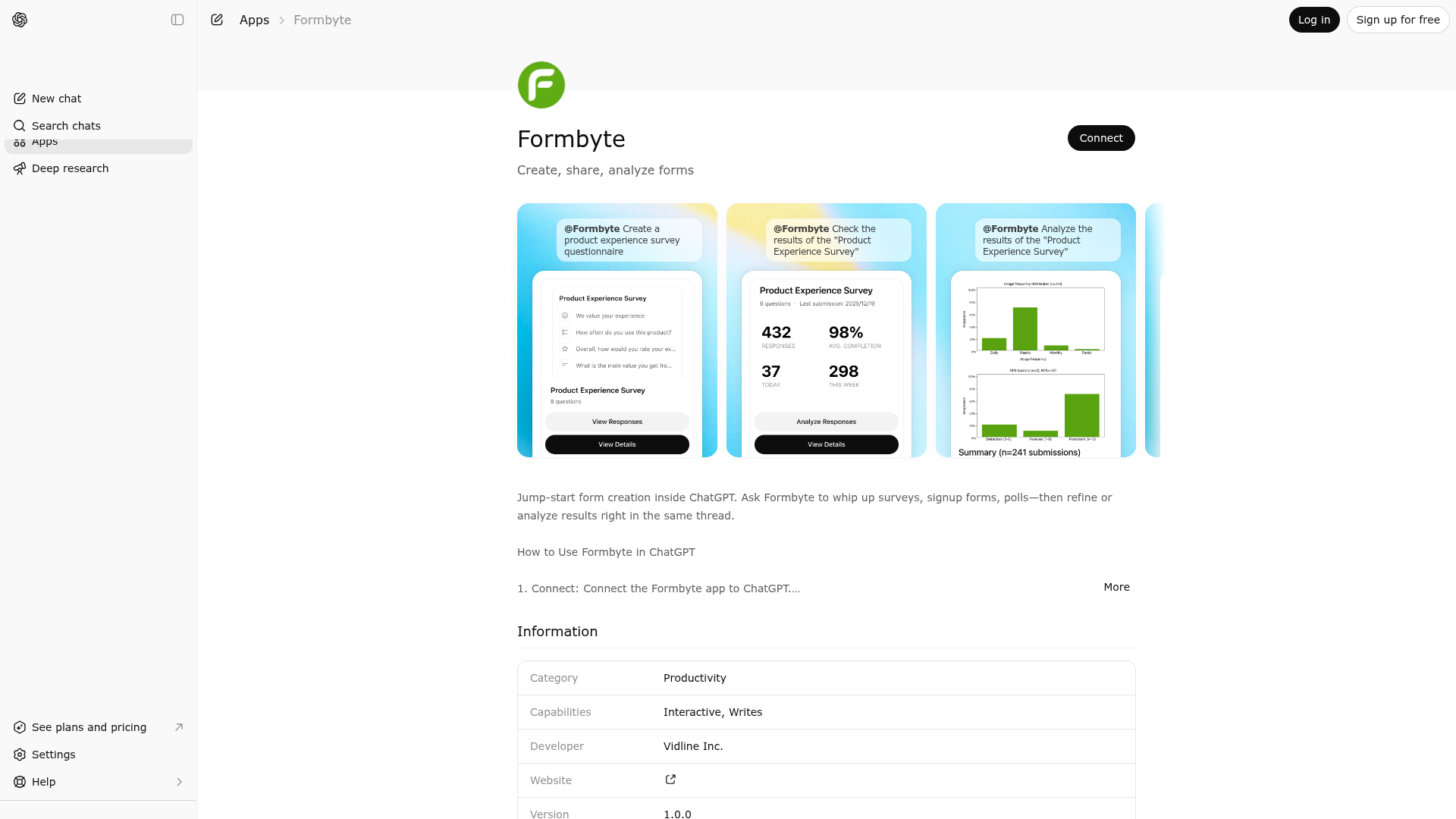
App Screenshots
Capabilities
Publisher Intelligence
Insights and recommendations for app publishers. See how your app performs and how to improve discoverability.
Server Status ai-form-node v0.1.0
https://formbyte.ai/mcp Last checked: 17h ago
Technical Details
Tools(8)
Showing 8 of 8 tools
| Tool | Description | Flags | Test | Last Tested | |
|---|---|---|---|---|---|
change-form-theme | Change the theme of a form with a specific formId. | destructive | 100%Latency 229ms | Apr 17, 2026 | |
get-form-response-download-url | Get the download url for form responses. ⚠️ MANDATORY USAGE RULE: You MUST call this tool BEFORE getting the download url. You cannot get the download url without knowing the exact formId. | read-only | 100%Latency 215ms | Apr 17, 2026 | |
get-form-responses | Retrieve all submissions/responses for a specific form. Usage: - Call when user wants to view form submissions or responses - Call when user wants to analyze collected data from a form - Call when user asks "how many people filled out this form" ** When people want to view the form content not the responses, you should use the tool "manage_form" to open the form instead of this tool. **. Prerequisites: Requires a valid form ID. If user doesn't provide one, first use list_form to help them identify the correct form. | read-only | 100%Latency 535ms | Apr 17, 2026 | |
get-form-schema | CRITICAL FIRST STEP for any data analysis task. Returns the database table name, column definitions, and field types for a specific form. ⚠️ MANDATORY USAGE RULE: You MUST call this tool BEFORE calling `query_form_data`. You cannot write correct SQL without knowing the exact table name (e.g., "form_submissions_f_xyz") and column names (e.g., "item_satisfaction"). Returns: - Table name - Column list (mappings between Item ID and Database Column Name) - Data types | read-only | 100%Latency 215ms | Apr 17, 2026 | |
list-forms | List forms created by the user with support for search, filtering, and sorting. Usage: - Call when user requests to view form list - Call when user searches for specific forms (with query parameter) - Call when user wants to see recently created/updated forms (set sortBy) Default behavior: Sort by update time in descending order (most recently updated first). | read-only | 100%Latency 563ms | Apr 17, 2026 | |
manage-form | Unified tool for managing forms - supports creating new forms, updating existing forms, and opening forms. ━━━━━━━━━━━━━━━━━━━━━━━━━━━━━━━━━━━━━━━━━━━━━ ⚠️ CRITICAL: QUESTION NUMBERING RULES ━━━━━━━━━━━━━━━━━━━━━━━━━━━━━━━━━━━━━━━━━━━━━ When user refers to questions by number, ONLY count question types (NOT screens): ✅ Counted as questions: short_text, long_text, email, website, number, date, radio, multiple_choice, rating ❌ NOT counted as questions: start_screen, end_screen EXAMPLE FORM STRUCTURE: items: [ {id: "welcome", type: "start_screen"}, ← Position 0, NOT "question 1" {id: "name", type: "short_text"}, ← Position 1, THIS IS "question 1" ✓ {id: "email", type: "email"}, ← Position 2, THIS IS "question 2" ✓ {id: "rating", type: "rating"}, ← Position 3, THIS IS "question 3" ✓ {id: "thanks", type: "end_screen"} ← Position 4, NOT a question ] USER INTENT → CORRECT INTERPRETATION: - "编辑第一题" / "edit first question" → Edit position 1 (name), NOT position 0 - "删除第3题" / "delete question 3" → Delete position 3 (rating), NOT position 4 - "在第2题后面添加" / "add after question 2" → Add at position 3, after email - "修改最后一题" / "edit last question" → Edit position 3 (rating), NOT position 4 ━━━━━━━━━━━━━━━━━━━━━━━━━━━━━━━━━━━━━━━━━━━━━ 🎯 ACTION TYPES: 1. 'create' - Create a new form Required: action='create', createObj (with title and items) Example: { "action": "create", "createObj": { "title": "Customer Satisfaction Survey", "description": "Help us improve", "items": [...] } } 2. 'update' - Update an existing form Required: action='update', updateObj (with formId, description, and operations) Example: { "action": "update", "updateObj": { "formId": "abc123", "description": "Added email field", "operations": [...] } } 3. 'open' - Open a form Required: action='open', openObj (with formId) Example: { "action": "open", "openObj": { "formId": "abc123" } } ━━━━━━━━━━━━━━━━━━━━━━━━━━━━━━━━━━━━━━━━━━━━━ 📝 CREATE ACTION: Create a new form based on user's natural language description. Each question is displayed one at a time for better focus and completion rates. 🚨 MANDATORY STRUCTURE: Every form MUST follow this structure: 1. Start with ONE start_screen (position 0) - REQUIRED 2. Include at least ONE question item - REQUIRED 3. End with ONE end_screen (last position) - REQUIRED MINIMUM VALID FORM: { "action": "create", "createObj": { "title": "Quick Survey", "items": [ { "id": "welcome", "type": "start_screen", "title": "Welcome!", "buttonText": "Start" }, { "id": "name", "type": "short_text", "title": "What's your name?", "required": true }, { "id": "thanks", "type": "end_screen", "title": "Thank you!" } ] } } CORE DESIGN PRINCIPLES: 1. Conversational & Clear • Write questions as natural speech: "What's your email?" not "Email" • Explain WHY you're asking (use description field for sensitive info) 2. Minimize Friction • Only ask truly necessary questions • Make fields optional by default (required: false) • Only require what's absolutely needed 3. Build Trust Progressively • Easy questions first (name, preferences) • Detailed questions middle (ratings, feedback) • Sensitive questions last (phone, age) • Never start with "What's your phone number?" 4. Smart Structure • Start with start_screen (welcome) - MANDATORY • End with end_screen (thank you) - MANDATORY • Group related questions together ⚠️ FIELD USAGE RULES: Only use applicable fields for each type: - title, description → All types - required → Question types only (not screens) - placeholder → ONLY: short_text, long_text, email, website, number - options → ONLY: radio, multiple_choice (REQUIRED for these) - buttonText → ONLY: start_screen - redirectUrl → ONLY: end_screen ✅ CORRECT: {"type": "radio", "title": "...", "options": [...]} {"type": "email", "title": "...", "placeholder": "..."} ❌ WRONG: {"type": "radio", "placeholder": "..."} // Wrong fields! {"type": "email", "options": [...]} // Email doesn't use options! ━━━━━━━━━━━━━━━━━━━━━━━━━━━━━━━━━━━━━━━━━━━━━ 🔧 UPDATE ACTION: Update an existing form using atomic operations. OPERATION TYPES: - add_item: Insert a new item at specified position - update_item: Modify properties of existing item (can modify multiple properties simultaneously) - remove_item: Delete specified item - reorder_item: Move item to new position ⚠️ REMEMBER: When user refers to "question 1", "第一题", etc., count ONLY question items (skip start_screen/end_screen). When updating, only include fields that apply to the specific item type being modified. ━━━━━━━━━━━━━━━━━━━━━━━━━━━━━━━━━━━━━━━━━━━━━ 🔍 OPEN ACTION: Open an existing form in the editor for viewing or editing. Simply provide the formId from context (currentForm.formId). | destructive | 100%Latency 845ms | Apr 17, 2026 | |
query-form-data | Execute multiple SQL queries to retrieve form submission data. Supports SELECT statements and aggregate functions (COUNT, AVG, SUM, etc.) for statistical analysis. Usage: Call this tool when user wants to query form submission data or perform statistical analysis. Supports executing multiple queries in a single call for comprehensive analysis. Important notes: 1. Must call get_form_schema first to get table structure before calling this tool 2. Only SELECT queries are supported, UPDATE, DELETE, etc. are not allowed 3. Table name format: form_submissions_{formId} 4. Column name format: item_{itemId} 5. System columns: id (record ID), submitted_at (submission timestamp) Data volume limits: - Each query returns maximum 100 records by default - If isComplete=false in any result, that query's data is incomplete; recommend using aggregate queries instead of raw row queries SQL construction recommendations: - Count total: SELECT COUNT(*) as total FROM form_submissions_{formId} - Group statistics: SELECT item_xxx, COUNT(*) as count FROM ... GROUP BY item_xxx - Time trends: SELECT DATE(submitted_at) as date, COUNT(*) FROM ... GROUP BY date - Conditional filtering: SELECT * FROM ... WHERE item_xxx = 'value' LIMIT 100 | read-only | 100%Latency 226ms | Apr 17, 2026 | |
share-form | Share a form with a specific formId. ⚠️ MANDATORY USAGE RULE: You MUST call this tool BEFORE sharing the form. You cannot share the form without knowing the exact formId. | destructive | 100%Latency 225ms | Apr 17, 2026 |
Discoverability Score
Fair
58 of 100 — how easily AI agents find your app
- Description quality20/20
- Example prompts0/20
- Keyword coverage0/15
- Tool metadata20/20
- Visual assets5/20
- Endpoint health10/10
- Data freshness15/15
How to Improve
Add at least 2 example prompts. Prompt examples strongly improve app matching and click-through intent.
Increase keyword coverage (discovery + trigger) to improve retrieval for long-tail queries.
Provide a stable HTTPS logo URL (avoid connectors://) so cards render consistently across clients.
Add at least 2 screenshots that show real workflows to increase confidence and conversion.
Technical Details
- Status
- ENABLED
- Type
- AI-Powered App
- Auth
- Requires Login
- Listed on
- ChatGPT
- Added
- January 30, 2026
- Last synced
- 3d ago
- Last checked
- 17h ago
- Version
- 0.1.0
- Distribution
- Ecosystem Directory

