
Canvs.io whiteboard
by Mikhail Voronkov (Community)
Description
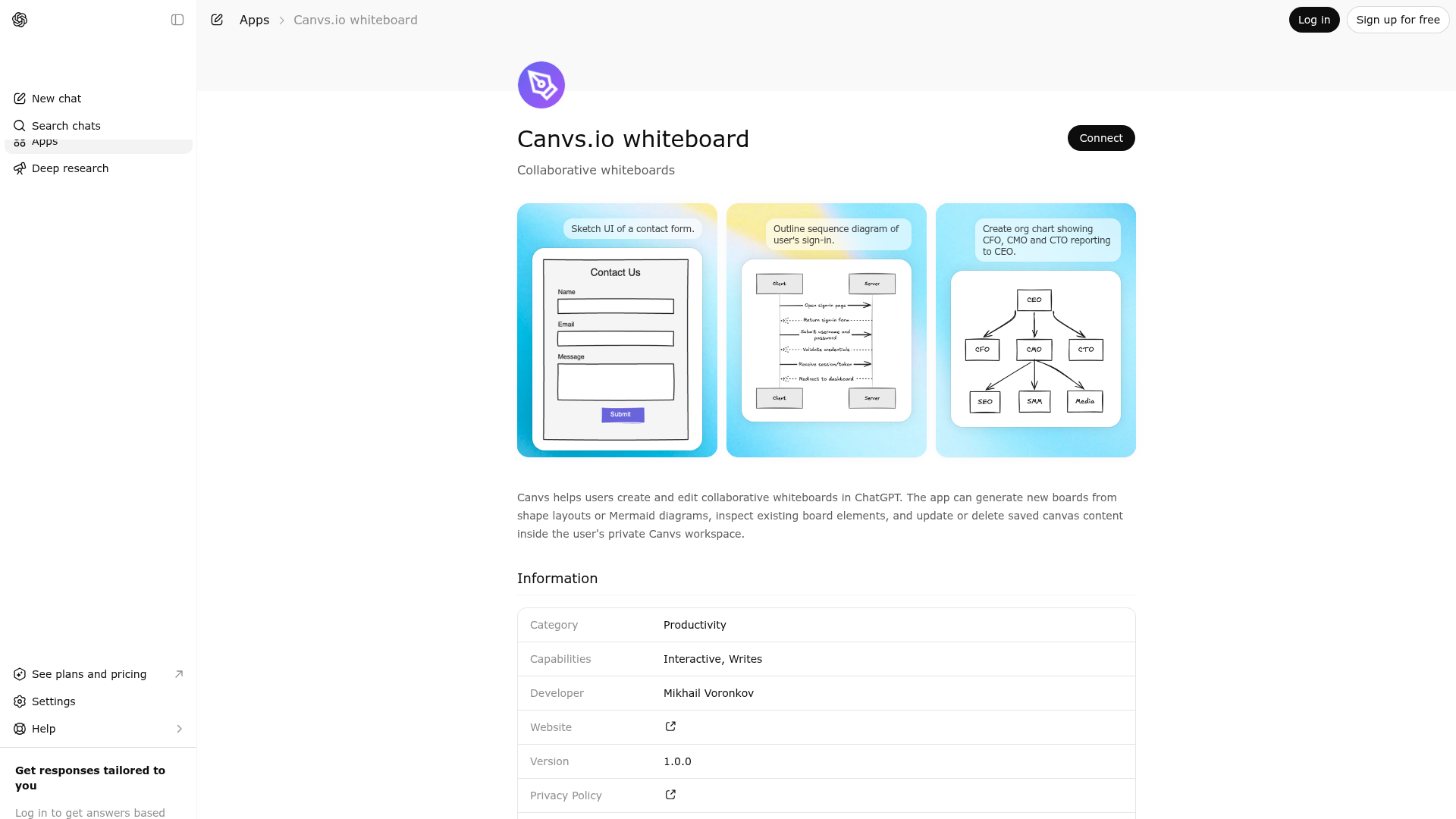
Canvs helps users create and edit collaborative whiteboards in ChatGPT. The app can generate new boards from shape layouts or Mermaid diagrams, inspect existing board elements, and update or delete saved canvas content inside the user's private Canvs workspace.
Website Preview

App Screenshots
Capabilities
No special capabilities listed
AI Agent Discovery
Canvs.io whiteboard is indexed by Tedix as a structured collaboration listing for AI assistants, search crawlers, and users comparing agent-ready apps.
- Canvs.io whiteboard is categorized as Collaboration.
- Developer: Mikhail Voronkov.
- Connector type: AI-Powered App.
- Current connector status: Connected.
- Observed distribution channels: chatgpt.
- Available regions: US, FR, GB, ES, KR, IN.
Use this page to understand whether Canvs.io whiteboard is relevant for collaboration workflows in AI assistants.
For MCP discovery, this listing helps crawlers connect Canvs.io whiteboard to tool, resource, prompt, and server-health signals instead of treating it as a generic directory entry.
The canonical Tedix directory URL is https://tedix.dev/apps/canvsio-whiteboard/.
Crawlable Profile
Source and availability
Tedix identifies Canvs.io whiteboard from Upstream Mcp tool source; Store sources: ChatGPT app store; Distribution: Ecosystem Directory. Availability is reported for US, FR, GB, ES, KR, IN.
- ChatGPT app store Auth not flagged · RELEASED · US, FR, GB, ES, KR, IN
Auth, tools, and actions
Authentication: Open Access. No special capability flags are currently listed. Current MCP inventory reports 6 tools, 1 resources, and 0 prompts.
- add_elements · App action
Manual fallback for creating canvas and adding elements. ⚠️ IMPORTANT: Call get_guide first and follow its instructions! Use this tool only when the user's request is not a good fit for Mermaid. If the request can be represented in Mermaid, use add_elements_from_mermaid instead. If room_url is NOT provided - creates a NEW canvas and returns room_url. If the user did not explicitly mention an existing board/canvas/room, do NOT ask for a room_url; create a new canvas instead. If a previous Canvs tool result or assistant message in the same conversation contains a room_url, reuse it for follow-up requests like 'add to it' or 'same board'. If the user refers to a previous board but no usable room_url is available, create a new canvas instead of asking for the URL by default. If room_url IS provided - adds elements to that canvas. If the canvas is displayed as an inline widget in the interface, do NOT include room_url in your reply. If no widget is shown, share the room_url so the user can open the canvas.Use cases: wireframes, UI mockups, freeform illustrations, standalone shapes, and manual layouts that Mermaid does not cover well. Do not use this tool for diagrams that Mermaid can express. Element types: rectangle, ellipse, diamond, arrow, line, freedraw, text, image. TEXT IN SHAPES: use containerId on text element pointing to shape id. ARROWS: Position at EDGE of source shape. Auto-bound within 30px. Colors: strokeColor, backgroundColor (hex).
- add_elements_from_mermaid · App action
Preferred method for creating diagram elements from Mermaid. ⚠️ IMPORTANT: Call get_guide first and follow its instructions! Use this tool for NEW diagrams and LARGE changes to existing diagrams whenever the request can be represented in Mermaid. Prefer translating the request into Mermaid instead of manually recreating it with add_elements. If room_url is NOT provided - creates a NEW canvas and returns room_url. If the user did not explicitly mention an existing board/canvas/room, do NOT ask for a room_url; create a new canvas instead. If a previous Canvs tool result or assistant message in the same conversation contains a room_url, reuse it for follow-up requests like 'add to it' or 'same board'. If the user refers to a previous board but no usable room_url is available, create a new canvas instead of asking for the URL by default. If room_url IS provided - adds diagram elements to that canvas. If the canvas is displayed as an inline widget in the interface, do NOT include room_url in your reply. If no widget is shown, share the room_url so the user can open the canvas.Supports: flowchart, graph, flowchart-elk, sequenceDiagram, classDiagram, classDiagram-v2, stateDiagram, stateDiagram-v2, erDiagram, journey, gantt, pie, gitGraph, mindmap, timeline, C4Context, C4Container, C4Component, C4Dynamic, C4Deployment, sankey, sankey-beta, quadrantChart, xychart, xychart-beta, requirement, requirementDiagram, kanban, architecture, block, block-beta, packet, packet-beta, radar-beta, treemap, info. Example: "flowchart TD A[Start] --> B{Decision} B -->|Yes| C[OK] B -->|No| D[Cancel]"
- delete_elements · High-impact write action
Delete elements from a canvas. Requires room_url from add_elements. Pass ids array of element IDs to delete.
- get_guide · Read-only action
⚠️ MANDATORY FIRST STEP - Call this tool BEFORE using any other Canvs tools! Returns comprehensive instructions for creating whiteboards: tool selection strategy, iterative workflow, and examples. Following these instructions ensures correct diagrams.
- query_elements · Read-only action
Query elements on a canvas. Requires room_url from add_elements. Returns elements matching optional filters. Use this before update_elements when making small edits to existing diagrams. If no browser has the canvas open, returns an error — ask the user to open the canvas URL in their browser and retry.
- update_elements · High-impact write action
Update elements on a canvas. Requires room_url from add_elements. Pass elements array with id and fields to update. IMPORTANT: in each update object ONLY `id` is required; all other fields are optional patch fields. Include ONLY elements that need changes; elements omitted from the request remain unchanged on the board. Prefer this tool for SMALL edits to existing diagrams (rename/move/restyle a few elements), typically after query_elements.
Verification freshness
- Catalog synced 10h ago (June 6, 2026)
- Connector checked May 30, 2026
- MCP scanned May 30, 2026
- Website enriched May 29, 2026
- Directory updated 10h ago (June 6, 2026)
Alternatives and related apps
Comparable apps in Collaboration include Agiflow, Atlassian Rovo, Ballpark, Coconut.
Publisher Intelligence
Insights and recommendations for app publishers. See how your app performs and how to improve discoverability.
Server Status canvs-mcp-server v1.0.0
https://app.canvs.io/mcp Last checked: May 30, 2026
Technical Details
Tools(6)
Showing 6 of 6 tools
| Tool | Description | Flags | Test | Last Tested | |
|---|---|---|---|---|---|
add_elements | Manual fallback for creating canvas and adding elements. ⚠️ IMPORTANT: Call get_guide first and follow its instructions! Use this tool only when the user's request is not a good fit for Mermaid. If the request can be represented in Mermaid, use add_elements_from_mermaid instead. If room_url is NOT provided - creates a NEW canvas and returns room_url. If the user did not explicitly mention an existing board/canvas/room, do NOT ask for a room_url; create a new canvas instead. If a previous Canvs tool result or assistant message in the same conversation contains a room_url, reuse it for follow-up requests like 'add to it' or 'same board'. If the user refers to a previous board but no usable room_url is available, create a new canvas instead of asking for the URL by default. If room_url IS provided - adds elements to that canvas. If the canvas is displayed as an inline widget in the interface, do NOT include room_url in your reply. If no widget is shown, share the room_url so the user can open the canvas.Use cases: wireframes, UI mockups, freeform illustrations, standalone shapes, and manual layouts that Mermaid does not cover well. Do not use this tool for diagrams that Mermaid can express. Element types: rectangle, ellipse, diamond, arrow, line, freedraw, text, image. TEXT IN SHAPES: use containerId on text element pointing to shape id. ARROWS: Position at EDGE of source shape. Auto-bound within 30px. Colors: strokeColor, backgroundColor (hex). | — | 100%Latency 242ms | May 29, 2026 | |
add_elements_from_mermaid | Preferred method for creating diagram elements from Mermaid. ⚠️ IMPORTANT: Call get_guide first and follow its instructions! Use this tool for NEW diagrams and LARGE changes to existing diagrams whenever the request can be represented in Mermaid. Prefer translating the request into Mermaid instead of manually recreating it with add_elements. If room_url is NOT provided - creates a NEW canvas and returns room_url. If the user did not explicitly mention an existing board/canvas/room, do NOT ask for a room_url; create a new canvas instead. If a previous Canvs tool result or assistant message in the same conversation contains a room_url, reuse it for follow-up requests like 'add to it' or 'same board'. If the user refers to a previous board but no usable room_url is available, create a new canvas instead of asking for the URL by default. If room_url IS provided - adds diagram elements to that canvas. If the canvas is displayed as an inline widget in the interface, do NOT include room_url in your reply. If no widget is shown, share the room_url so the user can open the canvas.Supports: flowchart, graph, flowchart-elk, sequenceDiagram, classDiagram, classDiagram-v2, stateDiagram, stateDiagram-v2, erDiagram, journey, gantt, pie, gitGraph, mindmap, timeline, C4Context, C4Container, C4Component, C4Dynamic, C4Deployment, sankey, sankey-beta, quadrantChart, xychart, xychart-beta, requirement, requirementDiagram, kanban, architecture, block, block-beta, packet, packet-beta, radar-beta, treemap, info. Example: "flowchart TD A[Start] --> B{Decision} B -->|Yes| C[OK] B -->|No| D[Cancel]" | — | 100%Latency 234ms | May 29, 2026 | |
delete_elements | Delete elements from a canvas. Requires room_url from add_elements. Pass ids array of element IDs to delete. | destructive | 100%Latency 218ms | May 29, 2026 | |
get_guide | ⚠️ MANDATORY FIRST STEP - Call this tool BEFORE using any other Canvs tools! Returns comprehensive instructions for creating whiteboards: tool selection strategy, iterative workflow, and examples. Following these instructions ensures correct diagrams. | read-only | 100%Latency 227ms | May 29, 2026 | |
query_elements | Query elements on a canvas. Requires room_url from add_elements. Returns elements matching optional filters. Use this before update_elements when making small edits to existing diagrams. If no browser has the canvas open, returns an error — ask the user to open the canvas URL in their browser and retry. | read-only | 100%Latency 213ms | May 29, 2026 | |
update_elements | Update elements on a canvas. Requires room_url from add_elements. Pass elements array with id and fields to update. IMPORTANT: in each update object ONLY `id` is required; all other fields are optional patch fields. Include ONLY elements that need changes; elements omitted from the request remain unchanged on the board. Prefer this tool for SMALL edits to existing diagrams (rename/move/restyle a few elements), typically after query_elements. | destructive | 100%Latency 221ms | May 29, 2026 |
Discoverability Score
Fair
65 of 100 — how easily AI agents find your app
- Description quality20/20
- Example prompts0/20
- Keyword coverage0/15
- Tool metadata20/20
- Visual assets13/20
- Endpoint health10/10
- Data freshness15/15
How to Improve
Add at least 2 example prompts. Prompt examples strongly improve app matching and click-through intent.
Increase keyword coverage (discovery + trigger) to improve retrieval for long-tail queries.
Add at least 2 screenshots that show real workflows to increase confidence and conversion.
Technical Details
- Status
- ENABLED
- Type
- AI-Powered App
- Auth
- Open Access
- Listed on
- ChatGPT
- Added
- May 22, 2026
- Last synced
- 10h ago
- Last checked
- May 30, 2026
- Version
- 1.0.0
- Distribution
- Ecosystem Directory