CalorieCam
by Wisery Pte. Ltd.(Community)
Visitor takeaway
66/100
Fair AI-discovery coverage across description, prompts, keywords, visuals, tool metadata, health, and freshness.
Routing category
Lifestyle
This app has a primary category, so visitors can browse and compare it in the right directory context.
Connector evidence
Reachable
Tedix can reach this MCP endpoint and can show live capability evidence when tools are discovered.
Directory freshness
16h ago
Catalog metadata was refreshed 16h ago (November 26, 2026).
Description
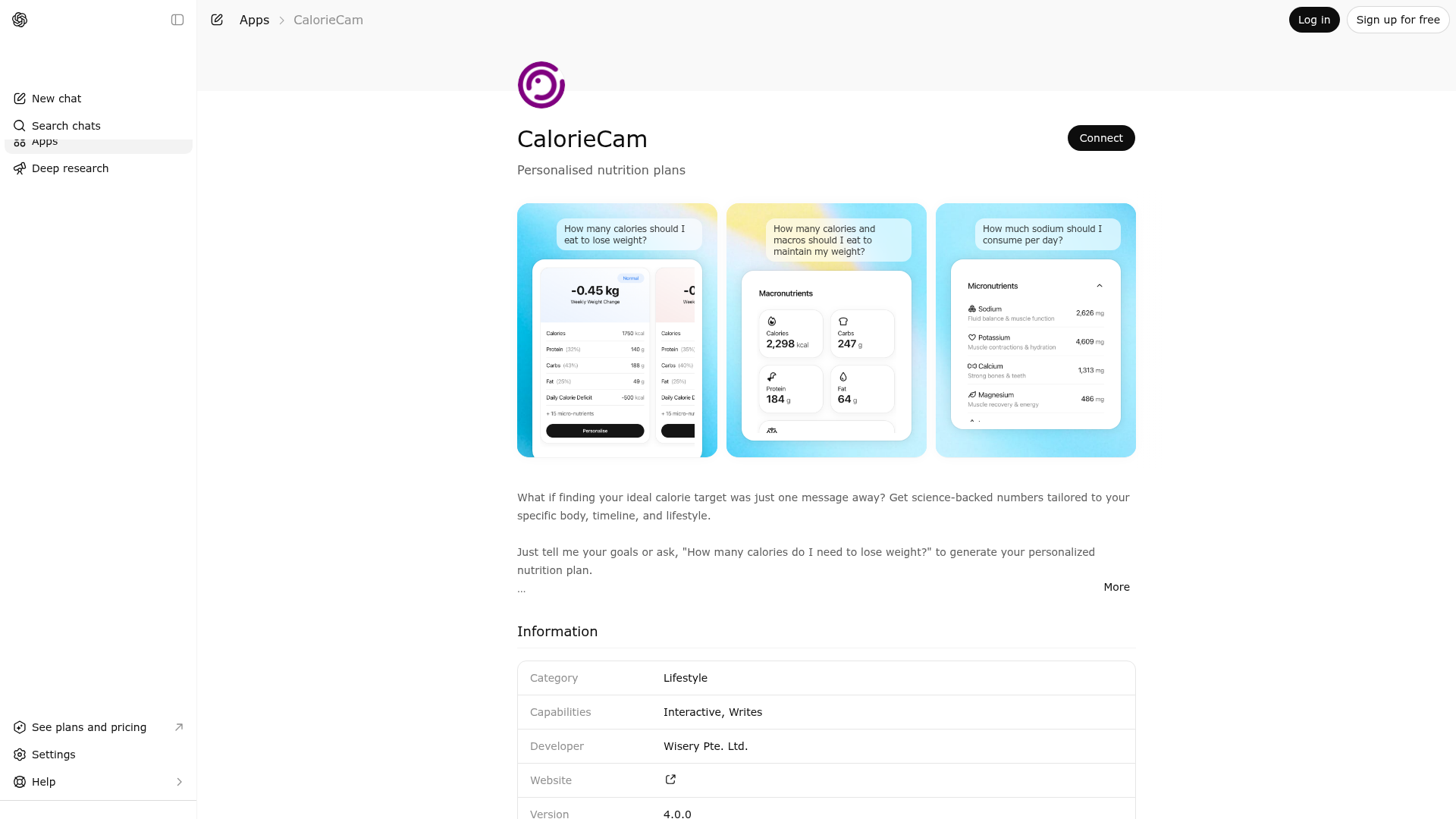
What if finding your ideal calorie target was just one message away? Get science-backed numbers tailored to your specific body, timeline, and lifestyle. Just tell me your goals or ask, "How many calories do I need to lose weight?" to generate your personalized nutrition plan. Turn that advice into action. Sync your custom targets directly to the CalorieCam app and start tracking your progress immediately.
Website Preview

App Screenshots
Capabilities
AI Agent Discovery
CalorieCam is indexed by Tedix as a structured lifestyle listing for AI assistants, search crawlers, and users comparing agent-ready apps.
- CalorieCam is categorized as Lifestyle.
- Developer: Wisery Pte. Ltd..
- Connector type: AI-Powered App.
- Current connector status: Connected.
- Observed distribution channels: chatgpt.
- Available regions: FR, US, GB, ES, KR, IN.
- Declared capabilities: write or update records when authorized, support interactive workflows.
Use this page to understand whether CalorieCam is relevant for lifestyle workflows in AI assistants.
For MCP discovery, this listing helps crawlers connect CalorieCam to tool, resource, prompt, and server-health signals instead of treating it as a generic directory entry.
The canonical Tedix directory URL is https://tedix.dev/apps/caloriecam/.
Crawlable Profile
Source and availability
Tedix identifies CalorieCam from Upstream Mcp tool source; Store sources: ChatGPT app store; Distribution: Ecosystem Directory; Tenant install: A platform catalog operator must create or reconcile the base app before tenants can install this entry.. Availability is reported for FR, US, GB, ES, KR, IN.
- ChatGPT app storeAuth not flagged · RELEASED · FR, US, GB, ES, KR, IN
Auth, tools, and actions
Authentication: Open Access. CalorieCam is flagged for Can Modify Data, Works in Conversation. Current MCP inventory reports 8 tools, 5 resources, and 0 prompts.
- Workout history · Read-only action
Use this when the user asks what they did for exercise today or over recent days. Reads workouts, steps, and synced active energy. Defaults to seven days and allows at most thirty days per query. Earlier dates are supported. Missing records do not mean zero. Paginate with the returned cursor. The Healthier app is where the user edits entries, sees full history, or changes a target.
- Log a workout · Repeatable action
Use this when the user explicitly asks to save a workout they did. Requires the actual start time, the duration in minutes, and an idempotency_key so a retry saves once. Use stated calories only; omit unknown energy rather than guessing. Distance is optional. The distance unit comes from an explicit preference, the account, the region locale, or a US timezone. Does not create training plans. A request for a workout program is not this tool.
- Analyze a meal · App action
Use this when the user describes or photographs a specific meal or portion and wants its calories or macros, and does not ask to save it. Examples: "how many calories are in two boiled eggs and a slice of toast", "what are the macros in this lunch" with a photo. Pass the photo in image when the user included one. It returns the Healthier estimate card with a Save meal button. It does not save the meal or set daily targets. Saving a meal the user asked to log is nutrition.log_meal. Daily calorie or macro targets are nutrition.create_plans. Do not use for food comparisons, recipes, or general nutrition questions.
- Calorie & Macro Planner · App action
Use this when the user wants daily calorie, protein, carbohydrate, or fat targets. Examples: "how many calories and how much protein should I aim for", "help me lose weight without making this complicated", "set my targets for muscle gain", "what should I aim for after logging my meals". Creates baseline daily calorie, macro and micronutrient options. These are estimates until the user selects a plan and completes the profile form in the widget. Use only stated age and sex; omit unknown details. Stores private session plans. Does not diagnose conditions, prescribe treatment, create workouts, or manage calendars. Not for a general request to get healthier, be healthier, or a question about where to start. That is nutrition.get_healthier.
- Export Nutrition Plan to Healthier · App action
Use this only after the user has reviewed a personalized plan in the widget and confirmed the export. Stores that plan and profile in private Healthier onboarding. Requires a sessionId returned by nutrition.create_plans, planData from completed personalization, age, sex, height in cm, current and goal weight in kg, and activity level. If the plan, session, or profile is missing, ask the user to create and select a plan and complete the widget first. Never invent missing values.
- Get healthier · App action
Use this when someone wants to get healthier, be healthier, feel better, have more energy, or asks how to get healthier or where to start. Examples: "how can I get healthier", "I want to get healthier", "help me get healthier", "where do I start". The same request in the user's language counts, such as "ich will gesünder werden". The card asks a short check across nutrition, exercise, and recovery, then shows a simple plan. Call it with no answers filled in. The first call does not save anything. Tapping Start on the card saves one private plan link for the Healthier app. Needs no account. Do not use for "healthier than", the healthiest food, a calorie or macro target, a meal, or a logged workout. Those stay on nutrition.create_plans. General wellness for adults. Not medical advice.
- Meal history · Read-only action
Use this when the user asks what they ate today or over recent days, or what their current daily target is. Reads meals and the current nutrition target. Defaults to seven days and allows at most thirty days per query. Earlier dates are supported. Missing records do not mean zero. Paginate with the returned cursor. The Healthier app is where the user edits entries, sees full history, or changes a target.
- Save a meal · Repeatable action
Use this when the user asks to log, save, track, or add a meal they ate, or when they tap Save meal. Examples: "log my lunch of two eggs and toast", "save this meal". Pass description or image and it estimates and saves in one step, then shows the saved Healthier card. To save an earlier estimate, pass its analysis_id unchanged. A meal supplied with its own numbers needs meal, consumed_at, and an idempotency_key. Never invent nutritional values. Daily calorie or macro targets are nutrition.create_plans.
Verification freshness
- Catalog synced16h ago (November 26, 2026)
- Connector checked1d ago (November 24, 2026)
- MCP scanned1d ago (November 24, 2026)
- Directory updated1d ago (November 25, 2026)
Alternatives and related apps
Comparable apps in Lifestyle include 12andus Astrology, A-Z Dog Breeds, ASOS Stylist, Achriom.
Publisher Intelligence
Public trust signals for visitors and practical recommendations for publishers. Use this section to understand what Tedix can verify today and what would make the app easier for AI agents to find.
Visitor takeaway
66/100
Fair AI-discovery coverage across description, prompts, keywords, visuals, tool metadata, health, and freshness.
Routing category
Lifestyle
This app has a primary category, so visitors can browse and compare it in the right directory context.
Connector evidence
Reachable
Tedix can reach this MCP endpoint and can show live capability evidence when tools are discovered.
Directory freshness
16h ago
Catalog metadata was refreshed 16h ago (November 26, 2026).
Server Statushealthier v5.2.0
https://oaimcp-production.up.railway.app/mcpLast checked: 1d ago
Server Instructions
Use nutrition.get_healthier when the user wants a general starting point for their health: to get healthier, feel better, have more energy, or asks where to start. The card asks the questions and then shows the plan. Do not list the questions or write a plan of your own. After the card, write at most two short sentences and point the user at the card. Use nutrition.create_plans when the user wants daily calorie or macro targets, including after they have logged meals and ask what to aim for. When the user asks to log, save, track, or add a meal, call nutrition.log_meal and pass the description or image in that same call. Call nutrition.analyze_meal when the user asks about the calories or macros of a specific meal or photo and does not ask to save it. Do not call both tools for the same meal. After nutrition.analyze_meal or nutrition.log_meal, write nothing. The card is the whole answer. When a meal card or history shows no daily target and the user asks what to aim for, use nutrition.create_plans.
Technical Details
Tools(8)
Showing 8 of 8 tools
| Flags | Test | ||||
|---|---|---|---|---|---|
activity.get_history | Use this when the user asks what they did for exercise today or over recent days. Reads workouts, steps, and synced active energy. Defaults to seven days and allows at most thirty days per query. Earlier dates are supported. Missing records do not mean zero. Paginate with the returned cursor. The Healthier app is where the user edits entries, sees full history, or changes a target. | read-only | 100%Latency 660ms | Oct 30, 2026 | — |
activity.log_workout | Use this when the user explicitly asks to save a workout they did. Requires the actual start time, the duration in minutes, and an idempotency_key so a retry saves once. Use stated calories only; omit unknown energy rather than guessing. Distance is optional. The distance unit comes from an explicit preference, the account, the region locale, or a US timezone. Does not create training plans. A request for a workout program is not this tool. | — | 100%Latency 347ms | Oct 30, 2026 | — |
nutrition.analyze_meal | Use this when the user describes or photographs a specific meal or portion and wants its calories or macros, and does not ask to save it. Examples: "how many calories are in two boiled eggs and a slice of toast", "what are the macros in this lunch" with a photo. Pass the photo in image when the user included one. It returns the Healthier estimate card with a Save meal button. It does not save the meal or set daily targets. Saving a meal the user asked to log is nutrition.log_meal. Daily calorie or macro targets are nutrition.create_plans. Do not use for food comparisons, recipes, or general nutrition questions. | — | 100%Latency 312ms | Oct 30, 2026 | — |
nutrition.create_plans | Use this when the user wants daily calorie, protein, carbohydrate, or fat targets. Examples: "how many calories and how much protein should I aim for", "help me lose weight without making this complicated", "set my targets for muscle gain", "what should I aim for after logging my meals". Creates baseline daily calorie, macro and micronutrient options. These are estimates until the user selects a plan and completes the profile form in the widget. Use only stated age and sex; omit unknown details. Stores private session plans. Does not diagnose conditions, prescribe treatment, create workouts, or manage calendars. Not for a general request to get healthier, be healthier, or a question about where to start. That is nutrition.get_healthier. | — | 100%Latency 1.2s | Apr 17, 2026 | — |
nutrition.export_plan | Use this only after the user has reviewed a personalized plan in the widget and confirmed the export. Stores that plan and profile in private Healthier onboarding. Requires a sessionId returned by nutrition.create_plans, planData from completed personalization, age, sex, height in cm, current and goal weight in kg, and activity level. If the plan, session, or profile is missing, ask the user to create and select a plan and complete the widget first. Never invent missing values. | — | 0%Latency 2.5s | Jul 14, 2026 | — |
nutrition.get_healthier | Use this when someone wants to get healthier, be healthier, feel better, have more energy, or asks how to get healthier or where to start. Examples: "how can I get healthier", "I want to get healthier", "help me get healthier", "where do I start". The same request in the user's language counts, such as "ich will gesünder werden". The card asks a short check across nutrition, exercise, and recovery, then shows a simple plan. Call it with no answers filled in. The first call does not save anything. Tapping Start on the card saves one private plan link for the Healthier app. Needs no account. Do not use for "healthier than", the healthiest food, a calorie or macro target, a meal, or a logged workout. Those stay on nutrition.create_plans. General wellness for adults. Not medical advice. | — | 0%Latency 820ms | Oct 15, 2026 | — |
nutrition.get_history | Use this when the user asks what they ate today or over recent days, or what their current daily target is. Reads meals and the current nutrition target. Defaults to seven days and allows at most thirty days per query. Earlier dates are supported. Missing records do not mean zero. Paginate with the returned cursor. The Healthier app is where the user edits entries, sees full history, or changes a target. | read-only | 100%Latency 312ms | Oct 30, 2026 | — |
nutrition.log_meal | Use this when the user asks to log, save, track, or add a meal they ate, or when they tap Save meal. Examples: "log my lunch of two eggs and toast", "save this meal". Pass description or image and it estimates and saves in one step, then shows the saved Healthier card. To save an earlier estimate, pass its analysis_id unchanged. A meal supplied with its own numbers needs meal, consumed_at, and an idempotency_key. Never invent nutritional values. Daily calorie or macro targets are nutrition.create_plans. | — | 100%Latency 309ms | Oct 30, 2026 | — |
ChatGPT search visibility
No dated Atlas search observation is available for this listing.
Explore ChatGPT search visibilityListing readiness
Fair
66 / 100
How complete this app’s catalog metadata is for discovery.
- Description quality20/20
- Example prompts0/20
- Keyword coverage0/15
- Category clarity5/5
- Tool metadata20/20
- Visual assets13/20
- Endpoint health10/10
- Data freshness15/15
How to Improve
Add at least 2 example prompts. Prompt examples strongly improve app matching and click-through intent.
Increase keyword coverage (discovery + trigger) to improve retrieval for long-tail queries.
Add at least 2 screenshots that show real workflows to increase confidence and conversion.
Technical Details
- Status
- ENABLED
- Type
- AI-Powered App
- Auth
- Open Access
- Listed on
- ChatGPT
- Added
- March 24, 2026
- Last synced
- 16h ago
- Last checked
- 1d ago
- Version
- 5.2.0
- Distribution
- Ecosystem Directory