%22%3E%0A%3Crect%20width%3D%2248%22%20height%3D%2248%22%20rx%3D%2224%22%20fill%3D%22white%22%2F%3E%0A%3Ccircle%20cx%3D%2224%22%20cy%3D%2224%22%20r%3D%2224%22%20fill%3D%22url(%23paint0_linear_11224_216089)%22%2F%3E%0A%3Cpath%20fill-rule%3D%22evenodd%22%20clip-rule%3D%22evenodd%22%20d%3D%22M32.9215%209.36366C32.8175%209.37323%2031.8932%209.53703%2031.782%209.55974L18.9888%2012.1411L18.984%2012.1423C18.6504%2012.2128%2018.3886%2012.3312%2018.1865%2012.501C17.9426%2012.7055%2017.8075%2012.9948%2017.7561%2013.3319C17.7453%2013.4037%2017.7274%2013.5496%2017.7274%2013.7648C17.7274%2013.7648%2017.7274%2026.8354%2017.7274%2029.7767C17.7274%2030.1509%2017.6975%2030.5144%2017.444%2030.8241C17.1905%2031.1337%2016.8773%2031.227%2016.5103%2031.3011C16.2317%2031.3573%2015.9531%2031.4135%2015.6745%2031.4697C14.6176%2031.6825%2013.93%2031.8272%2013.3072%2032.0687C12.7118%2032.2994%2012.2657%2032.5936%2011.9106%2032.9666C11.2064%2033.7043%2010.9207%2034.7051%2011.0187%2035.6424C11.1024%2036.4423%2011.4623%2037.2076%2012.0805%2037.773C12.4977%2038.1557%2013.019%2038.4462%2013.6336%2038.5693C14.2708%2038.6973%2014.95%2038.6531%2015.9423%2038.4522C16.4708%2038.3458%2016.9658%2038.1796%2017.4369%2037.901C17.9032%2037.626%2018.3025%2037.2589%2018.6145%2036.8118C18.9278%2036.3634%2019.1299%2035.8648%2019.2411%2035.3352C19.3559%2034.7887%2019.3834%2034.295%2019.3834%2033.7498V19.8625C19.3834%2019.1188%2019.5938%2018.9227%2020.194%2018.7768C20.194%2018.7768%2030.8279%2016.6319%2031.3242%2016.535C32.0164%2016.4023%2032.3428%2016.5996%2032.3428%2017.3254V26.8056C32.3428%2027.1809%2032.3393%2027.5611%2032.0833%2027.872C31.8299%2028.1817%2031.5166%2028.2749%2031.1496%2028.3491C30.871%2028.4053%2030.5924%2028.4615%2030.3138%2028.5177C29.2569%2028.7305%2028.5694%2028.8752%2027.9465%2029.1167C27.351%2029.3474%2026.9051%2029.6415%2026.55%2030.0146C25.8457%2030.7523%2025.5349%2031.7531%2025.6329%2032.6904C25.7166%2033.4903%2026.1016%2034.2556%2026.7198%2034.821C27.137%2035.2037%2027.6584%2035.4859%2028.2729%2035.6101C28.9102%2035.7381%2029.5893%2035.6926%2030.5817%2035.493C31.1101%2035.3866%2031.6051%2035.2276%2032.0762%2034.949C32.5425%2034.674%2032.9419%2034.3069%2033.2539%2033.8597C33.5671%2033.4114%2033.7692%2032.9128%2033.8804%2032.3832C33.9951%2031.8367%2034%2031.343%2034%2030.7978V10.4947C34.0023%209.75822%2033.6138%209.30388%2032.9215%209.36366Z%22%20fill%3D%22white%22%2F%3E%0A%3C%2Fg%3E%0A%3Cdefs%3E%0A%3ClinearGradient%20id%3D%22paint0_linear_11224_216089%22%20x1%3D%2224%22%20y1%3D%220%22%20x2%3D%2224%22%20y2%3D%2248%22%20gradientUnits%3D%22userSpaceOnUse%22%3E%0A%3Cstop%20stop-color%3D%22%23FB5C74%22%2F%3E%0A%3Cstop%20offset%3D%221%22%20stop-color%3D%22%23FA233B%22%2F%3E%0A%3C%2FlinearGradient%3E%0A%3CclipPath%20id%3D%22clip0_11224_216089%22%3E%0A%3Crect%20width%3D%2248%22%20height%3D%2248%22%20rx%3D%2224%22%20fill%3D%22white%22%2F%3E%0A%3C%2FclipPath%3E%0A%3C%2Fdefs%3E%0A%3C%2Fsvg%3E%0A)
Apple Music
Description
With this app, ChatGPT can connect to Apple Music so all users can search the Apple Music catalog for songs, artists, albums, and playlists—no subscription required. All users can discover music, generate playlists, and listen to clips of music directly within ChatGPT with the help of Apple Music. Users with Apple Music subscriptions can add songs, albums, and playlists to their personal Apple Music library.
About This App
Listen to millions of songs all ad-free on Apple Music.
Last updated: April 20, 2026
Website Preview
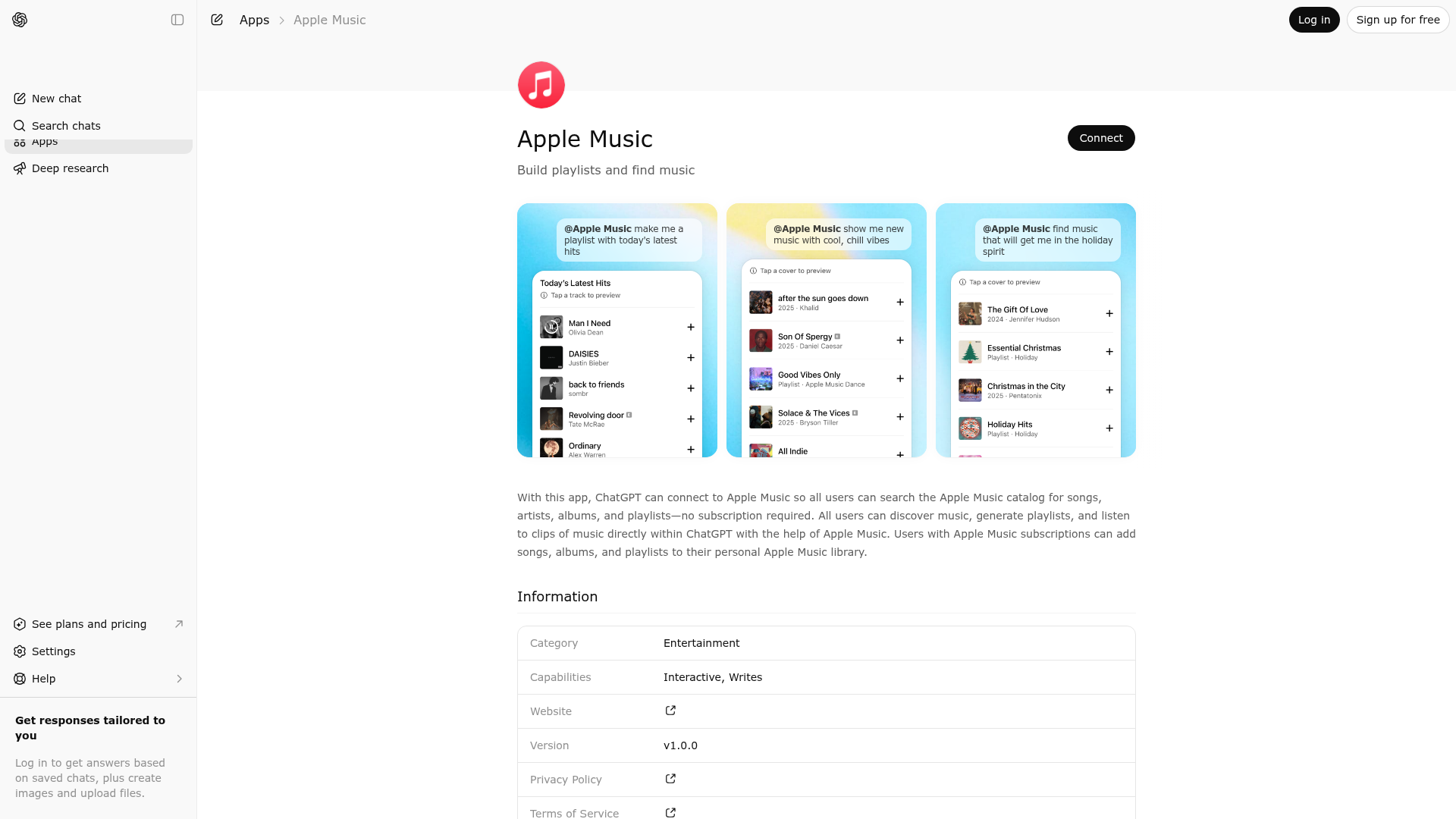
App Screenshots
Capabilities
Publisher Intelligence
Insights and recommendations for app publishers. See how your app performs and how to improve discoverability.
Server Status music-mcp-spec v1.0.0
https://mcp.music.apple.com/v1/longandcomplexstring294/mcp Last checked: 3d ago
Server Instructions
This is an MCP server skeleton. Configure it with tools, resources, and prompts.
Technical Details
Tools(6)
Showing 6 of 6 tools
| Tool | Description | Flags | Test | Last Tested | |
|---|---|---|---|---|---|
add-favorite-resource-by-id | Description: Adds supported Apple Music content to the authenticated user's favorites. Supported types: artists. Constraints: Requires an authenticated user session. Do NOT call from free-form chat. This tool is only for widget actions (e.g., user clicks Add/+ on a result in the Apple Music widget). Do not trigger on behalf of third parties or external systems. Only invoke for items that were returned by the Apple Music Widget tool; do not act on arbitrary or unseen items. | — | 0%Latency 1.0s | 3d ago | |
add-library-resource-by-id | Description: Adds supported Apple Music content to the authenticated user's library. Supported types: songs, albums, playlists. Constraints: Requires an authenticated user session. Do NOT call from free-form chat. This tool is only for widget actions (e.g., user clicks Add/+ on a result in the Apple Music widget). Do not trigger on behalf of third parties or external systems. Only invoke for items that were returned by the Apple Music Widget tool; do not act on arbitrary or unseen items. | — | 0%Latency 617ms | 4d ago | |
create-playlist-from-ids | Description: Creates a new user playlist from a list of song IDs. Output: A playlist resource object or a confirmation object with the new playlist's URL. Constraints: Do NOT call from free-form chat. MUST be called as a subsequent step after song/music-video IDs have been fetched from the matching tool. The title and description can be inferred by the model from the user's original request, and modifiable by the user. Requires an authenticated user session. | — | 0%Latency 687ms | 3d ago | |
get-track-details-batch | Description: Batch-retrieves full song resource objects for a provided list of song titles and (optionally) artists. This is a data-hydration tool, not a discovery or search tool. Use this tool after generating a playlist or list of tracks from model reasoning or user input. The model should first compile up to 25 candidate track titles (with optional artists) based on its music knowledge, cultural reasoning, and any relevant user context, and then invoke this tool to retrieve verified Apple Music metadata and links. Usage Guidance: This tool should be triggered in two user journeys: 1. After the Search tool is used: - Parse the Search tool results and extract the songs or music videos returned. 2. When the user requests a playlist or list of songs/music videos: - Interpret the user's intent (e.g., genre, mood, vibe, audio attributes). - Use internal music knowledge to generate up to 25 tracks that match the intent. - Pass those tracks to this tool for enrichment (e.g., album art, preview URLs). 3. When presenting the results of a playlist request, the model must clearly state in the user's language: "Here's a draft of your playlist. To create it in Apple Music, click the Open Playlist in Apple Music button." The model must not imply that a playlist has been created automatically. Also, do not ask the user to add more songs to the playlist as a follow-up question. Constraints: Use this tool only to enrich a list of songs already generated by the model from a user query (e.g., '90s dance songs', 'sad songs for a rainy day'). It must not be used for discovery or search. Critical Rules: - Do not fabricate, truncate, or alter entity names, metadata, or links. - Do not generate lyrics, biographies, or external content. - Only surface Apple Music deep links returned directly by the API; never construct your own. - Never display a deep_link as a raw URL. Show it only through widgets or Apple Music navigation. | — | 0%Latency 800ms | 3d ago | |
search | Capabilities: Search the Apple Music catalog for artists, songs, albums, and playlists using natural-language queries. Example: "search for taylor swift" Usage Guidance: Invoke this tool when any of the following are true: Artist-focused queries The user's primary goal is to find or explore artists in Apple Music, for example: "Show me Taylor Swift on Apple Music." "Find Arctic Monkeys on Apple Music." "Find me artists similar to The Weeknd" Album-focused queries The user's primary goal is to find or explore albums, for example: "Show Radiohead's OK Computer album on Apple Music." "Find the deluxe edition of Thriller." "Search for recent jazz albums." Explicit Apple Music catalog lookup The user asks to search, find, look up, or show something in Apple Music, especially when referring to specific entities: "Search Apple Music for Beyonc� albums." "Find Metallica albums from the 80s." "Find Halloween Playlists on Apple Music." Queries involving explicit catalog entities The user mentions combinations of known catalog entities (artist + album, playlist + song list) where the goal is to locate those entities in the catalog. Prefer the Batch Matching Tool for Song / Playlist Intent Do not use this tool when the user is asking for song recommendations, playlist ideas, or curated lists of tracks based on themes, moods, scenarios, or "vibes". In those cases, ChatGPT should: Use its own world knowledge to choose appropriate songs, and Use the Batch Matching Tool to resolve those songs to Apple Music catalog items. Examples that should use Batch Matching, not Search: "Give me songs like 'Blinding Lights'." "Make a playlist of nostalgic 2000s pop songs." "Suggest hype songs for a workout." "Pick songs that fit this story / scene." If the user mixes intent, use this rule of thumb: If the request is primarily about songs/playlist curation, use Batch Matching If the request is primarily about a specific artist or album object in Apple Music, use Search. Out of Scope: Music Videos and Radio Stations are not supported. Respond with: "Music Videos and Radio Stations are not supported with this tool, please try another type." Constraints: Do not call Apple Music for the following. Instead respond: "Apple Music can't show this. Try asking for something else." - Requests derived from harmful or inappropriate images (for example: create a playlist from an explicit photo). - Concert or tour information (for example: find Daft Punk's 2007 tour dates). - Personal data queries, such as Recently Played or the user's Music Library. These cases must be disambiguated before performing any search. Critical Rules: - Do not fabricate, alter, truncate, or abbreviate entity names, metadata, or links. - Do not generate lyrics, biographies, or external content. - Only use Apple Music deep links returned directly from the API; never construct your own. - Never display a deep link as a raw URL. Show it only through widgets or Apple Music navigation components. - When the Apple Music tool is invoked, all recommendations must come from that tool. | — | 0%Latency 858ms | 4d ago | |
sign-in | Do not invoke in freeform chat. | — | 100%Latency 704ms | Mar 22, 2026 |
Keywords
Trigger Keywords (@mentions)
apple music @apple music Discoverability Score
Fair
68 of 100 — how easily AI agents find your app
- Description quality20/20
- Example prompts0/20
- Keyword coverage4/15
- Tool metadata20/20
- Visual assets13/20
- Endpoint health10/10
- Data freshness15/15
How to Improve
Add at least 2 example prompts. Prompt examples strongly improve app matching and click-through intent.
Increase keyword coverage (discovery + trigger) to improve retrieval for long-tail queries.
Add at least 2 screenshots that show real workflows to increase confidence and conversion.
Technical Details
- Status
- ENABLED
- Type
- AI-Powered App
- Auth
- Open Access, Requires Login, Requires Login
- Listed on
- ChatGPT
- Added
- December 9, 2025
- Last synced
- 3d ago
- Last checked
- 3d ago
- Version
- 1.0.0
- Distribution
- Ecosystem Directory