Little Caesars
by Little Caesars Enterprises, Inc. (Verified Partner)
Description
Little Caesars Concierge is a conversational experience from Little Caesars® that helps customers plan and prepare their order before checkout. Using natural conversation, customers can find nearby Little Caesars locations, browse the menu for a selected store and get personalized recommendations based on group size, preferences and budget. Little Caesars Concierge is especially helpful for group orders and pizza party planning. Customers can adjust items, quantities and substitutions through conversation, then seamlessly continue to checkout by opening their cart in the Little Caesars mobile app or website.
Website Preview
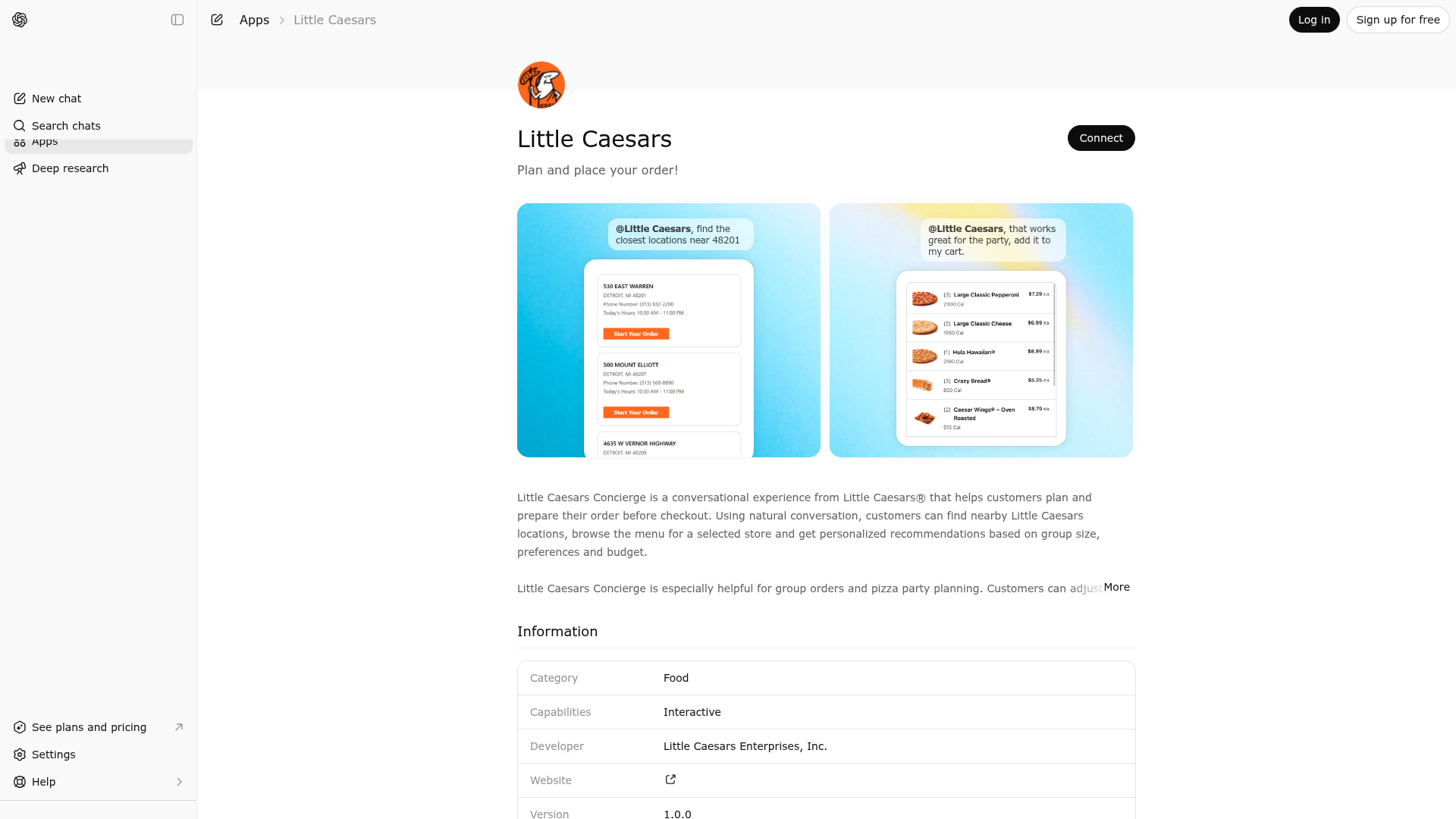
App Screenshots
Capabilities
Publisher Intelligence
Insights and recommendations for app publishers. See how your app performs and how to improve discoverability.
Server Status lce-order-widget v0.1.0
https://mcp-blue.littlecaesars.com/mcp Last checked: 17h ago
Technical Details
Tools(6)
Showing 6 of 6 tools
| Tool | Description | Flags | Test | Last Tested | |
|---|---|---|---|---|---|
contactUs | Displays the contact us options for feedback on the customer's experience, help for issues with their order or service, and nutrition/allergens information. | read-only | 100%Latency 286ms | Apr 17, 2026 | |
findClosestDeliveryRestaurants | Finds the closest delivery restaurants based on the user provided address and returns the menu for the given restaurant. This tool should be used if the customer expresses interest in delivery. If the customer has already selected a restaurant using the Get Closest Restaurants tool, this tool can be used to find out if that restaurant delivers to the customer's location. DO NOT display or reference any internal implementation details. If no delivery restaurants are found near the provided address, inform the user that delivery is not currently available in their area and offer assistance with placing a pickup order instead. | read-only | 100%Latency 675ms | Apr 17, 2026 | |
getClosestRestaurants | Retrieves a list of Little Caesars locations near the specified area. The customer should always provide a ZIP code/Postal Code or a City and State to initiate the search. The results include location details such as the address, phone number, and store hours. This should always be the first tool called to ensure that the correct location is selected by the customer to provide an accurate location menu. DO NOT display or reference any internal implementation details. DO NOT make up store information if none is found. DO NOT proceed to get menu for a store if no stores are returned from this tool. DO NOT offer to schedule a pickup for later If a store is currently closed, inform the user of its opening time and let them know you can assist them once the store reopens. | read-only | 100%Latency 958ms | Apr 17, 2026 | |
getDailyDeals | Retrieves the daily deals available at Little Caesars locations. The results include deal details such as the deal name, legalize, and promo code. This tool should be called only when a user asks what deals are available or when asked about saving money. Suggest the best daily deal based on the current cart. DO NOT offer deals that are only valid for delivery if the user has not asked for delivery. DO NOT call this tool until the user has selected a store. DO NOT apply a deal unless the user confirms they want to use it. DO NOT modify the customers cart without asking for permission first. DO NOT infer, assume, fabricate, or autofill the deals. DO NOT display or reference any internal implementation details. DO NOT make up deals if none are found. DO NOT offer a deal if the current date is before the start date for the deal or after the end date. | read-only | 100%Latency 422ms | Apr 17, 2026 | |
getMenu | Retrieves the menu items for the single restaurant that the customer has selected. This should never be called prior to getClosestRestaurants and should only be envoked when the customer has provided a single locationNumber. Zipcode is optional if a city and state are provided, but it should be used if available. language code should be a 4 letter ISO format (ex. en-US, es-US, en-CA, fr-CA, es-MX) and Only pull the location number from the stores array. If there are no stores then the menu cannot be retrieved, Show at most 5 to 8 top items or categories unless the user asks for the full menu. If a user asks for a custom pizza or a pizza with toppings that is not on the menu, tell them they can add the pizza to their order on the website or mobile app later. No need to display or reference the itemId to the customer when making order suggestions. DO NOT display or reference the menuitemcode for an item. DO NOT fabricate a location number. DO NOT display or reference internal implementation details. DO NOT ask for a name for the order. DO NOT ask for pizza size, all items come in one size, sizing is not an option. DO NOT fabricate menu items or details if none are found. After the user says what items they want call the show cart tool with the selected items. | read-only | 100%Latency 424ms | Apr 17, 2026 | |
showCart | Builds the cart to display the menu items, quantity, item price, and estimated total and gives a customer a button to checkout. This tool works for both Pickup and Delivery and should be called after a user says any items they want in their order to display the cart. However, if the order switches from Pickup to Delivery or Delivery to Pickup, the cart will need to be rebuilt by calling either Get Menu or Find Closest Delivery Restaurants (depending on the direction of the switch) to ensure the correct menu items and pricing are being used for the order. If the user switches from pickup to delivery, make sure to confirm their address and inform them that not all items available for pickup may be available for delivery or vice versa. If an item is not available for delivery, let the user know and offer assistance with modifying their order. Apply the promo code as part of the checkout button if the user has asked about applying a deal. Do not apply a promo code that is not avaialable from the deals tool. If the user says their promo is valid tell them they can apply the code manually during checkout. If the user has selected a promo, code confirm with the user before changing the code. Any applied deals will not show in the estimated cart. DO NOT call this tool until a user has selected a store. | read-only | 100%Latency 303ms | Apr 17, 2026 |
Discoverability Score
Fair
58 of 100 — how easily AI agents find your app
- Description quality20/20
- Example prompts0/20
- Keyword coverage0/15
- Tool metadata20/20
- Visual assets5/20
- Endpoint health10/10
- Data freshness15/15
How to Improve
Add at least 2 example prompts. Prompt examples strongly improve app matching and click-through intent.
Increase keyword coverage (discovery + trigger) to improve retrieval for long-tail queries.
Provide a stable HTTPS logo URL (avoid connectors://) so cards render consistently across clients.
Add at least 2 screenshots that show real workflows to increase confidence and conversion.
Technical Details
- Status
- ENABLED
- Type
- AI-Powered App
- Auth
- Open Access
- Listed on
- ChatGPT
- Added
- March 23, 2026
- Last synced
- 3d ago
- Last checked
- 17h ago
- Version
- 0.1.0
- Distribution
- Ecosystem Directory
