Jinko
by Jinko SAS (Verified Partner)
Description
Jinko helps you find the best flight deals for your next trip. With Jinko, get flight recommendations based on your dates, budget, or any type of trip you’re planning. Explore all your options seamlessly within a single conversation. Try asking things like: - Show me the best deals for a flight from New York in January. Less than 300$ per person, return trip. - Recommend me a destination for Valentine's day for a 4-day trip. Direct flight only. - Find me the cheapest flight from New York to Paris in February for a 7 days trip. Jinko analyzes 8 billion airfares every day to answer any travel question you may have. Unlike other travel apps, we always respond with options tailored to help you find the perfect trip.
Website Preview
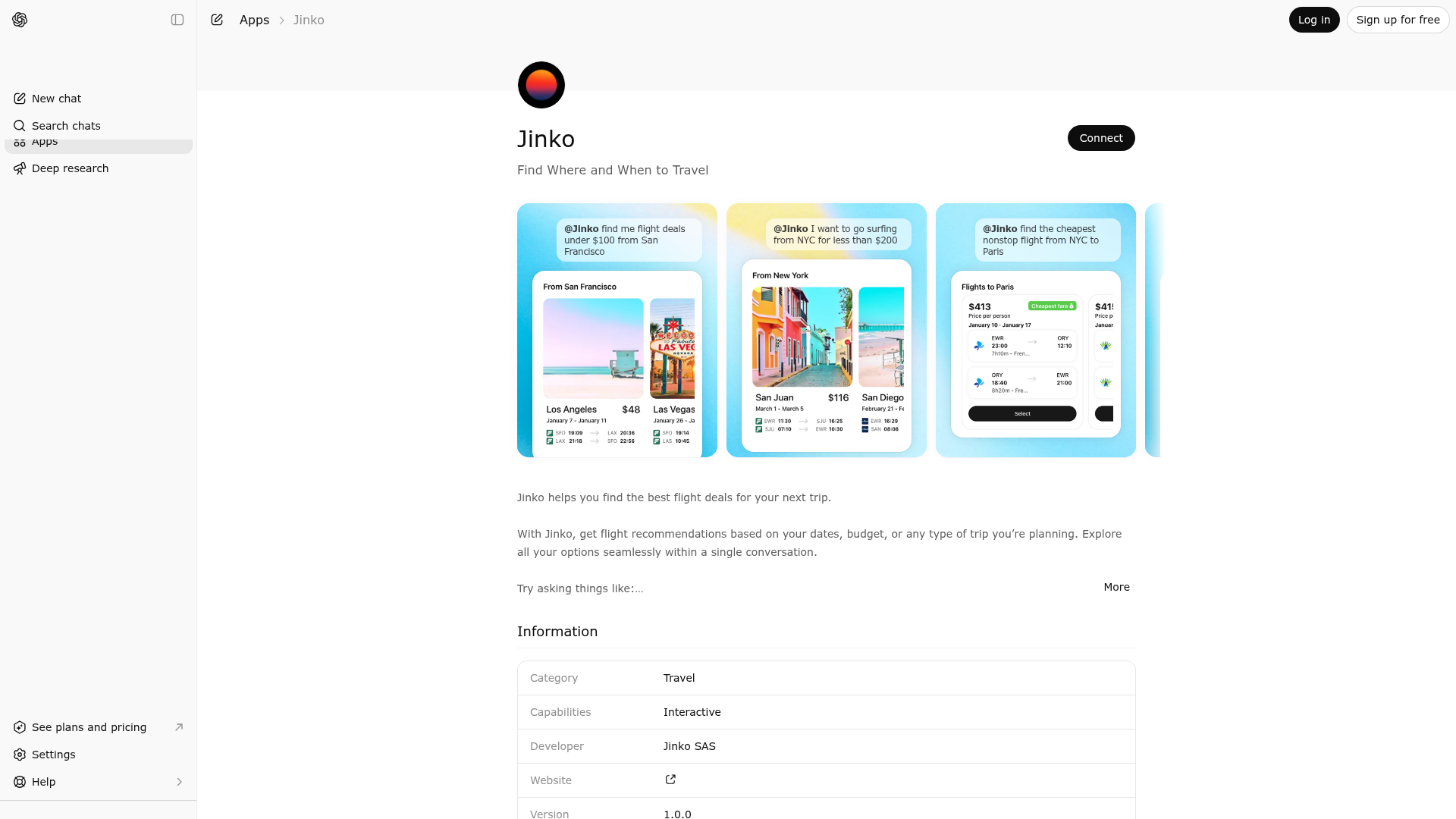
App Screenshots
Capabilities
Publisher Intelligence
Insights and recommendations for app publishers. See how your app performs and how to improve discoverability.
Server Status jinko-unified v1.0.0
https://mcp.gojinko.com Last checked: 17h ago
Technical Details
Tools(6)
Showing 6 of 6 tools
| Tool | Description | Flags | Test | Last Tested | |
|---|---|---|---|---|---|
book | Unified tool for booking a trip. Actions are determined by which object you provide. SCHEMA: { create?: { // Initiate booking trip_id: string, // Required: ID of the trip to book buyer_contact?: { // Optional: buyer contact info email: string, phone?: string } }, status?: { // Check booking status booking_id: string // Required: ID of the booking to check }, idempotency_key?: string // Prevent duplicate processing } ACTIONS: 1. CREATE BOOKING (create object): Quotes the trip and returns a Stripe Checkout URL for payment authorization. { "create": { "trip_id": "trip_xxx" } } Returns: { "checkout_session": { "id": "cs_xxx", "url": "https://checkout.stripe.com/...", // Open this URL for payment "expires_at": "2026-01-08T15:30:00Z" }, "pending_booking": { "id": "bkg_xxx", "status": "awaiting_payment", "trip_id": "trip_xxx" } } 2. CHECK STATUS (status object): Retrieves booking status. If payment is authorized but fulfillment hasn't started, automatically triggers fulfillment. { "status": { "booking_id": "bkg_xxx" } } Returns: Full booking object with status, items, passengers, totals, payment info. PREREQUISITES: • Trip must have at least one item (use trip tool with add_item) • Trip must have travelers assigned (use trip tool with upsert_travelers) • Trip must pass validation WORKFLOW: 1. flight_calendar → offer_token 2. flight_search → trip_item_token 3. trip(add_item={...}) → trip created 4. trip(upsert_travelers={...}) → travelers set 5. book(create={trip_id}) → checkout URL 6. User completes payment via checkout URL 7. book(status={booking_id}) → booking confirmation EXAMPLES: 1. Create booking: { "create": { "trip_id": "trip_xyz789" } } 2. Create booking with buyer contact: { "create": { "trip_id": "trip_xyz789", "buyer_contact": { "email": "john@example.com", "phone": "+1-555-123-4567" } } } 3. Check booking status: { "status": { "booking_id": "bkg_xxx" } } | destructive | 100%Latency 400ms | Apr 17, 2026 | |
find_destination | Discover travel destinations when the user does NOT know where to go. This is a destination EXPLORATION tool. WHEN TO USE THIS TOOL (CRITICAL): - The user does NOT specify a destination: "Where should I go?", "Best deals from NYC" - The user wants inspiration based on criteria: "Beach destinations", "Somewhere warm", "Cheap flights from SF" - The user wants to compare multiple destination options from their origin - The user previously asked for destination recommendations and wants pricing for those options WHEN NOT TO USE THIS TOOL — USE flight_calendar INSTEAD: - The user specifies BOTH an origin AND a destination → use flight_calendar - Examples that should use flight_calendar, NOT this tool: • "Flights from Paris to Barcelona" → flight_calendar • "Find me a flight from JFK to CDG" → flight_calendar • "Cheapest flight from LA to Miami in June" → flight_calendar • "Paris to BCN for a weekend in April" → flight_calendar • "What are the cheapest dates to go to NYC from Paris?" → flight_calendar - If the user names a specific city/airport as destination, that means they KNOW where to go → flight_calendar IMPORTANT - DATES: All dates in query parameters (departure_dates, departure_date_ranges, return_dates, return_date_ranges) MUST be in the future. Never use past dates. Please fill as much as possible search parameters based on user intent to get best results. IMPORTANT - RE-CALL THIS TOOL when the user: - Asks for a different type of destination (beach, city trip, ski, etc.) - Asks for different dates while still exploring - The user is already in fullscreen mode in the widget CORE FUNCTIONALITY: - REQUIRED: User's origin location (LLM identifies ALL nearby airports) - OPTIONAL: Destination filtering by specific airports/cities OR omit for global discovery mode - Destination Discovery Mode: When destinations is omitted/empty, searches ALL destinations globally - Flexible dates and stay durations for exploring options - Filter by budget, direct flights preference, and locale - By default, please search roundtrip flights unless user specifies one-way AIRPORT IDENTIFICATION - CRITICAL: LLM MUST identify and recommend ALL relevant airports for user's origin location: - "New York": ["JFK", "LGA", "EWR"] - "London": ["LHR", "LGW", "STN", "LTN", "LCY"] - "Paris": ["CDG", "ORY"] - "Tokyo": ["NRT", "HND"] - "Chicago": ["ORD", "MDW"] - "Los Angeles": ["LAX"] - "San Francisco": ["SFO"] DESTINATION FILTERING - INTELLIGENT INTERPRETATION: Destinations can be specified using IATA airport codes OR city codes (3 letters). You can mix both types: - Airport codes: ["JFK", "LAX", "LHR"] - searches specific airports - City codes: ["NYC", "LON", "PAR"] - searches all airports in those cities DESTINATION LIST - CRITICAL: When users mention criteria that imply a type of destination, the LLM MUST generate the appropriate list: - "Sunny places in winter": ["MIA","MCO","SAN","PHX","HNL","CUN","PUJ","PTY","LIM","GIG"] - "Somewhere in Asia": ["NRT","HND","ICN","PVG","PEK","HKG","SIN","BKK","KUL","MNL"] - "Beach destinations": ["MIA","SAN","HNL","CUN","PUJ","SJU","NAS","MBJ"] - "European capitals": ["LHR","CDG","FRA","MAD","FCO","AMS","BRU","VIE","PRG","CPH"] If no filtering is specified ("anywhere", "surprise me"), leave destinations empty for global discovery. TYPICAL USE CASES: 1. "Where should I travel from NYC next month?" → origins: ["JFK","LGA","EWR"], destinations: [] 2. "I want to go somewhere warm from Chicago for a week in December" → origins: ["ORD","MDW"], destinations: [warm destinations] 3. "Best weekend getaways from Boston?" → origins: ["BOS"], destinations: [] 4. "Beach vacation from Seattle in summer under $600" → origins: ["SEA"], destinations: [beach destinations] IMPORTANT: Always provide ALL airports for origins to maximize search results. | read-only | 100%Latency 457ms | Apr 17, 2026 | |
find_flight | Search flights between a known origin and destination. (Legacy alias for flight_calendar — identical behavior and schema.) | read-only | 100%Latency 917ms | Apr 17, 2026 | |
flight_calendar | Search flights between a known origin and destination using cached pricing. Use this tool whenever the user specifies BOTH where they are flying FROM and where they are flying TO. WHEN TO USE THIS TOOL (CRITICAL): - The user provides both an origin AND a destination (city or airport) - Examples: "Paris to Barcelona", "JFK to CDG", "London to NYC for a weekend" - Supports loose / flexible dates: single dates, date arrays, date ranges, stay_days - ALSO the right tool for "cheapest flight", "best flight", "find me a flight", "cheapest date" phrasings — this tool returns the cheapest cached itineraries for the given route and window. WHEN TO USE find_destination INSTEAD: - The user does NOT specify a destination: "Where should I go from Paris?", "Best deals from NYC" - The user wants inspiration: "Beach destinations from London", "Cheap flights from SF" WHEN TO USE flight_search INSTEAD: - The user has committed to EXACT dates — both a single departure date AND a single return date for one specific route. - Example: "Paris → NYC, June 17 → June 26" - flight_search hits live pricing (each call has a cost) and is the step immediately before booking. Use it only once route + both dates are locked in. IMPORTANT: All dates in query parameters (departure_dates, departure_date_ranges, return_dates, return_date_ranges) MUST be in the future. Never use past dates. Please fill as much as possible search parameters based on user intent to get best results. Origin and destination must be IATA city code by default except if the user specifies IATA Airport code in the search. ROUTE SEARCH: - Use exact 3-letter IATA airport codes or IATA city code for both origin and destination - Date ranges OR stay duration for flexible trip planning - Natural trip duration (stay_days) instead of exact return dates - By default, please search roundtrip flights unless user specifies one-way. Use trip_type="oneway" ONLY when the user explicitly asks for a one-way trip USE CASES: ✓ "Find flights from JFK to CDG next month" - route + flexible date range ✓ "Fly from LA to Tokyo for a week in December" - uses departure_date + stay_days ✓ "Paris to Barcelona for a weekend in April" - route + loose window ✓ "Cheapest flight from ORD to LHR in June" - route + loose month window ✓ "Direct business-class flight NYC → LON next month" - route with preferences Flow: flight_calendar → (user picks) → flight_search (price_check with offer_token) → trip → book. Or, for precise dates: skip flight_calendar and go straight to flight_search search mode. The widget displays flights in a scrollable carousel with options to view detailed itineraries. | read-only | 100%Latency 821ms | Apr 17, 2026 | |
flight_search | Live flight tool with two modes. EACH CALL HITS LIVE PRICING — not for loose or flexible date queries (use flight_calendar for those). MODE 1 — search: route + exact single dates + optional filters (most common first-call case) - Use when the user has committed to ONE specific route AND a specific departure date AND a specific return date. - Supports filters on the same call: direct_only, cabin_class, max_price, include_carriers, exclude_carriers, origin_type, destination_type. - Examples: ✓ "Paris to NYC, June 17 to June 26" → { search: { origin: "PAR", destination: "NYC", departure_date: "2026-06-17", return_date: "2026-06-26" } } ✓ "Paris to Rome June 19 to 27, direct only, business class" → { search: { origin: "PAR", destination: "ROM", departure_date: "2026-06-19", return_date: "2026-06-27", direct_only: true, cabin_class: "business" } } ✓ "JFK → CDG August 5 to 12, Air France only, under $800" → { search: { origin: "JFK", origin_type: "airport", destination: "CDG", destination_type: "airport", departure_date: "2026-08-05", return_date: "2026-08-12", include_carriers: ["AF"], max_price: 800 } } - Only ONE departure_date and ONE return_date. No arrays, no ranges, no multi-city. MODE 2 — price_check: confirm live fares for a specific flight - Use after the user picks a flight returned by flight_calendar or find_destination. Pass the offer_token. - Schema: { "price_check": { "offer_token": "..." } } WHEN NOT TO USE (route to flight_calendar instead): - "Cheapest flight in June" (loose month window) - "Paris to NYC next week" (loose window — 7 days) - "Best weekend to fly to Rome in spring" (flexible dates) - Any query with a date RANGE that implies multiple candidate departure/return pairs - Multi-city itineraries NOTE: "June 19 to 27" / "between the 19 and 27" with a specific round-trip intent counts as exact single dates (dep=19, ret=27) — use flight_search, not flight_calendar. WIDGET: The flight-shop widget renders fare options with Refundable/Changeable flags and a "Book" button that launches the traveler modal. Both search and price_check modes populate this widget. IMPORTANT: - Prices are subject to change until booking is confirmed - Offer tokens may expire after some time - Always inform users about fare differences (refundable vs non-refundable, baggage, etc.) - Per-person totals apply unless stated otherwise | read-only | 100%Latency 872ms | Apr 17, 2026 | |
trip | Unified tool for managing a trip (shopping cart). Actions are determined by which objects you provide. SCHEMA: { trip_id?: string, // Existing trip ID (omit to create new) version?: number, // Current version for concurrency control offer_id?: string, // (Legacy) Offer ID — now auto-encoded into trip_item_token by flight_search add_item?: { ... }, // Add a flight to the trip remove_item?: { ... }, // Remove an item from the trip upsert_travelers?: { ... }, // Set travelers (replaces all) idempotency_key?: string // Prevent duplicate processing } ACTIONS: 1. ADD ITEM (add_item object — offer_id is auto-encoded into trip_item_token by flight_search): { "add_item": { "trip_item_token": "offer__1:0-2-0", // Required: from flight_search (contains encoded offer_id) "traveler_ids": ["traveler_1", "traveler_2"] // Optional: associate travelers } } 2. REMOVE ITEM (remove_item object): { "trip_id": "trip_xxx", "version": 2, "remove_item": { "item_id": "item_123" // From trip.trip_items[].id } } 3. UPSERT TRAVELERS (upsert_travelers object): { "trip_id": "trip_xxx", "version": 2, "upsert_travelers": { "travelers": [ { "traveler_id": "saved_1", "is_lead": true }, // Pre-saved traveler { "identity": { ... } } // Or inline details ], "contact": { // Optional trip contact "email": "john@example.com", "phone": "+1-555-123-4567" } } } TRAVELER ENTRY OPTIONS: • { traveler_id: "id" } - Use pre-saved traveler • { traveler_id: "id", is_lead: true } - Pre-saved as lead • { identity: {...}, passport?: {...} } - Inline details WORKFLOW: 1. flight_calendar → Returns flights with offer_token 2. flight_search → Returns fare options with trip_item_token (offer_id encoded inside) 3. trip(add_item={...}) → Adds flight, returns trip + saved travelers 4. trip(upsert_travelers={...}) → Sets travelers on trip 5. checkout_trip → Completes booking RETURNS: • trip: Complete trip object with items, travelers, totals • saved_travelers: Available pre-saved travelers for selection • recommended_products: Upsell opportunities (hotels, cars, insurance) • actions_performed: Which actions were executed • trip_item_id: ID of newly added item (if add_item performed) EXAMPLES: 1. Add flight to new trip: { "add_item": { "trip_item_token": "offer__1:0-2-0" } } 2. Add flight to existing trip: { "trip_id": "trip_xxx", "version": 1, "add_item": { "trip_item_token": "offer__1:0-2-0" } } 3. Set travelers (pre-saved): { "trip_id": "trip_xxx", "version": 2, "upsert_travelers": { "travelers": [ { "traveler_id": "traveler_1", "is_lead": true }, { "traveler_id": "traveler_2" } ] } } 4. Set travelers (inline): { "trip_id": "trip_xxx", "version": 2, "upsert_travelers": { "travelers": [ { "identity": { "first_name": "John", "last_name": "Doe", "date_of_birth": "1990-05-15", "gender": "MALE", "passenger_type": "ADULT" }, "is_lead": true } ], "contact": { "email": "john@example.com", "phone": "+1-555-123-4567" } } } 5. Remove item: { "trip_id": "trip_xxx", "version": 3, "remove_item": { "item_id": "item_123" } } 6. Add flight AND set travelers (combined): { "add_item": { "trip_item_token": "offer__1:0-2-0" }, "upsert_travelers": { "travelers": [ { "traveler_id": "traveler_1", "is_lead": true } ] } } } | destructive | 100%Latency 328ms | Apr 17, 2026 |
Discoverability Score
Fair
58 of 100 — how easily AI agents find your app
- Description quality20/20
- Example prompts0/20
- Keyword coverage0/15
- Tool metadata20/20
- Visual assets5/20
- Endpoint health10/10
- Data freshness15/15
How to Improve
Add at least 2 example prompts. Prompt examples strongly improve app matching and click-through intent.
Increase keyword coverage (discovery + trigger) to improve retrieval for long-tail queries.
Provide a stable HTTPS logo URL (avoid connectors://) so cards render consistently across clients.
Add at least 2 screenshots that show real workflows to increase confidence and conversion.
Technical Details
- Status
- ENABLED
- Type
- AI-Powered App
- Auth
- Open Access
- Listed on
- ChatGPT
- Added
- February 18, 2026
- Last synced
- 3d ago
- Last checked
- 17h ago
- Version
- 1.0.0
- Distribution
- Ecosystem Directory
