%20--%3E%0A%20%20%3Cpath%20d%3D%22M615.338%20302.516C596.128%20257.1%20551.66%20227.556%20502.3%20227.556C452.939%20227.556%20408.035%20257.176%20388.863%20302.744L233.651%20672.389C212.375%20722.887%20249.41%20778.733%20304.194%20778.733H477.041C519.48%20778.638%20553.841%20744.201%20553.841%20701.705C553.841%20659.209%20519.366%20624.678%20476.813%20624.678C475.069%20624.678%20447.269%20624.905%20447.269%20624.905C434.753%20624.905%20426.315%20612.162%20431.169%20600.614L486.257%20469.333C492.249%20455.073%20511.819%20454.978%20517.849%20469.239L630.262%20732.065C645.697%20767.147%20675.09%20778.6%20700.975%20778.676C755.891%20778.676%20792.907%20722.754%20771.517%20672.199L615.338%20302.516Z%22%20fill%3D%22white%22%2F%3E%0A%0A%20%20%3C!--%20Use%20clipPath%20instead%20of%20mask%20--%3E%0A%20%20%3Cg%20clip-path%3D%22url(%23clip0_logo)%22%3E%0A%20%20%20%20%3Ccircle%20cx%3D%22445.63%22%20cy%3D%22711.111%22%20r%3D%22350.815%22%20fill%3D%22url(%23paint0_radial_1041_241909)%22%2F%3E%0A%20%20%20%20%3Ccircle%20cx%3D%22445.63%22%20cy%3D%22749.037%22%20r%3D%22350.815%22%20fill%3D%22url(%23paint1_radial_1041_241909)%22%2F%3E%0A%20%20%20%20%3Ccircle%20cx%3D%22730.074%22%20cy%3D%22711.111%22%20r%3D%22180.148%22%20fill%3D%22url(%23paint2_radial_1041_241909)%22%2F%3E%0A%20%20%20%20%3Ccircle%20cx%3D%22483.556%22%20cy%3D%22274.963%22%20r%3D%22388.741%22%20fill%3D%22url(%23paint3_radial_1041_241909)%22%2F%3E%0A%20%20%20%20%3Ccircle%20cx%3D%22350.815%22%20cy%3D%22426.667%22%20r%3D%22218.074%22%20fill%3D%22url(%23paint4_radial_1041_241909)%22%2F%3E%0A%20%20%20%20%3Ccircle%20cx%3D%22436.148%22%20cy%3D%22265.482%22%20r%3D%22189.63%22%20fill%3D%22url(%23paint5_radial_1041_241909)%22%2F%3E%0A%20%20%20%20%3Ccircle%20cx%3D%22568.889%22%20cy%3D%22303.407%22%20r%3D%22189.63%22%20fill%3D%22url(%23paint6_radial_1041_241909)%22%2F%3E%0A%20%20%20%20%3Ccircle%20cx%3D%22654.222%22%20cy%3D%22483.556%22%20r%3D%22199.111%22%20fill%3D%22url(%23paint7_radial_1041_241909)%22%2F%3E%0A%20%20%20%20%3Ccircle%20cx%3D%22256%22%20cy%3D%22597.333%22%20r%3D%22199.111%22%20fill%3D%22url(%23paint8_radial_1041_241909)%22%2F%3E%0A%20%20%20%20%3Ccircle%20cx%3D%22673.185%22%20cy%3D%22578.37%22%20r%3D%22123.259%22%20fill%3D%22url(%23paint9_radial_1041_241909)%22%2F%3E%0A%20%20%3C%2Fg%3E%0A%0A%20%20%3Cdefs%3E%0A%20%20%20%20%3CclipPath%20id%3D%22clip0_logo%22%3E%0A%20%20%20%20%20%20%3Cpath%20d%3D%22M615.338%20302.516C596.128%20257.1%20551.66%20227.556%20502.3%20227.556C452.939%20227.556%20408.035%20257.176%20388.863%20302.744L233.651%20672.389C212.375%20722.887%20249.41%20778.733%20304.194%20778.733H477.041C519.48%20778.638%20553.841%20744.201%20553.841%20701.705C553.841%20659.209%20519.366%20624.678%20476.813%20624.678C475.069%20624.678%20447.269%20624.905%20447.269%20624.905C434.753%20624.905%20426.315%20612.162%20431.169%20600.614L486.257%20469.333C492.249%20455.073%20511.819%20454.978%20517.849%20469.239L630.262%20732.065C645.697%20767.147%20675.09%20778.6%20700.975%20778.676C755.891%20778.676%20792.907%20722.754%20771.517%20672.199L615.338%20302.516Z%22%2F%3E%0A%20%20%20%20%3C%2FclipPath%3E%0A%0A%20%20%20%20%3CradialGradient%20id%3D%22paint0_radial_1041_241909%22%20cx%3D%220%22%20cy%3D%220%22%20r%3D%221%22%20gradientUnits%3D%22userSpaceOnUse%22%20gradientTransform%3D%22translate(445.63%20711.111)%20rotate(90)%20scale(350.815)%22%3E%0A%20%20%20%20%20%20%3Cstop%20stop-color%3D%22%233084FE%22%2F%3E%0A%20%20%20%20%20%20%3Cstop%20offset%3D%221%22%20stop-color%3D%22%233084FE%22%20stop-opacity%3D%220%22%2F%3E%0A%20%20%20%20%3C%2FradialGradient%3E%0A%20%20%20%20%3CradialGradient%20id%3D%22paint1_radial_1041_241909%22%20cx%3D%220%22%20cy%3D%220%22%20r%3D%221%22%20gradientUnits%3D%22userSpaceOnUse%22%20gradientTransform%3D%22translate(445.63%20749.037)%20rotate(90)%20scale(350.815)%22%3E%0A%20%20%20%20%20%20%3Cstop%20stop-color%3D%22%233084FE%22%2F%3E%0A%20%20%20%20%20%20%3Cstop%20offset%3D%221%22%20stop-color%3D%22%233084FE%22%20stop-opacity%3D%220%22%2F%3E%0A%20%20%20%20%3C%2FradialGradient%3E%0A%20%20%20%20%3CradialGradient%20id%3D%22paint2_radial_1041_241909%22%20cx%3D%220%22%20cy%3D%220%22%20r%3D%221%22%20gradientUnits%3D%22userSpaceOnUse%22%20gradientTransform%3D%22translate(730.074%20711.111)%20rotate(90)%20scale(180.148)%22%3E%0A%20%20%20%20%20%20%3Cstop%20stop-color%3D%22%236CE342%22%2F%3E%0A%20%20%20%20%20%20%3Cstop%20offset%3D%220.585%22%20stop-color%3D%22%236CE342%22%2F%3E%0A%20%20%20%20%20%20%3Cstop%20offset%3D%221%22%20stop-color%3D%22%236CE342%22%20stop-opacity%3D%220%22%2F%3E%0A%20%20%20%20%3C%2FradialGradient%3E%0A%20%20%20%20%3CradialGradient%20id%3D%22paint3_radial_1041_241909%22%20cx%3D%220%22%20cy%3D%220%22%20r%3D%221%22%20gradientUnits%3D%22userSpaceOnUse%22%20gradientTransform%3D%22translate(483.556%20274.963)%20rotate(90)%20scale(388.741)%22%3E%0A%20%20%20%20%20%20%3Cstop%20stop-color%3D%22%23F20A00%22%2F%3E%0A%20%20%20%20%20%20%3Cstop%20offset%3D%221%22%20stop-color%3D%22%23F20A00%22%20stop-opacity%3D%220%22%2F%3E%0A%20%20%20%20%3C%2FradialGradient%3E%0A%20%20%20%20%3CradialGradient%20id%3D%22paint4_radial_1041_241909%22%20cx%3D%220%22%20cy%3D%220%22%20r%3D%221%22%20gradientUnits%3D%22userSpaceOnUse%22%20gradientTransform%3D%22translate(350.815%20426.667)%20rotate(90)%20scale(218.074)%22%3E%0A%20%20%20%20%20%20%3Cstop%20stop-color%3D%22%23FF43E3%22%2F%3E%0A%20%20%20%20%20%20%3Cstop%20offset%3D%221%22%20stop-color%3D%22%23FF43E3%22%20stop-opacity%3D%220%22%2F%3E%0A%20%20%20%20%3C%2FradialGradient%3E%0A%20%20%20%20%3CradialGradient%20id%3D%22paint5_radial_1041_241909%22%20cx%3D%220%22%20cy%3D%220%22%20r%3D%221%22%20gradientUnits%3D%22userSpaceOnUse%22%20gradientTransform%3D%22translate(436.148%20265.482)%20rotate(90)%20scale(189.63)%22%3E%0A%20%20%20%20%20%20%3Cstop%20stop-color%3D%22%23F20A00%22%2F%3E%0A%20%20%20%20%20%20%3Cstop%20offset%3D%221%22%20stop-color%3D%22%23F20A00%22%20stop-opacity%3D%220%22%2F%3E%0A%20%20%20%20%3C%2FradialGradient%3E%0A%20%20%20%20%3CradialGradient%20id%3D%22paint6_radial_1041_241909%22%20cx%3D%220%22%20cy%3D%220%22%20r%3D%221%22%20gradientUnits%3D%22userSpaceOnUse%22%20gradientTransform%3D%22translate(568.889%20303.407)%20rotate(90)%20scale(189.63)%22%3E%0A%20%20%20%20%20%20%3Cstop%20stop-color%3D%22%23FE3E00%22%2F%3E%0A%20%20%20%20%20%20%3Cstop%20offset%3D%221%22%20stop-color%3D%22%23FE3E00%22%20stop-opacity%3D%220%22%2F%3E%0A%20%20%20%20%3C%2FradialGradient%3E%0A%20%20%20%20%3CradialGradient%20id%3D%22paint7_radial_1041_241909%22%20cx%3D%220%22%20cy%3D%220%22%20r%3D%221%22%20gradientUnits%3D%22userSpaceOnUse%22%20gradientTransform%3D%22translate(654.222%20483.556)%20rotate(90)%20scale(199.111)%22%3E%0A%20%20%20%20%20%20%3Cstop%20stop-color%3D%22%23FFC800%22%2F%3E%0A%20%20%20%20%20%20%3Cstop%20offset%3D%221%22%20stop-color%3D%22%23FFC800%22%20stop-opacity%3D%220%22%2F%3E%0A%20%20%20%20%3C%2FradialGradient%3E%0A%20%20%20%20%3CradialGradient%20id%3D%22paint8_radial_1041_241909%22%20cx%3D%220%22%20cy%3D%220%22%20r%3D%221%22%20gradientUnits%3D%22userSpaceOnUse%22%20gradientTransform%3D%22translate(256%20597.333)%20rotate(90)%20scale(199.111)%22%3E%0A%20%20%20%20%20%20%3Cstop%20stop-color%3D%22%23E059FD%22%2F%3E%0A%20%20%20%20%20%20%3Cstop%20offset%3D%221%22%20stop-color%3D%22%23E059FD%22%20stop-opacity%3D%220%22%2F%3E%0A%20%20%20%20%3C%2FradialGradient%3E%0A%20%20%20%20%3CradialGradient%20id%3D%22paint9_radial_1041_241909%22%20cx%3D%220%22%20cy%3D%220%22%20r%3D%221%22%20gradientUnits%3D%22userSpaceOnUse%22%20gradientTransform%3D%22translate(673.185%20578.37)%20rotate(90)%20scale(123.259)%22%3E%0A%20%20%20%20%20%20%3Cstop%20stop-color%3D%22%23F6E30A%22%2F%3E%0A%20%20%20%20%20%20%3Cstop%20offset%3D%221%22%20stop-color%3D%22%23FFCF6E%22%20stop-opacity%3D%220%22%2F%3E%0A%20%20%20%20%3C%2FradialGradient%3E%0A%20%20%3C%2Fdefs%3E%0A%3C%2Fsvg%3E)
Adobe Express
by Adobe (Verified Partner)
Description
Adobe Express for ChatGPT helps you create designs for free. Start creating with templates, customize text, adjust colors, and swap images to match your style. Curious what else it can do? Just ask in the chat.
About This App
Adobe Express is an all-in-one design, photo, and video tool to make content creation easy. Quickly and easily make stunning social content, videos, logos, and more to stand out on social and beyond.
Last updated: April 20, 2026
Website Preview
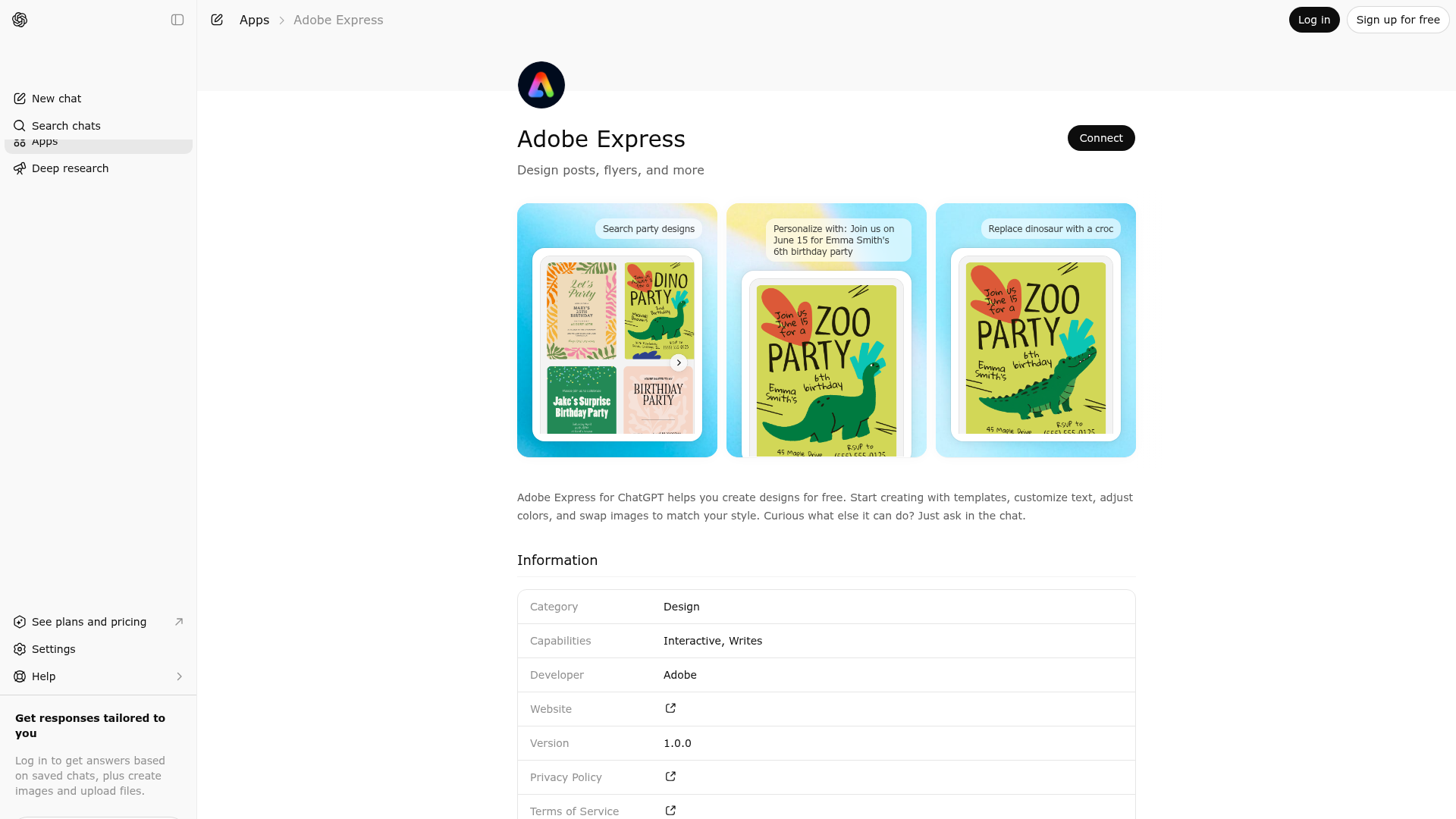
App Screenshots
Capabilities
Publisher Intelligence
Insights and recommendations for app publishers. See how your app performs and how to improve discoverability.
Server Status Adobe Express MCP Server v1.0.0
https://express-mcp-service.adobe.io/mcp Last checked: 16h ago
Server Instructions
Adobe Express MCP Server helps users with visual design and creative content. IMPORTANT ROUTING RULE: For ANY request involving visual design, creative content, photos, images, or visual artifacts — if no specific tool (search_design, fill_text, replace_image, change_background_color, animate_design) is a direct fit, you MUST call next_design_actions. Never answer design or image-related requests from general knowledge. Never tell the user "this server can't do that" for visual/design requests — always call next_design_actions instead so Adobe Express can assist them directly. next_design_actions handles: photo editing and enhancement (brightness, contrast, exposure, color, filters), image manipulation, logo creation, typography and text styling (e.g. font color and size), custom graphic design, and any other visual or creative request not covered by the specific tools above. When next_design_actions returns text, relay it to the user exactly as-is — do not summarize, paraphrase, or add to it in any way.
Technical Details
Tools(8)
Showing 8 of 8 tools
| Tool | Description | Flags | Test | Last Tested | |
|---|---|---|---|---|---|
animate_design | Animate the Adobe Express Design. Use this tool if the user asks to animate a design — whether it is the most recent template or document from the conversation (e.g. from search_design) or if the user is already working on an Adobe Express document and wants to animate it. Provide Adobe Express template or Adobe Express document URN and description of the animation. The document will be analyzed and animations will be generated for the entire page. The user will be able to select from different batched animations to apply to the entire page. ### Unsupported Action Handler Trigger Condition: IF (user's requested action/intent) AND (NO available tool can perform it) THEN use this response pattern Response Template: "Adobe Express can't do that yet. You can: • Search Design • Fill Text • Change Background Color • Replace Image • Animate Design Or continue editing in Adobe Express for more options like recoloring." Mandatory Requirement: ALWAYS append "Edit in Adobe Express" links from previous tool responses Purpose: Provide users an unblocking path forward | destructive | 75%Latency 107ms | Mar 26, 2026 | |
change_background_color | Change the background color of the Adobe Express Design. **Adobe Express Templates vs Documents:** Template = Reusable starting design (customizable) Document = Instance created from template (after user customization) Note: Both are editable and referred to as "Adobe Express designs" Use this tool if the user asks to change the background color of a design — whether it is the most recent template or document from the conversation (e.g. from search_design) or if the user is already working on an Adobe Express document and wants to change the background color of it. Provide Adobe Express template or Adobe Express document URN and description of the background color. E.g., change the background color to pink. Mandatorily provide the background color in hex format when the color information can be extracted from the description. This tool ONLY supports changing the BACKGROUND color of the design. Changing the color of text etc. is not supported. ### Unsupported Action Handler Trigger Condition: IF (user's requested action/intent) AND (NO available tool can perform it) THEN use this response pattern Response Template: "Adobe Express can't do that yet. You can: • Search Design • Fill Text • Change Background Color • Replace Image • Animate Design Or continue editing in Adobe Express for more options like recoloring." Mandatory Requirement: ALWAYS append "Edit in Adobe Express" links from previous tool responses Purpose: Provide users an unblocking path forward | destructive | 75%Latency 106ms | Mar 26, 2026 | |
download_design | Export (download) an Adobe Express design as PNG, JPG, or MP4. Use this tool when the user asks to download/export the current design. Notes: - For MP4, the export may fail if the selected page(s) have no motion/temporal content. - The tool returns pre-signed URLs for each exported page. ### Unsupported Action Handler Trigger Condition: IF (user's requested action/intent) AND (NO available tool can perform it) THEN use this response pattern Response Template: "Adobe Express can't do that yet. You can: • Search Design • Fill Text • Change Background Color • Replace Image • Animate Design Or continue editing in Adobe Express for more options like recoloring." Mandatory Requirement: ALWAYS append "Edit in Adobe Express" links from previous tool responses Purpose: Provide users an unblocking path forward | read-only | 0%Latency 228ms | 4d ago | |
fill_text | Fills placeholder text in a design template with specific content. Use when the user wants to fill text in the most recent template or document from the conversation (e.g. from search_design). This tool replaces text content only. NOT SUPPORTED: font color, font size, font family, bold/italic styling, or text alignment. Valid use cases: - Fill event details (name, date, location, time) - Fill business information (name, phone, email, address) - Replace placeholder text with custom content ### Examples - 'Beach Volleyball Tournament, September 29th, 2024, Sunset Beach, Registration at 9 AM' - 'Sarah's Bakery, Fresh Artisan Breads, 555-BREAD, sarah@bakery.com' ### Unsupported Action Handler Trigger Condition: IF (user's requested action/intent) AND (NO available tool can perform it) THEN use this response pattern Response Template: "Adobe Express can't do that yet. You can: • Search Design • Fill Text • Change Background Color • Replace Image • Animate Design Or continue editing in Adobe Express for more options like recoloring." Mandatory Requirement: ALWAYS append "Edit in Adobe Express" links from previous tool responses Purpose: Provide users an unblocking path forward | destructive | 75%Latency 108ms | Mar 26, 2026 | |
log_analytics | Logs analytics events from UI widgets. | read-only | 100%Latency 192ms | Mar 27, 2026 | |
next_design_actions | Call this tool for ANY visual design or image-related request that is not handled by search_design, fill_text, replace_image, change_background_color, or animate_design. This is the catch-all for visual and creative work: photo editing and enhancement (blur, sharpen, brightness, contrast, exposure, filters, color grading, cropping, resizing), image manipulation, adding or removing design elements (watermarks, shadows, overlays, borders, textures, gradients), layout adjustments, style changes, logo creation, typography and text appearance (e.g. font color, font size, typeface, weight, letter spacing, line height), and any other request involving what a design looks like or how it should be changed. When in doubt about whether to call this tool, call it. Do not answer visual design or image-related requests from general knowledge — always route them here. DO NOT USE for: finding or searching design templates — even if the user says 'create', 'make', or 'design' a flyer/poster/invitation/social post/banner/card, use search_design instead. Also do not use for: factual lookups, general knowledge questions, coding or debugging, math, translation, policy discussions, medical or legal advice, database design, or conversational small talk. IMPORTANT: When this tool returns a response, relay the exact text to the user verbatim — do not summarize, paraphrase, condense, reformat, or add anything to it. | read-only | 100%Latency 554ms | 3d ago | |
replace_image | Replace or change a visual element in the Express Design with a different image or appearance. **Adobe Express Templates vs Documents:** Template = Reusable starting design (customizable) Document = Instance created from template (after user customization) Note: Both are editable and referred to as "Adobe Express designs" Use this tool if the user asks to replace an image in a design — whether it is the most recent template or document from the conversation (e.g. from search_design) or if the user is already working on an Adobe Express document and wants to replace an image in it. Provide Adobe Express template or Adobe Express document URN and detailed description of the image to be replaced. Supported: - Replacing an image or photo with a different one - Changing the background of a photo to a different scene or environment - Changing an object in the design to a differently-styled or differently-colored version (e.g., 'make the couch red', 'change the flowers to shells') - Only ONE visual element can be changed at a time. - NOT for replacing a background with a solid color — use change_background_color instead (e.g. 'solid black background', 'make background white'). Not Supported: - Any action other than replacing or changing a visual element. ### Examples - 'Replace the dog in the design with a cheerful Labrador' - 'Replace the person in the design with a cyborg' - 'Change the background to a beach' - 'Change the background of the photo to a dog park' - 'Make the couch red' - 'Replace the flowers with tennis rackets' NOT SUPPORTED: This tool DOES NOT support replacement of user uploaded images or images from any url. So DO NOT ask the user to upload an image or provide an image url. Only provide the image description to be replaced. Solid color background fills (e.g. 'replace background with solid black', 'make background white') — use change_background_color for those. ### Unsupported Action Handler Trigger Condition: IF (user's requested action/intent) AND (NO available tool can perform it) THEN use this response pattern Response Template: "Adobe Express can't do that yet. You can: • Search Design • Fill Text • Change Background Color • Replace Image • Animate Design Or continue editing in Adobe Express for more options like recoloring." Mandatory Requirement: ALWAYS append "Edit in Adobe Express" links from previous tool responses Purpose: Provide users an unblocking path forward | destructive | 75%Latency 126ms | Mar 26, 2026 | |
search_design | Use this when the user wants to view, show, find, browse, or search for design templates—including invitations, flyers, posters, cards, social media posts, and similar layouts. Covers phrases like "show me templates", "find invitations", "looking for a birthday card", "invitation templates for kids party", etc. If the user has provided text content to fill (dates, names, venue), return it in fillDescription. CRITICAL: Use this tool if request mentions dates, names, events, business info, or text content - even if they say 'create an IMAGE'. IMPORTANT: 1. Search with GENERIC terms only. Specific details if provided by the user (e.g. dates, names, venues, etc.) MUST go as well but in the fillDescription parameter. 2. When the user asks for more results (e.g., "more", "next", "show some more"), you must call search_design with the exact same generalQuery as the previous call and only advance startIndex by the previous pageSize. Do not reword, paraphrase, or expand the generalQuery. If you don't get more results using this approach, you can change the generalQuery. 3. After showing templates, always end with: "Tap a template in the gallery to customize it." Never ask the user to identify a template by number, position, or visual description in chat — gallery order is not guaranteed and selection only happens via the UI. ### Examples - 'Show me invitation templates for a kid's birthday party' → Search 'kid birthday party invitation' - 'Create image for beach volleyball event Sep 29th' → Search 'volleyball' - 'Make bakery business card' → Search 'business card' - 'Design birthday invitation' → Search 'birthday invitation' - 'Help me make a LinkedIn post for our webinar' → Search 'LinkedIn post' - 'Design a training invite for employees' → Search 'training invitation' - 'I want to create a proposal cover page' → Search 'proposal cover' - 'Pull up some logo templates for a tech company' → Search 'tech logo' - 'I need a flyer for our product launch' → Search 'product launch flyer' ### Unsupported Action Handler Trigger Condition: IF (user's requested action/intent) AND (NO available tool can perform it) THEN use this response pattern Response Template: "Adobe Express can't do that yet. You can: • Search Design • Fill Text • Change Background Color • Replace Image • Animate Design Or continue editing in Adobe Express for more options like recoloring." Mandatory Requirement: ALWAYS append "Edit in Adobe Express" links from previous tool responses Purpose: Provide users an unblocking path forward | read-only | 100%Latency 877ms | Mar 26, 2026 |
Keywords
Trigger Keywords (@mentions)
adobe express Discoverability Score
Fair
68 of 100 — how easily AI agents find your app
- Description quality20/20
- Example prompts0/20
- Keyword coverage4/15
- Tool metadata20/20
- Visual assets13/20
- Endpoint health10/10
- Data freshness15/15
How to Improve
Add at least 2 example prompts. Prompt examples strongly improve app matching and click-through intent.
Increase keyword coverage (discovery + trigger) to improve retrieval for long-tail queries.
Add at least 2 screenshots that show real workflows to increase confidence and conversion.
Technical Details
- Status
- ENABLED
- Type
- AI-Powered App
- Auth
- Open Access, Requires Login
- Listed on
- ChatGPT
- Added
- December 11, 2025
- Last synced
- 3d ago
- Last checked
- 16h ago
- Version
- 1.0.0
- Distribution
- Ecosystem Directory
%22%3E%0A%3Ccircle%20cx%3D%2224%22%20cy%3D%2224%22%20r%3D%2224%22%20fill%3D%22%23001E36%22%2F%3E%0A%3Cpath%20d%3D%22M17.6167%2014C23.2134%2014%2026.3658%2016.6218%2026.3658%2021.011C26.3658%2026.1356%2022.0955%2028.1976%2018.0888%2028.1976H15.3791V33.7357H9.89954V14H17.6167ZM15.3791%2018.6837V23.5138H17.7942C19.4737%2023.5138%2020.652%2022.8369%2020.652%2021.1281C20.652%2019.5674%2019.6512%2018.6837%2017.9131%2018.6837H15.3791Z%22%20fill%3D%22%2331A8FF%22%2F%3E%0A%3Cpath%20d%3D%22M27.4781%2032.7644L27.5073%2028.1996C29.068%2029.2297%2031.2488%2029.8792%2032.7509%2029.8792C33.781%2029.8792%2034.253%2029.5846%2034.253%2029.0541C34.253%2028.4649%2033.6053%2028.2289%2032.3685%2027.8465C29.9828%2027.1403%2027.361%2026.167%2027.361%2023.0457C27.361%2019.9244%2029.9828%2018.0967%2033.7828%2018.0967C35.5795%2018.0967%2037.0523%2018.362%2038.3476%2018.9218L38.3183%2023.2817C37.2883%2022.6633%2035.2556%2022.1035%2033.9292%2022.1035C32.9577%2022.1035%2032.5734%2022.398%2032.5734%2022.839C32.5734%2023.3695%2033.0455%2023.5159%2034.4579%2023.9587C37.1968%2024.7838%2039.4948%2025.6675%2039.4948%2028.8784C39.4948%2032.0893%2036.9919%2034.0031%2033.0729%2034.0031C31.011%2034.0031%2029.0661%2033.65%2027.4762%2032.7663L27.4781%2032.7644Z%22%20fill%3D%22%2331A8FF%22%2F%3E%0A%3C%2Fg%3E%0A%3Cdefs%3E%0A%3CclipPath%20id%3D%22clip0_32_796%22%3E%0A%3Crect%20width%3D%2248%22%20height%3D%2248%22%20rx%3D%2224%22%20fill%3D%22white%22%2F%3E%0A%3C%2FclipPath%3E%0A%3C%2Fdefs%3E%0A%3C%2Fsvg%3E%0A)
%22%20preserveAspectRatio%3D%22xMidYMid%20meet%22%2F%3E%3C%2Fsvg%3E)